
83% of strategy and operations leaders get no automatic signal when a priority starts to drift, and 59% lose an hour or more each month chasing goal status. A KPI dashboard fixes both when it's built well: six to eight metrics, each with a target, a trend, a status and one owner, updated from live data so it's current every time someone opens it.
Monday's leadership meeting opens with a slide of numbers someone pasted in on Sunday night. Revenue is from last Friday, churn is from the end of last month, and the pipeline figure came from a sales report that nobody is sure was filtered the same way as the last one. The first fifteen minutes go on agreeing what the numbers are, and the meeting ends before anyone decides what to do about them.
A KPI dashboard is meant to end that routine, and our research shows how much it costs to go without one. In the Strategy Execution Benchmark, only 17% of 180 leaders said they get an automatic signal when a priority drifts, and in the Goal-Setting Benchmark, teams that spend the most time chasing status have 51% of their priorities on track, against 67% for teams that spend the least. The sections below cover what a useful KPI dashboard shows, how to build one in six steps and examples for every team.
What a KPI Dashboard Is For
A KPI dashboard is a single view of the handful of metrics that tell a leadership team whether the business is healthy. Revenue, retention, margin, pipeline and customer and employee sentiment are typical. A good one answers four questions for each metric at a glance: where it is now, where it should be, which way it's moving and who is responsible for it.
The audience decides everything else. A company dashboard for the leadership team holds six to eight metrics and gets read in two minutes before a weekly meeting. A team dashboard goes one level deeper into the metrics that team controls, such as conversion rates for marketing or incident counts for engineering. Mixing the two produces a wall of charts nobody reads, which is how a lot of dashboards end up as vanity metrics that look busy and change nothing.
What Every KPI on the Dashboard Needs
A number on its own tells a leadership team very little. The example below shows the five things each metric needs to be useful.
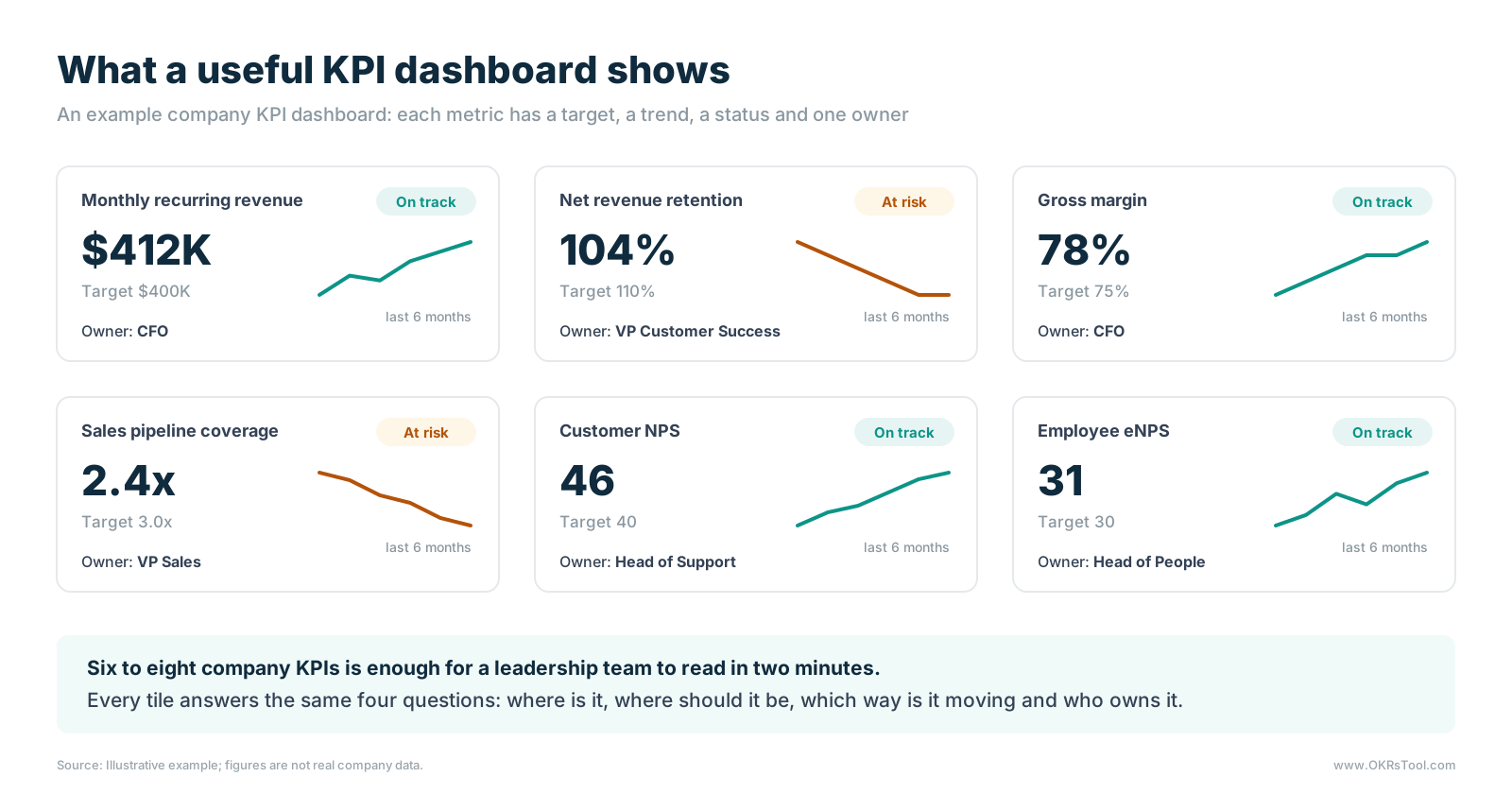
- A clear definition. "Revenue" can mean bookings, billings or recognized revenue. Write down exactly how each metric is calculated and where the data comes from, so the number means the same thing every week.
- A target or threshold. Without a target, a reader can't tell whether 104% net revenue retention is good news. Growth metrics need a target to reach, while others, such as gross margin, need a healthy range to stay inside.
- A trend. Six months of history shows whether an on-target number is improving or slipping toward the line.
- A status. On track, at risk or off track, set by the target, so the reader's eye goes straight to what needs attention.
- One owner. Each KPI needs a named person who explains the number and acts when it slips. Shared ownership leaves each person assuming someone else is watching, which is the same reason ownership matters for goals.
How to Build a KPI Dashboard in Six Steps
1. Decide Who Reads It and When
Start with the meeting the dashboard serves. A leadership dashboard reviewed every Monday needs different metrics and a different level of detail from a monthly board report or a quarterly business review. Name the audience and the cadence before choosing a single metric.
2. Choose Six to Eight KPIs
Pick the metrics that describe the health of the business for that audience, and stop at eight. A useful filter is the forever test: a KPI is something you could track every week indefinitely without it ever being finished. If a metric has a finish line, it's a goal or a project and belongs elsewhere. Our list of OKR metrics shows how health metrics and change metrics divide in practice.
3. Set Targets and Healthy Ranges
Give every KPI a target or a range, and decide in advance what counts as at risk. A KPI that's 5% below target might be fine for one metric and an emergency for another, so agree the thresholds once and let the status update itself.
4. Name One Owner Per KPI
Assign each KPI to one person, usually the leader whose team moves it most. The owner doesn't produce every result alone, but they explain the number in the meeting, and they decide what happens when it turns amber.
5. Connect Live Data
A dashboard someone updates by hand is out of date by Tuesday. Pull each number from the system that produces it, such as the billing system for revenue, the CRM for pipeline or the support desk for satisfaction scores, through integrations or an API. Where a metric can't be automated, ask the owner for a short update in the weekly check-in.
6. Review It on a Fixed Cadence
Put the dashboard at the top of a recurring meeting, look at the red and amber tiles first, and leave each one with a decision. A short weekly report or check-in covers the context the numbers can't, such as why a metric moved and what the owner is doing about it.
Keep the Dashboard Live
The biggest difference between a dashboard that gets used and one that gets ignored is whether the numbers are current. Our research links live, shared tracking to better results across three measures.
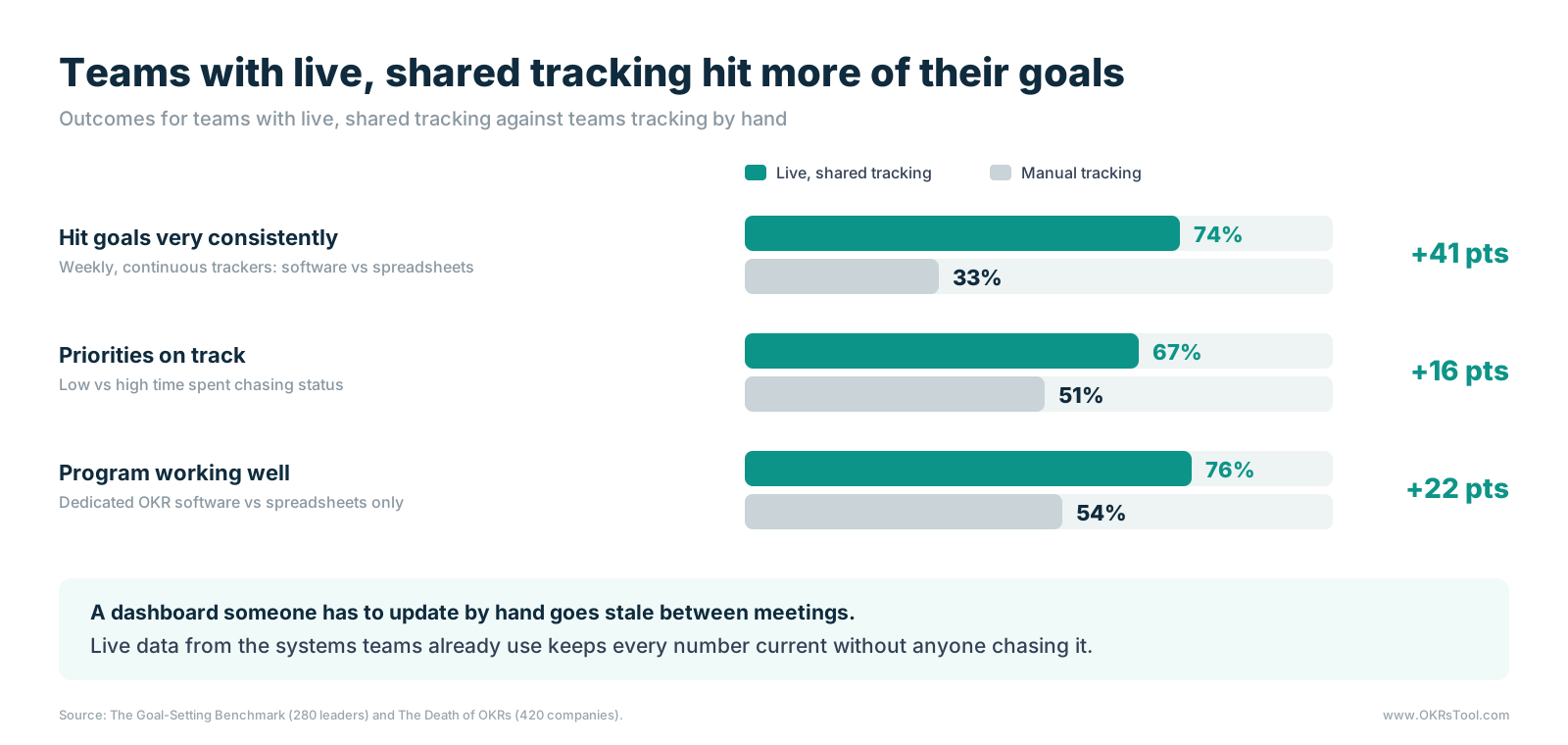
In the Goal-Setting Benchmark, among teams already reviewing weekly and tracking continuously, 74% of those on dedicated KPI software hit their goals very consistently, against 33% of those on spreadsheets.
59% of leaders lose an hour or more each month chasing goal status, the hidden cost of manual OKR reporting, and the teams that chase most have fewer priorities on track. The Death of OKRs found the same pattern for whole programs, with 76% of companies on dedicated software describing their program as working well, against 54% of spreadsheet-only companies.
Speed matters as much as accuracy. In the Strategy Execution Benchmark, 21% of leaders said a priority had been off track for a month or more before they knew, and only 17% get an automatic signal when something drifts. A spreadsheet can hold the right numbers and still miss that window, because nobody opens it until the meeting. The limits of OKR tracking spreadsheets apply to KPI sheets in exactly the same way.
KPI Dashboard Examples by Team
The table lists a starting set of KPIs for a company dashboard and for each team. Each team should keep four to six and choose the ones it can influence most.
For a people-focused view, a performance management dashboard goes deeper into reviews, goals and engagement.
Put KPIs and OKRs on the Same Page
A KPI dashboard shows whether the business is healthy, and a set of goals says what the team will change this quarter. A surprising share of companies try to run on the dashboard alone.
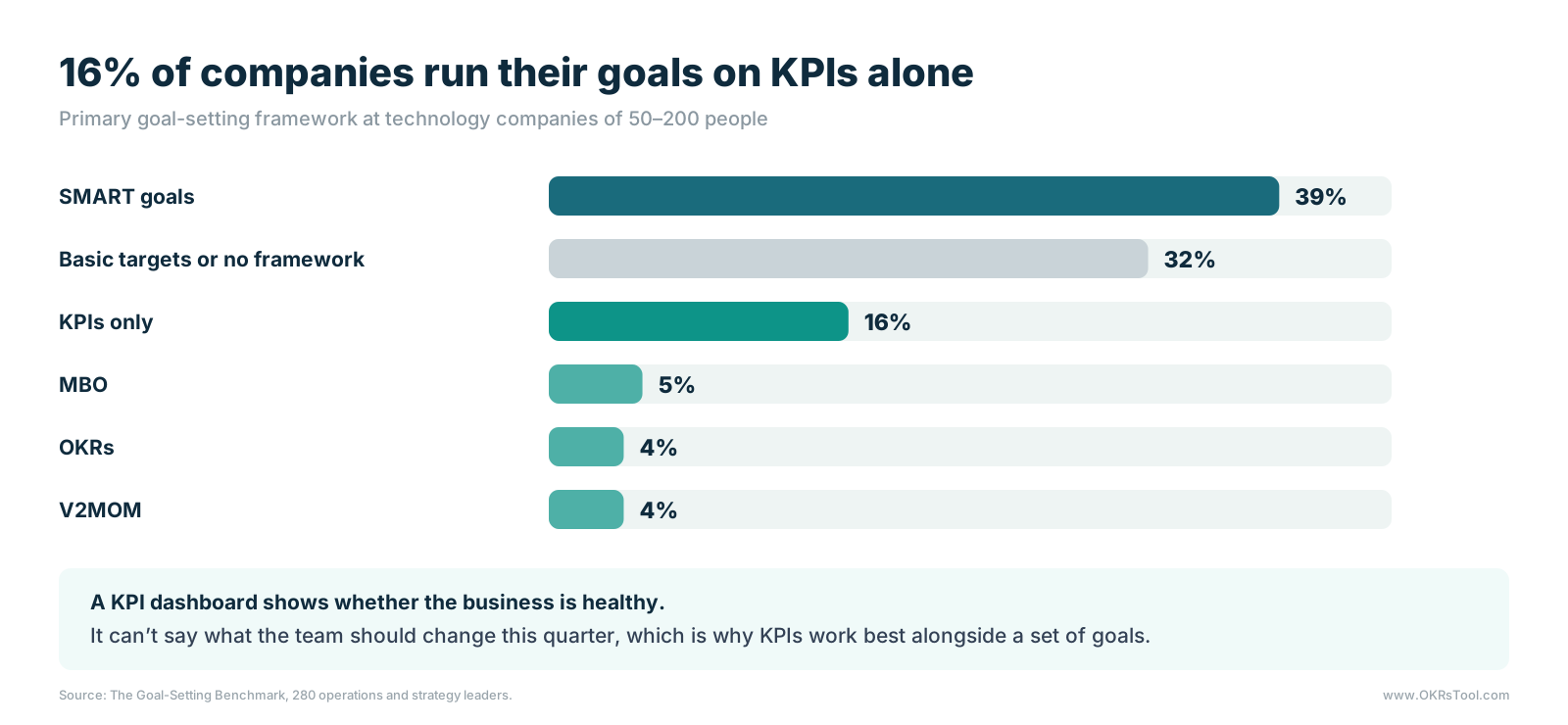
16% of companies in the Goal-Setting Benchmark run their goals on KPIs alone. The two tools do different jobs. KPIs track ongoing health, and OKRs track a change the team has committed to make this quarter. The link between them is the most useful part: when a KPI turns red, such as net revenue retention slipping below target, that's the signal to set an objective and key results to fix it. The difference between KPIs and OKRs covers when to use each.
Keeping them apart has a cost in the other direction too. In our analysis of 20,952 key results in the OKRs Tool platform data, 52% were tasks or KPIs in disguise, often a health metric copied into the list of key results because there was nowhere else to put it. A KPI dashboard gives those metrics a home, so the OKRs can focus on change. A workflow for integrating KPIs and OKRs keeps both on the same weekly rhythm, and an OKR dashboard shows the goals beside them.
The KPI View in OKRs Tool
In OKRs Tool, KPIs and other business metrics sit on the same platform as the company's OKRs. Each KPI has a target, an owner and a status, so leadership sees business health and goal progress side by side.
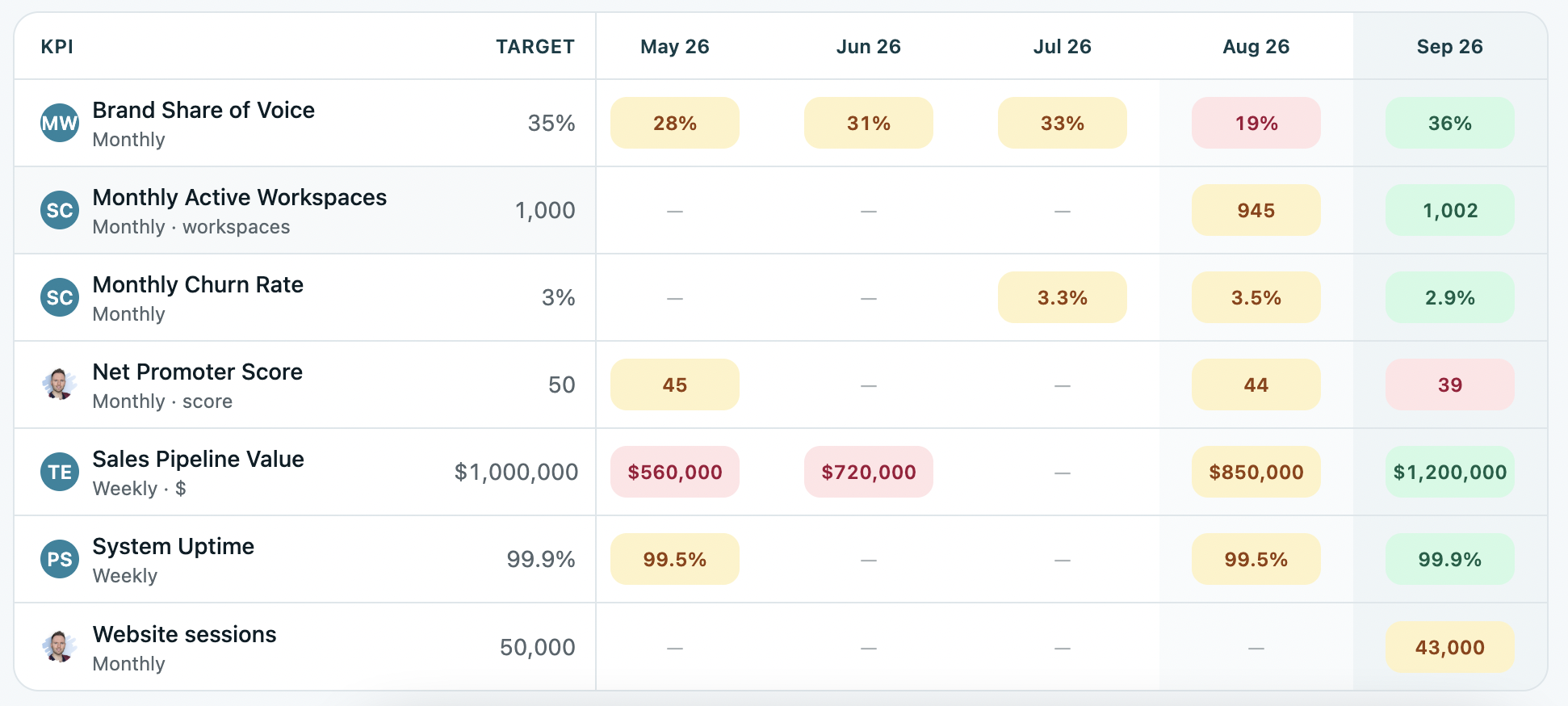
That's the core of KPI tracking alongside OKRs: one place where a red KPI can turn into a new objective without anyone copying numbers between tools.
Build the Dashboard Around Decisions
A KPI dashboard earns its place when it changes what a leadership team decides on Monday. That takes fewer metrics than most teams start with, a target and one owner for each, numbers that update themselves and a fixed meeting where the red tiles get a decision. With those in place, the first fifteen minutes of the meeting go on what to do about the numbers, and nobody spends Sunday night pasting them into slides.
A platform that keeps KPIs and OKRs together closes the loop between noticing a problem and setting a goal to fix it, so business health and the work to improve it are visible in one place every week. That's the habit behind leadership visibility without status meetings.
Data: The Strategy Execution Benchmark, The Goal-Setting Benchmark, The Death of OKRs (and How to Revive Them) and OKRs Tool platform data.