Welcome to our "What's New" page!
This is where we share the latest features, improvements, and product updates as they roll out. We update this page regularly to highlight what’s new, what’s improved, and how each change helps teams plan better, stay aligned, and execute on their strategy.
Last updated: September 24th 2026.
September update
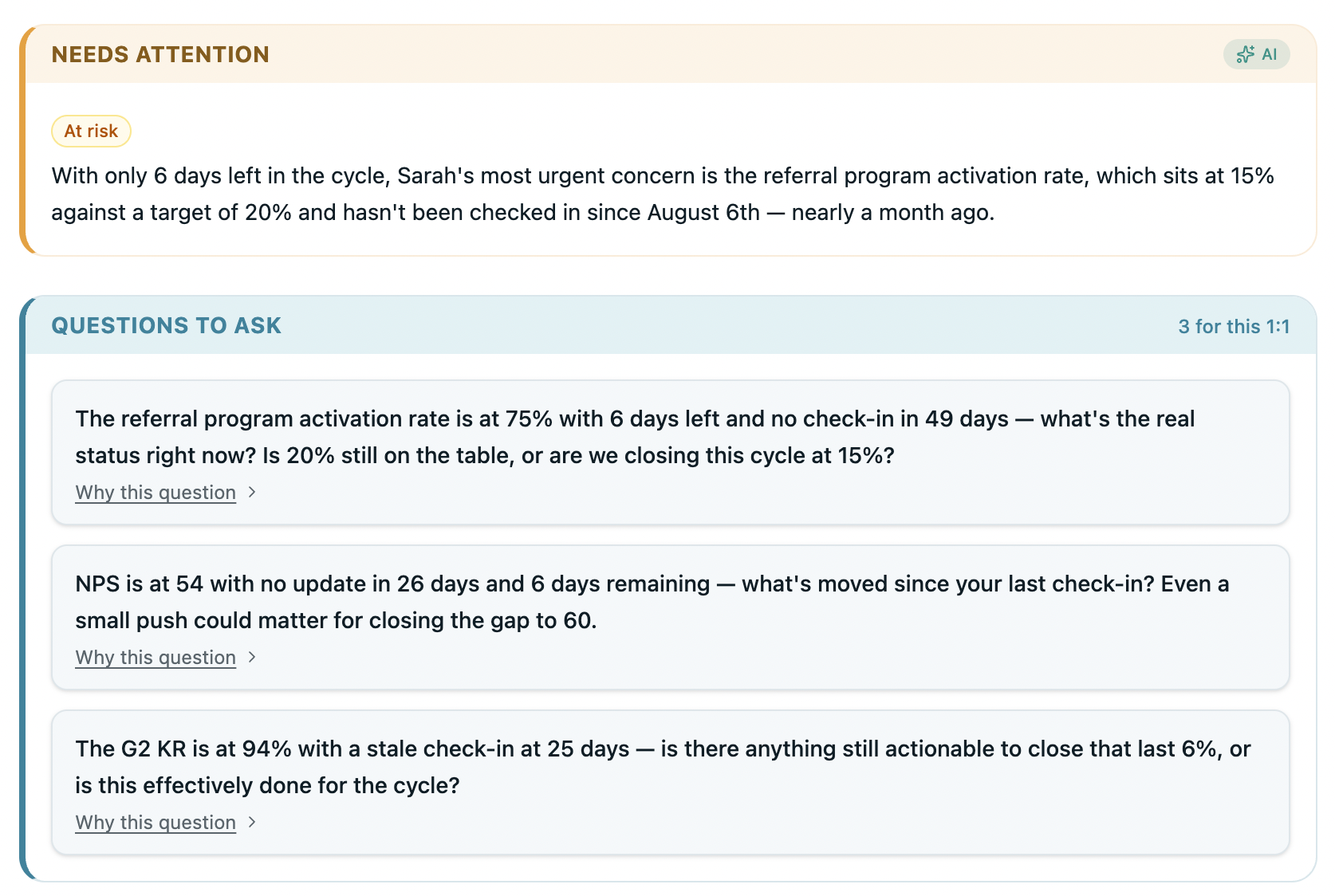
- 1:1 Brief – Every team member now has a performance profile their manager can open before a 1:1. See which OKRs need urgent attention, where progress has stalled, and get three AI-generated questions — specific to that person's performance — ready to use verbatim in the meeting. Less prep time, better conversations
- Multi-Workspace – Group companies can now connect all their entities in one place. Set up each subsidiary as its own workspace under a parent group — separate OKRs, teams, and data per company, with a single connected view across all of them. Built for holding companies, franchise groups, and multi-entity organisations running OKRs across the whole group.
- KPI View & Shared KPIs – A redesigned KPI experience with a new shared KPI structure built in. Set a single team-level KPI, then assign individual targets to each person within that team — one source of truth at the top, individual accountability underneath. See team and personal KPI performance in one clean view.
- Milestone-Based Key Results – A new KR metric type alongside numbers, percentages, binary, and threshold. Add named milestones to any key result, weight them individually, and let completion roll up automatically as each milestone is hit. For goals that move in stages, not just numbers.
- Export Initiatives to CSV – Export your full initiatives list to CSV in one click. Every task, owner, status, and linked KR — ready to drop into a spreadsheet, share with stakeholders, or pull into another tool.
August update
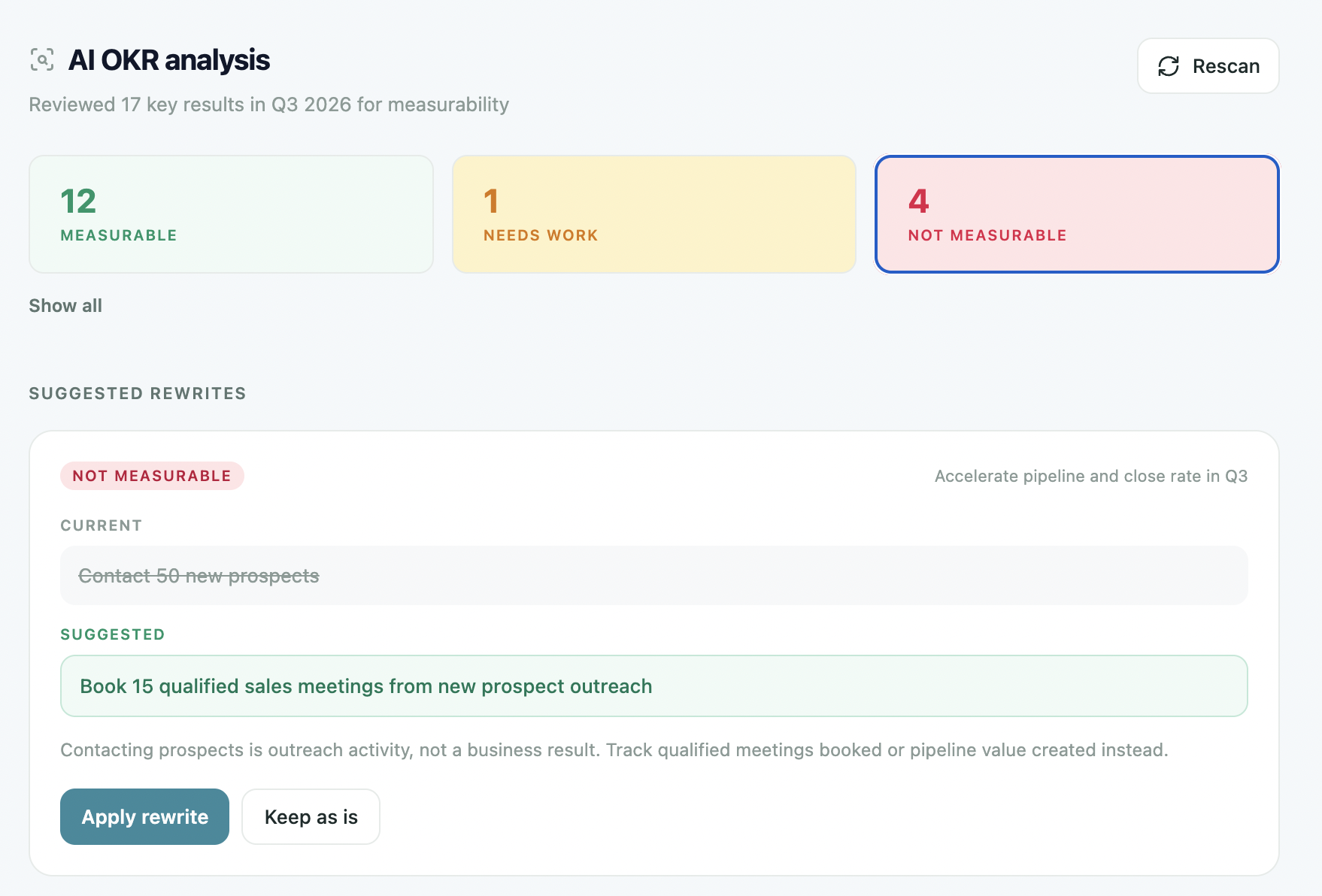
- OKR Analysis – Scan every key result in your active cycle for measurability and flag the ones that won't hold up at review time. See which are solid, which need work, and which aren't measurable at all — with a suggested rewrite and the reasoning behind it for each. Apply the fix in one click or keep it as is. Better OKRs in, better outcomes out.
- Presentation Mode – Walk through your OKRs in full-screen, one objective at a time. Each slide shows the objective, owner, overall progress, and every key result with its current value and pace indicator — ahead or behind. Built for leadership meetings, board updates, and all-hands reviews where you need the numbers front and centre, not buried in a dashboard.
- Feature Requests – Tell us what to build next from inside OKRs Tool. Submit a request, upvote what matters to you, and see what's already under review — all anonymously. No one can see who posted or who voted. The features that ship most often start here.
- Nested OKR View – See every objective and its key results in a single expandable tree. Drill into the structure of any OKR without leaving the page — no clicking between levels, no losing your place. The full hierarchy, visible in one view.
- Custom Dashboard – Build the dashboard that fits how you actually run your OKRs. Choose which widgets appear and in what order — summary stats, AI insights, momentum map, team performance, KPIs, nested OKR tree, 9-box summary, engagement score, and more. Hide what you don't use, surface what you do, and get straight to what matters every time you log in.
- Session Timeout – Automatically sign users out after a period of inactivity or after a maximum session length — workspace-wide, including SSO users. Set idle and absolute session limits, or leave both as never to keep sessions open until sign-out. Simple security that keeps your workspace tighter without any extra effort from your team.
- 9-Box Grid – Place every team member by performance and potential on a single grid. OKR progress seeds the performance axis — you make the final call. Spot your stars, identify who needs coaching, and make talent decisions with actual data behind them, not just gut feel.
- Feedback – Give, receive, and request continuous feedback from colleagues at any point in the cycle. Post praise, constructive notes, or general input — publicly to the recognition feed or privately. Keep development conversations ongoing and connected to the work that's actually happening, not just the annual review.
- Jira Two-Way Sync (Updated) – The Jira integration now syncs in both directions. Status changes pushed from OKRs Tool land in Jira instantly, and delivery progress pulls back automatically each day — or on demand with a single click. Your goals and your engineering board stay in step without anyone manually bridging the gap.
- OKR Vault (Improved) – A cleaner, faster way to access your full library of past OKRs across every cycle. Browse, reference, and reuse previous goals without losing context — so nothing gets rebuilt from scratch that doesn't need to be.
- Timeline (Improved) – A sharper, more complete history of your strategy and performance. Every strategy change, cycle milestone, and health score update logged in one dated feed — so you always know exactly what changed, when, and why.
- OKR Pacing Benchmark Report – A behavioral analysis of 24,000 Key Result updates revealing exactly where winning goals sit at weeks 4, 8, and 12. Key Results that hit their target are already at 50% by week four — a third of the way into the quarter. The report gives you the benchmark line, the week-4 tell, and a practical framework for intervening while there's still time to act.
July update
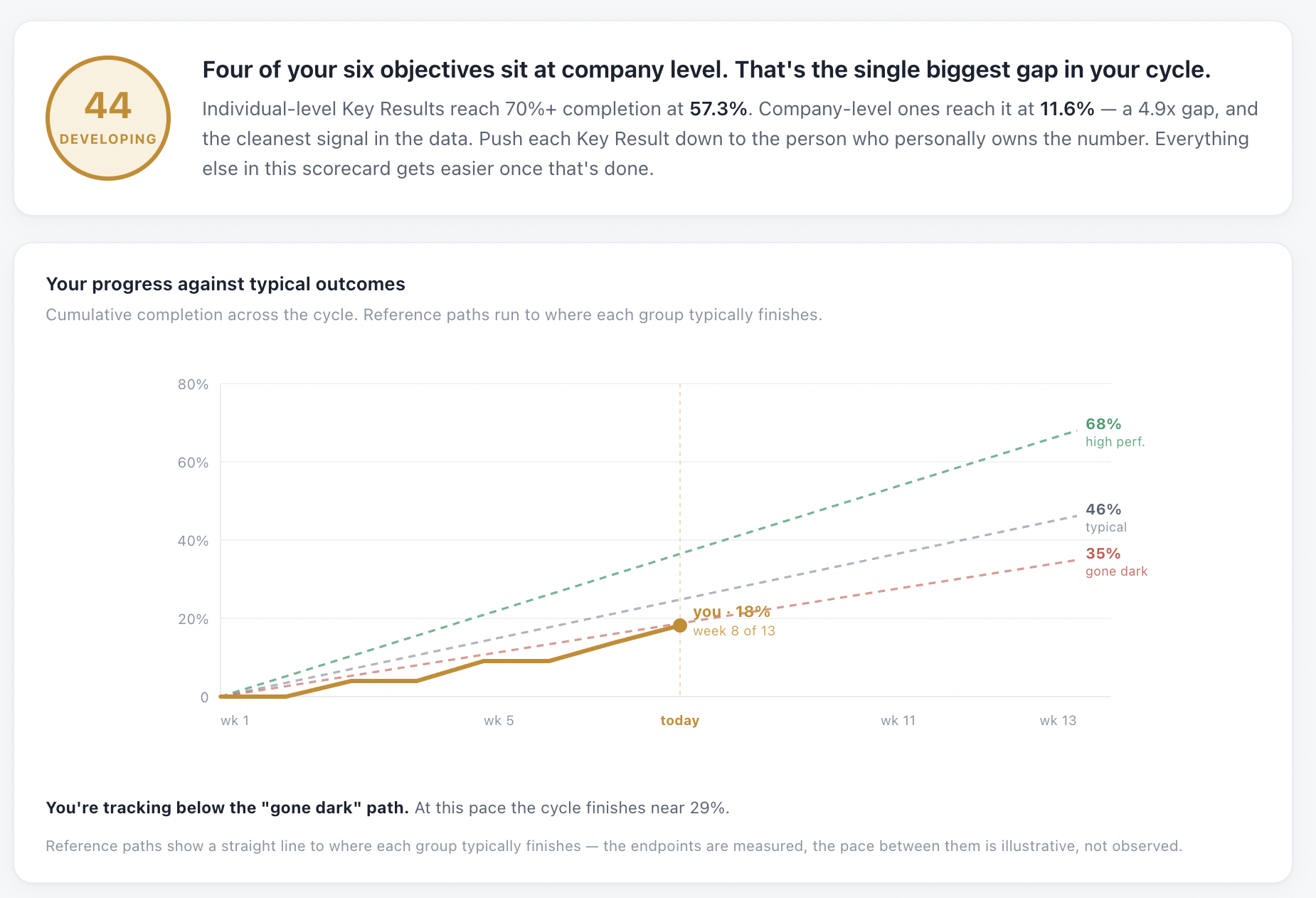
- Benchmark Report (Beta) – See how your OKR progress compares against high performers, typical teams, and those who've gone dark — plotted week by week across the cycle. Know exactly where you stand, and what trajectory you're on, before the quarter ends.
- Collapsible Sidebar – Collapse the navigation when you need more room to focus, expand it when you need to move fast. A small change that makes a big difference across a full workday.
- Help Section (Updated) – A cleaner, more organised help experience built into the product. Find answers faster, get unblocked without leaving the app, and spend less time raising tickets.
- Silent Rollout – Set up your workspace, build your team structure, and assign key results to teammates — all before a single invite goes out. Get everything in order first, then roll out to the team when you're ready.
- Strategic Pillars – Define your strategic pillars in the strategy canvas, then tag OKRs against them. See at a glance which goals are driving which initiatives — and where your priorities have no OKR coverage at all.
- Collaborators on Key Results – Add collaborators to any KR so more than one person can log progress. Ownership stays with one person — but the whole team contributing to a result can now update it directly.
- Continuous Feedback – Request and give feedback to colleagues at any point in the cycle — not just at review time. Keep development conversations ongoing, visible, and connected to the work that's actually happening.
- Auto Roll-Up at KR Level – Progress updates logged at the key result level now roll up automatically through the OKR hierarchy. No manual recalculating, no chasing owners for numbers — the moment a KR moves, everything above it updates to reflect exactly where things stand.
- User Offboarding – Remove a team member cleanly when they leave. Revoke access immediately, reassign or unassign any key results they owned, and keep their check-in history intact — all in one step, no loose ends.
- MCP Server – Free on All Plans – The OKRs Tool MCP server is now included on every plan — Launch, Scale, and Expand. Connect Claude directly in your browser or use Claude Desktop, Cursor, n8n, or any MCP-compatible AI tool. Log check-ins, pull board-ready summaries, and power your own AI workflows — for free.
- Brazilian Portuguese – OKRs Tool is now available in Brazilian Portuguese, joining English, German, and Spanish. Choose your language at sign-up, on the login screen, or anytime under Settings → Language.
- Clone OKR to Next Cycle – Duplicate any OKR into the next cycle in one click. The structure, owners, and key results carry over — progress resets to zero. Pick up where the strategy left off without rebuilding from scratch every quarter.
- Assign Managers to Departments and Teams – Set a named manager for any department or team directly inside OKRs Tool. Ownership is visible across the org, accountability is clear from day one, and there's no ambiguity about who's responsible when it matters most.
- Awards & Recognition – OKRs Tool wins Tability's Most Affordable OKR Platform for 2026, ranks top 3 in Zekai's best OKR tools with a score of 9.1/10, and is listed as a top 5 goal-setting tool for online businesses by HostAdvice — independently reviewed and ranked against the leading platforms in the market.
June update
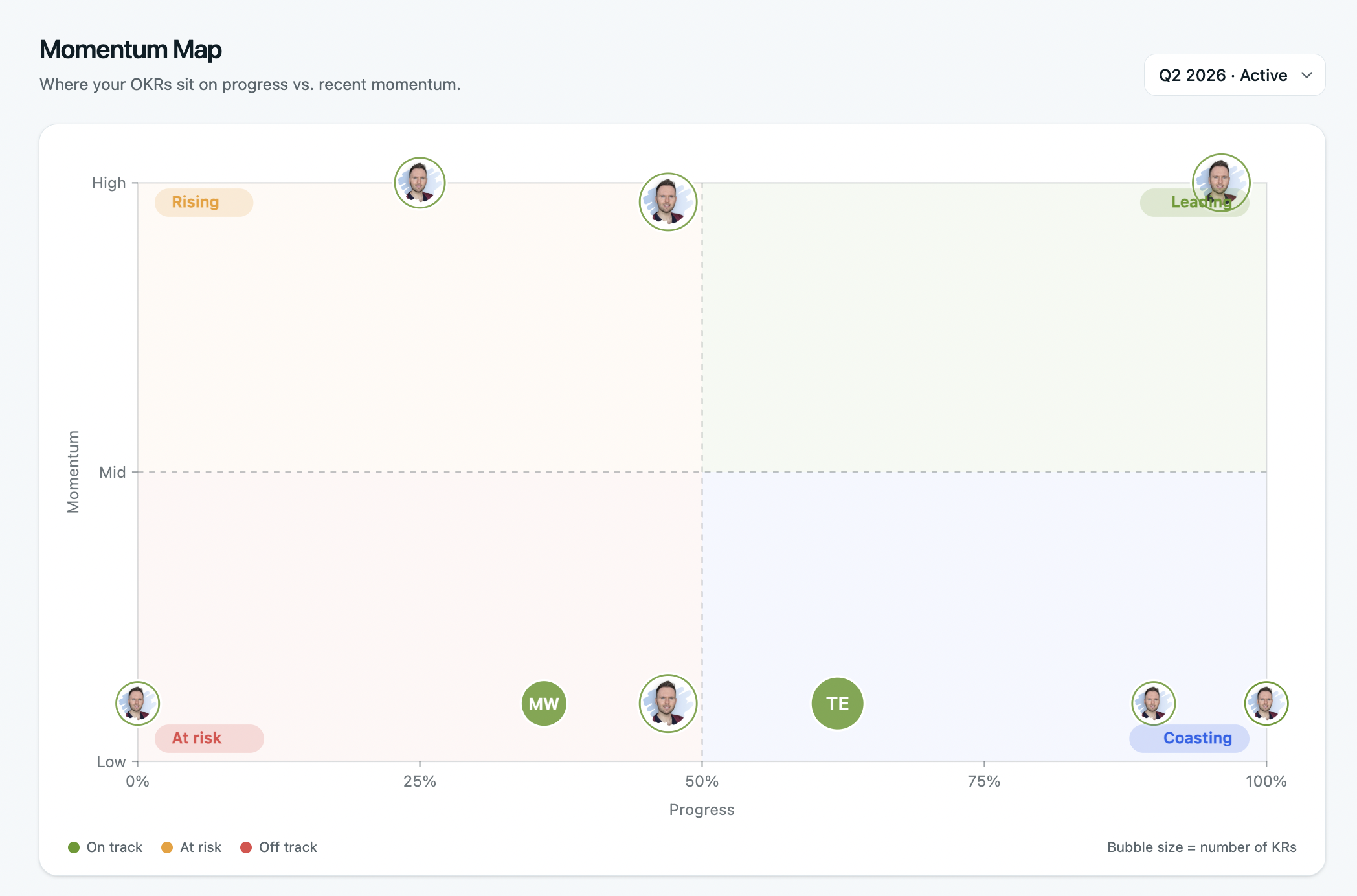
- Momentum Map – See at a glance where every OKR sits across progress and momentum on a single chart. Spot who's leading, rising, coasting, or at risk — without digging through dashboards. One view tells you where to focus, who needs support, and what's quietly slipping before it's too late.
- Mobile Check-In – Log KR progress from wherever you are. Request a sign-in link, open it on your phone, and check in on one or all of your key results in seconds — no app download required, no desktop needed.
- People & Teams Dashboard – A rebuilt view for managing your entire organisation in one place. Add people directly to departments, see teams, members, and health at a glance — with cleaner controls and a layout that scales as you grow.
- Strategy coverage – An AI-powered diagnostic that reads your live OKRs against your strategy canvas and tells you what's covered, what's missing, and what to do about it. Only runs when your North Star is set — because without direction, coverage is meaningless.
- Retrospective – A structured end-of-cycle review built into OKRs Tool. Reflect on what worked, what didn't, and what to carry forward — so every cycle makes the next one sharper.
- Close Cycle & Carry Forward – Officially close a cycle and rate each OKR as Missed, Partial, or Achieved. Carry forward, rewrite, or drop — one decision per OKR, with notes, before you move into the next quarter.
- German & Spanish (+ Portuguese Coming Soon) – OKRs Tool is now live in German and Spanish, with Portuguese on the way. Choose your language at sign-up, on the login screen, or anytime in Settings → Language.
- Edit OKR Inline – Hover over any objective name and click to edit directly. No modal, no extra steps — just fix it and move on.
- Link Team OKRs to Company OKRs – Connect team-level goals directly to company objectives and see those relationships reflected live in the alignment map. Every team's work, visibly tied to what the organisation is trying to achieve.
- Cross-Cycle Linking – Link OKRs across cycles so goals that span multiple quarters stay connected. Carry the thread forward without losing context, history, or alignment.
- List View – Switch between card and list view on your Goals page to see every OKR on one screen. Scope, owner, cycle, progress, and status — all in a single scannable table.
- Initiative Progress & External Sharing – Update initiative progress, log notes, and leave comments directly from the initiative card. Share a live view externally with stakeholders or clients — no login required, no static exports, no back-and-forth on what's current.
- Feature Controls – Choose exactly what your team sees. Toggle features on or off across Goals, People, and Reports to keep the sidebar clean and focused on what your organisation actually uses. Core items stay visible for everyone — everything else is yours to configure.
- Initiative-to-KR Automatic Roll-up (opt-in) – When initiative progress moves, your key results move with it. Progress rolls up automatically from initiatives to linked KRs, so your OKRs always reflect what's actually happening on the ground — without anyone manually updating numbers up the chain.
- KR History – Every value logged, every status change, and every note captured in a full timeline for each key result. See exactly how a KR progressed across the cycle, spot when things shifted, and have a complete record ready for reviews — no reconstruction required.
- Team Report – A department-level health view across all your teams in one place. See health scores, OKR counts, member activity, and last check-in dates at a glance — filtered by department and cycle. Know which teams are on track and which need attention before your next leadership meeting.
- Strategy Canvas, Timeline & Cascade Map – Set the foundation your OKRs are built on. Define your North Star, Mission, and annual priorities in one place, then watch them flow down through company, department, and team OKRs on a live cascade map. The timeline logs every strategy change and performance milestone automatically.
- Connect to Parent on Creation – Link a new OKR to its parent objective the moment you create it. No post-creation editing, no orphaned goals — every OKR lands in the right place in the hierarchy from the start.
- Create OKR from KR – Turn any key result into the objective for the next level down with one click. The KR becomes the parent objective, and a new OKR cascades directly from it — so teams can build on what's already in motion without starting from a blank page.
- Awards & Recognition – OKRs Tool is ranked in the Top 10 Best OKR Software by WifiTalents, Top 3 Best OKR Software by TopickZ, and Top 3 Best Strategy Execution Software by Danetsoft — independently reviewed and ranked against the leading platforms in the market.
May update
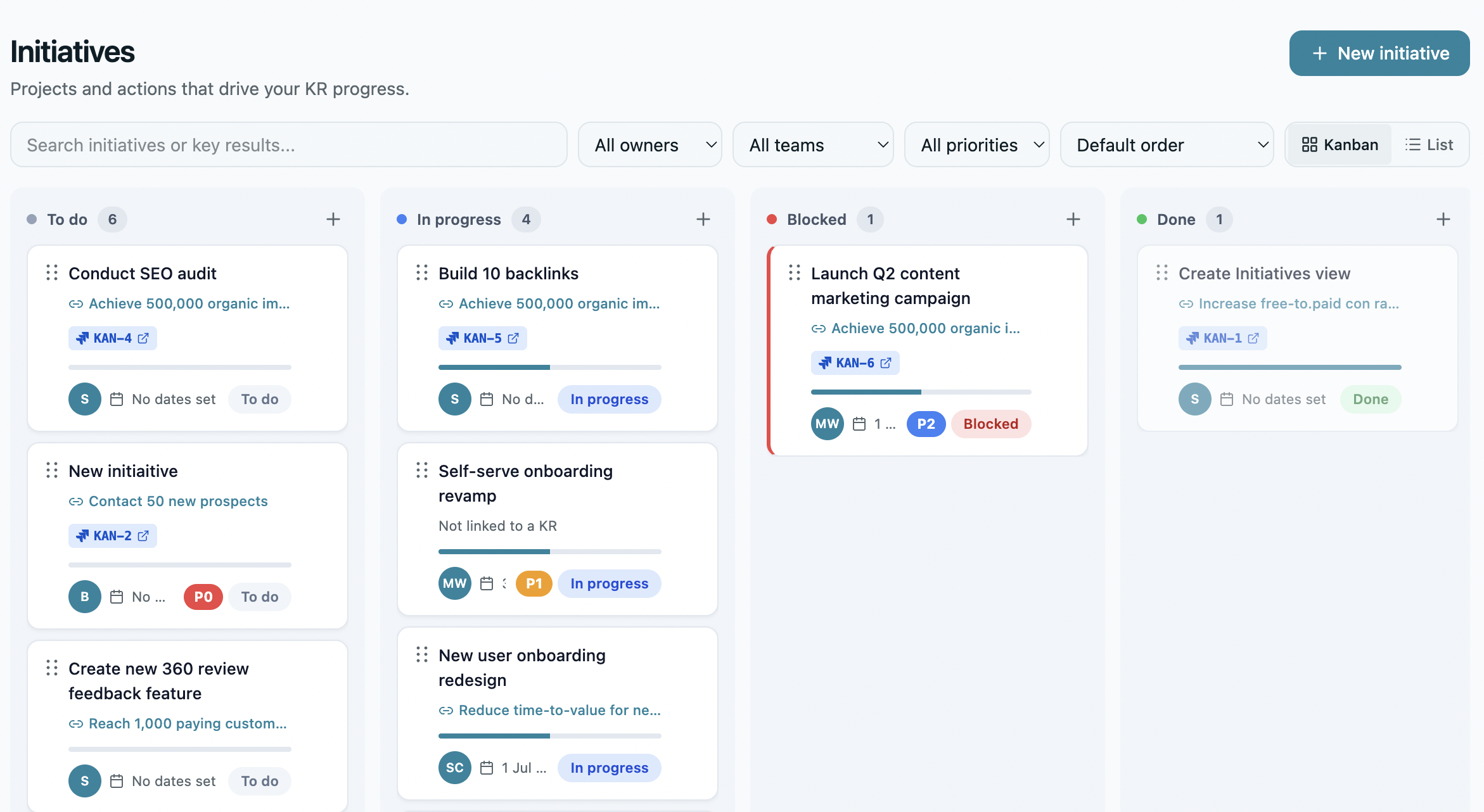
- Jira Integration – Link the delivery work directly to the goals it drives. Search Jira issues from inside OKRs Tool, attach them to your initiatives, and watch progress roll up automatically as tickets move forward. No copy-paste, no status updates across two tools — just a clear, live connection between what your team is building and why it matters.
- MCP Server – Talk to your OKRs from any AI tool, in plain English. Connect OKRs Tool to Claude, Cursor, n8n, or any MCP-compatible client and ask questions, log check-ins, and pull board-ready summaries — without opening the app. One OAuth connection, no code required, and every request is logged in the audit trail.
- Trust & Compliance Centre – Everything your security team needs to complete a vendor review, in one place. EU data residency on AWS Ireland, AES-256 encryption at rest, TLS 1.3 in transit, SAML SSO, GDPR compliance, row-level database isolation, and a full indefinite audit log. Inherited SOC 2, ISO 27001, and PCI DSS from Cloudflare, AWS, and Supabase — plus signed DPAs and security questionnaires available on request.
- ClickUp Integration – Connect the tasks your team is already working on to the goals they're meant to move. Link any ClickUp task to an initiative in OKRs Tool, see status inline on your initiative cards, and let daily sync keep everything current. Tasks stay in ClickUp — OKRs Tool just connects them to the bigger picture.
- Business Reviews (MBR & QBR) – Auto-generated monthly and quarterly business reviews that give you a complete picture of OKR performance without the manual prep. See overall health scores, average progress, at-risk flags, and quarter-on-quarter comparisons in one view — then export to PDF and share with leadership in seconds.
- Google Workspace Integration – One OAuth connection that ties your entire Google stack to your OKRs. Schedule performance reviews and 1:1s straight to Calendar, export cycle data to Sheets, link Drive files to key results, and sync your Workspace directory automatically. No double entry, no tab switching — just your tools, connected.
- 1:1s – Run structured, consistent one-to-ones without the prep overhead. Build shared agendas, track action items, view an OKR snapshot for each person, and log coaching notes — all in one place. Every meeting has context, every conversation has a record, and nothing important falls through the cracks between sessions.
- Notion Integration – Embed live OKRs directly inside the Notion pages your team already reads. Paste any OKRs Tool link into a strategy doc, all-hands page, or board update and it renders as a live block — current progress, owner, status, last check-in. No screenshots, no stale numbers, no manual updates.
- Close Cycle – End every cycle with intention, not just a calendar flip. Officially close the quarter, rate overall performance, and capture what worked before moving into the next cycle. Build a clear record of progress over time and give your team the closure that makes the next cycle start stronger.
- Live Preview – See the real product before you commit to anything. Click around a fully loaded workspace, explore every feature, and get a genuine feel for how OKRs Tool works — no sign-up, no email, no login required. What you see is exactly what you get.
- Free OKR Course – A free 7-day email course built on data from 330 organisations and 7,857 key results. One short, practical lesson a day — covering everything from writing your first OKR to the habits that make cycle two stick. No theory, no fluff, unsubscribe anytime.
- Linear Integration – Connect the work your engineering team is already doing to the goals it's meant to move. Link Linear issues and projects directly to your OKRs, and let progress update automatically as work ships. No manual syncing, no duplicate tracking — just a live connection between your roadmap and your results.
- SCIM Provisioning – Automate user management across your organisation without the admin overhead. Provision and deprovision team members automatically as people join, move teams, or leave — keeping access accurate, permissions consistent, and your OKRs Tool workspace in sync with your identity provider at all times.
- Employee Engagement Surveys – Measure how your team feels, not just how they're performing. Run structured engagement surveys alongside your OKR cycles, track sentiment over time, and surface the signals that matter before they become retention problems. Connect people data to goal data — and lead with the full picture.
- Asana Integration – Keep your OKRs and your task lists in sync, without the manual overhead. Connect Asana tasks to your OKR initiatives and let task status roll up to goal progress automatically. When work gets done, your OKRs reflect it — so you always have an accurate picture of where things stand, in real time.
- 360 Reviews – Collect well-rounded feedback with structured 360° performance reviews. Gather input from peers, managers, and self-assessments in one place, with clear competency scoring and AI-generated summaries. Identify strengths, uncover growth areas, and support fair, consistent evaluations — all without chasing feedback across tools.
- Slack Integration (V2) – Bring OKR visibility into the conversations your team is already having. Send check-in reminders, at-risk alerts, milestone celebrations, and weekly digests directly to any Slack channel — formatted as rich messages with action buttons. Keep goals front of mind without asking anyone to open another tab.
- Microsoft Teams Integration (V2) – Surface OKR updates where your team collaborates, without disrupting how they work. Post check-in nudges, at-risk alerts, and weekly digests to any Teams channel as Adaptive Cards with action buttons. Six notification types, zero context-switching — so your goals stay visible across the whole organisation.
- Resource Centre – Everything you need to run OKRs well, in one place. Compare OKR tools, download 50+ free guides and playbooks, and get instant answers from the Knowledge Base — so nothing slows you down between strategy and execution.
- Idea Board – Capture, vote on, and prioritise ideas collaboratively across your organisation. Submit suggestions, gather feedback, and move the best ideas from review to approved initiatives. Keep innovation visible and structured, so high-impact opportunities don’t get lost in Slack threads or scattered docs.
- Webhooks – Connect your OKRs Tool to the rest of your stack with real-time webhooks. Trigger automated workflows when OKRs update, check-ins are submitted, or progress changes. Keep systems in sync and reduce manual work by pushing updates directly to the tools your team already uses.
- AI Coach – Get personalised guidance on your OKRs with an AI-powered coach that understands your goals and progress. Surface stalled key results, prioritise what matters most, and get actionable recommendations in real time. Stay focused, aligned, and proactive — without needing constant manual oversight.
- Google Calendar Integration – Schedule 1:1 performance reviews and mid-cycle check-ins directly from OKRs Tool, without switching tabs. Automatically surface OKRs that are behind or at risk and book focused review sessions before the cycle ends. Keep your team aligned and proactive with calendar invites that sync in real time.
April update: OKRs Tool launches V2
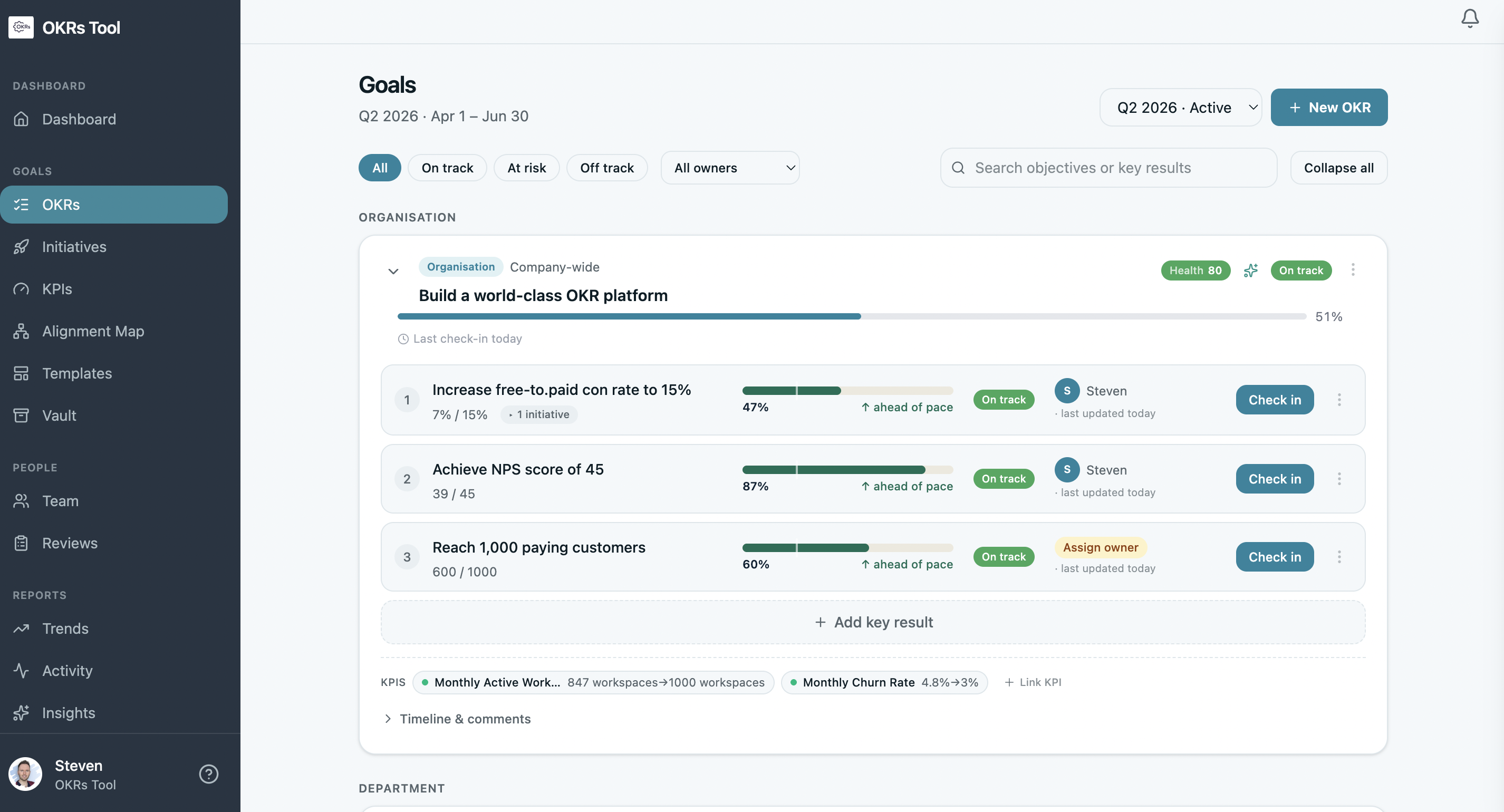
We've rebuilt OKRs Tool from scratch. V2 is a ground-up redesign — faster, more secure, and packed with the features you've been asking for. Here's what's new:
- Google Sheets Integration (Export) – You can now export OKRs data straight to Google Sheets for reporting, deeper analysis, or sharing with stakeholders outside the platform. Pull the numbers once, work with them anywhere — no copy-paste, no reformatting.
- Global MFA – Multi-factor authentication can now be enforced across your entire organisation in a single setting. Admins get consistent security coverage without chasing individual users, and your account gets an extra layer of protection by default.
- Role-Based Access Control (RBAC) – Permissions are now tied to roles rather than handled user-by-user. Assign people as admins, editors, or viewers and they'll only see and do what their role allows — cleaner governance, less admin overhead.
- Dashboard Analytics – A new analytics dashboard gives you a visual view of OKR progress, KPI health, and team performance at a glance. Spot what's on track, what's slipping, and where to focus — without digging through individual objectives.
- API Access – OKRs Tool now has a public API, so you can connect your OKR data to the rest of your stack. Pipe updates into BI tools, sync with internal systems, or automate reporting — whatever fits your workflow. Full documentation here.
- Import Users & OKRs – Bulk import users and existing OKRs directly into the platform, so onboarding a team or migrating from another tool no longer means manual entry. Upload once and you're up and running.
- Template Library – A library of ready-made OKR templates is now available, covering common functions and use cases. Start from a proven structure instead of a blank page — useful for teams new to OKRs or anyone looking to move faster.
- Single Sign-On (SSO) – Sign in using your organisation's existing identity provider for simpler access and stronger identity management. No more separate credentials — just seamless, secure login through the tools your team already uses.
- There Be Giants Recommended Partner – OKRs Tool has been recognised as a recommended software partner by There Be Giants (TBG), a leading OKR consulting and training agency. This means you can get expert OKR support and coaching alongside the tool you already use.
March Update:
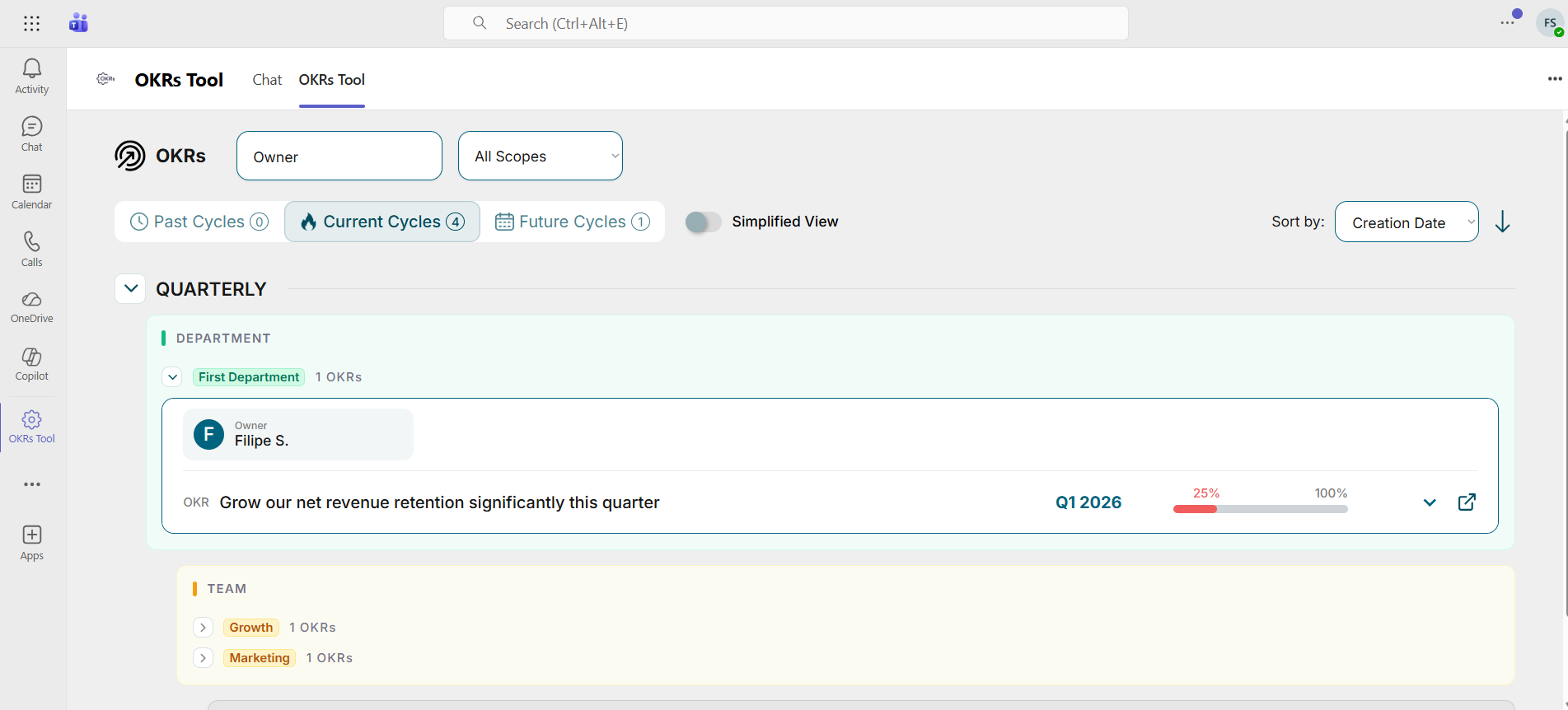
- Microsoft Teams Integration V1 – Your OKRs now appear directly inside Microsoft Teams via a sidebar app, weekly digest, channel tab, and slash commands. Stay informed on progress, receive nudges for overdue check-ins, and deep-link back to OKRs Tool — all without leaving Teams.
- Kanban Initiatives Board – Initiatives are now organized in a visual Kanban board with stages like Created, Planned, In Progress, and Completed. Drag and drop initiatives between stages to update execution status and clearly track the work driving each Key Result.
- Reflection – At the end of each cycle, users can complete a short reflection to review overall OKR progress and answer a few questions about how the cycle went. Based on your responses, AI generates suggestions on what to continue, stop, and start next cycle to improve execution.
- Performance Review updates – When creating a performance review, the creator is automatically assigned as the manager to simplify setup and clarify ownership. You can also filter performance reviews by status, making it easier to track progress and manage reviews across the organization.
- Expanded OKR Permissions – Department and team leaders can now delete OKRs within their own departments or teams. This gives leaders more control to manage and maintain their team’s OKRs without relying on organization admins.
- OKRs Tool Selected by PeopleGoal: OKRs Tool was named one of the 9 best goal-setting software solutions of 2026 by PeopleGoal, recognized for helping teams set clear goals and drive execution.
- OKRs Tool Endorsed by Tability: OKRs Tool earned a spot in Tability's Best OKR Software for Startups list - outranking Profit.co, Betterworks and 15five - praised for its simplicity and ability to keep fast-moving teams focused and aligned.
February Update:
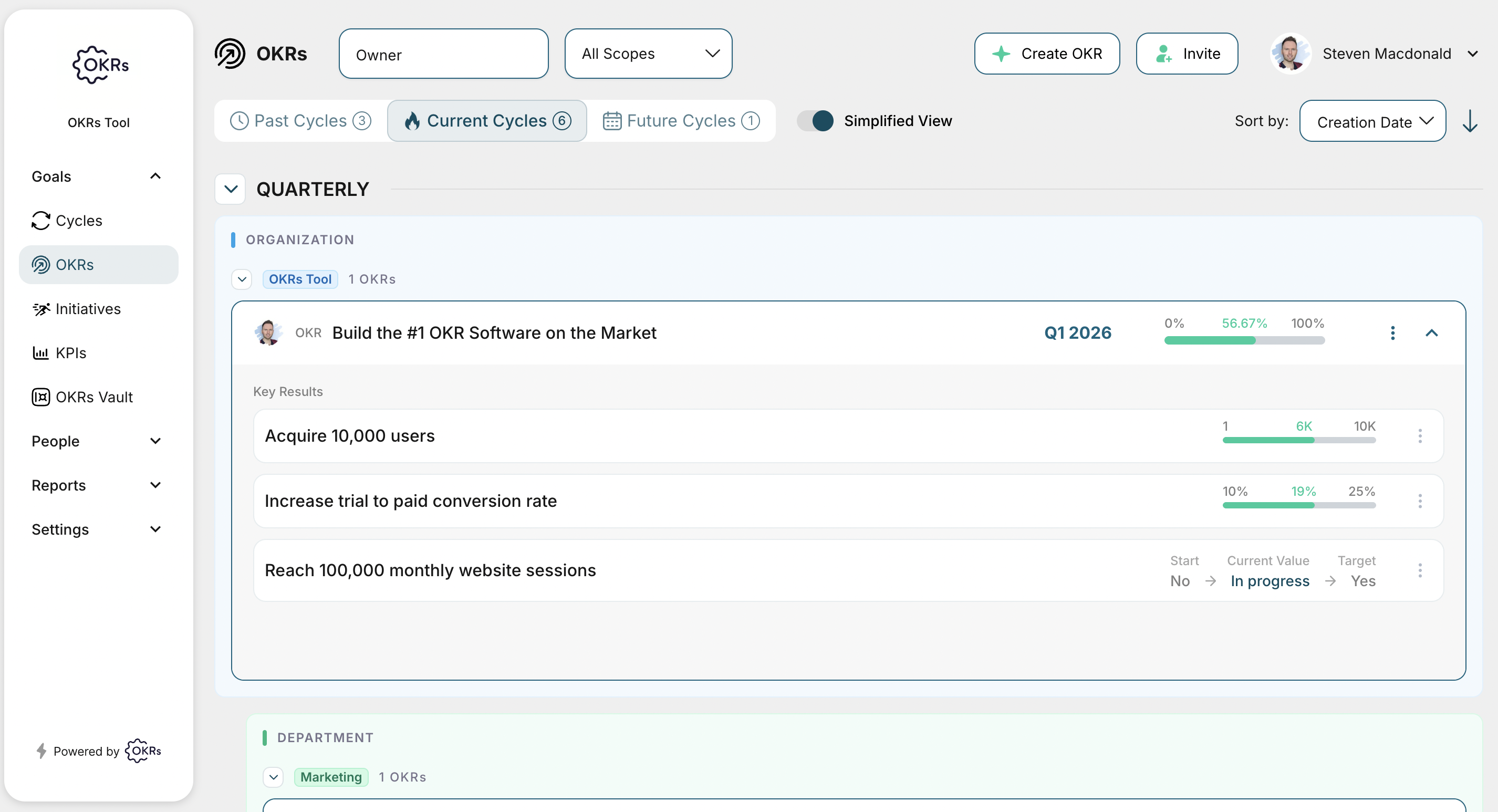
- Simplified OKR View – Toggle on Simplified View from the top menu for a cleaner, distraction-free way to track OKRs. It removes graphs and status controls so you can see all Key Results at a glance and quickly update them via the 3-dot menu. Prefer the full view? You can switch back anytime.
- New OKR View: The new hierarchical OKR view automatically organizes objectives by Organization, Department, Team, and Individual within each cycle. This makes ownership clearer, reduces cognitive load, and helps teams quickly understand how work connects across levels — without changing how OKRs are created or managed.
- Visible Ownership with Headshots – Headshots now appear at the Objective and Key Result level, making ownership instantly clear. This adds quick visual accountability and helps teams move faster - without changing workflows.
- Clearer Leadership Visibility – An improved interface for Departments, Teams, and Users makes leadership roles easier to identify. This increases transparency and clarifies ownership across the organization.
- Department & Team OKR Ownership: Department-and team-level OKRs can now have assigned owners, making accountability clear and responsibility visible across the organization — without changing existing OKR workflows.
- Streamlined Department Management – Add users directly to departments to simplify onboarding and keep team structures organized from day one.
- Integrated Leadership Setup – Assign department and team leaders during creation to establish clear ownership and accountability from the start.
- Empowered Leadership Tools – Allow department and team leaders to create performance reviews to drive continuous feedback and stronger team development.
- Richer Collaboration – Attach files directly to comments to provide context, improve discussions, and support faster decision-making.
- Printable OKRs for Meetings – You can now print OKRs by clicking “Share progress” and selecting Print in the top right. Perfect for 1-on-1s and reviews.
January Update:
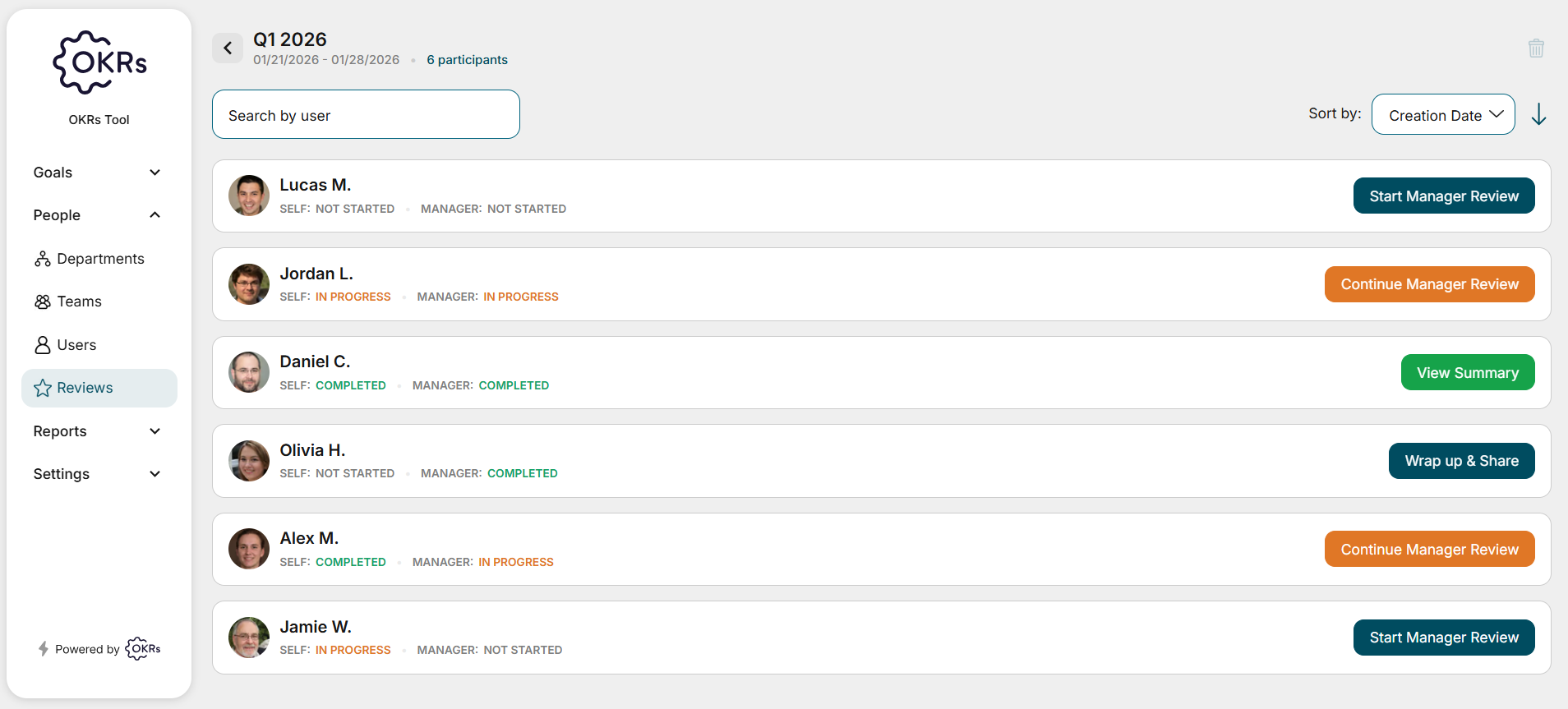
- Performance Reviews: The new Performance Reviews experience brings structured, OKR-aligned reviews into one unified flow. Teams can run review cycles, collect self and manager input, reference OKRs, and set next-cycle focus to connect performance reflection to business outcomes.
- KPI Tracking: The new KPI Tracking experience brings organization-level KPIs alongside your OKRs in one unified view. Teams can track current and target values, assign owners, link KPIs to OKRs, and spot risks early to connect outcomes to measurable business results.
- Improved OKR Experience:The refreshed OKR view reduces clutter, clarifies hierarchy, improves RAG visibility, and streamlines Key Result actions, helping teams understand progress faster and take action more effectively.
- Automated Email Controls: Admins can enable automated emails and weekly check-in reminders from Organization Settings. Turning on Weekly Check-in Email ensures teams receive regular check-in notifications, keeping updates consistent and progress top of mind.
- Annual Plans Available: You can now purchase annual plans directly in the product. Scale is $330/year with 1 month free, and Expand is $500/year with 2 months free, making it easy to save while committing long term.
- OKR Adoption Insurance: A new industry-first adoption protection for OKR software rollouts. If teams don’t reach 60% active usage within 30 days, customers are eligible for a full refund, helping reduce rollout risk and increase confidence in long-term adoption.
- OKRs Tool Recognized by Teamflect: OKRs Tool was featured in Teamflect’s “Top 11 OKR Software in 2026” article, highlighting it as a trusted platform for helping teams align goals, track progress, and drive execution effectively.
- OKRs Tool Ranked Top OKR Software by Mooncamp: OKRs Tool was featured in Mooncamp’s “10 Best OKR Tools of 2026” list, recognizing it as a leading platform that helps teams align, plan, and achieve strategic goals effectively.
- #1 Goal Management Software for 2026: OKRs Tool was named the #1 Goal Management Software for 2026 by Attention Insights, recognizing its leadership in helping teams align, track, and achieve goals effectively.
Stay tuned for our next update! We’ll continue to roll out new features to make goal-setting, tracking, and team alignment easier and more efficient.
For more details, be sure to check back regularly!