Ask Claude about your OKRs.
Connect OKRs Tool to Claude — right in your browser, no install needed — or to Claude Desktop, Cursor, and any MCP-compatible AI tool. Talk to your OKRs in plain English; Claude pulls live data and responds instantly.
MCP, in plain English.
MCP (Model Context Protocol) is the open standard for connecting AI tools to your data. Your AI assistant — Claude in the browser, Claude Desktop, Cursor, n8n, and others — pulls live OKR data from OKRs Tool whenever you ask — no copy-paste, no exports, no switching tabs.
Stop logging in just to check progress.
Most days you don't need the full OKRs Tool dashboard — you just need one answer. Ask your AI assistant and get it in seconds.
- "What are my at-risk OKRs this quarter?"
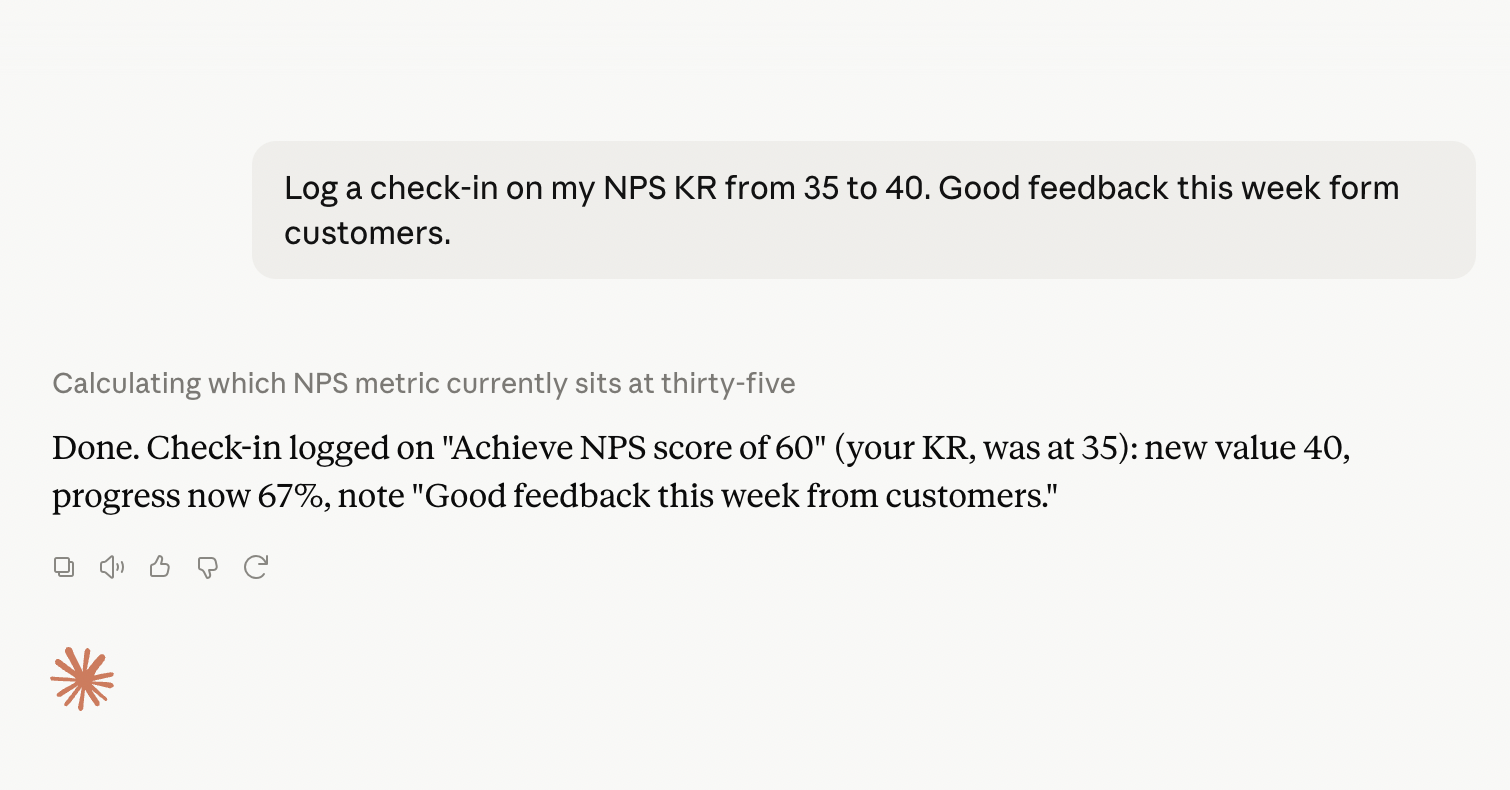
- "Log a check-in on my ARR KR — we hit $1.8M"
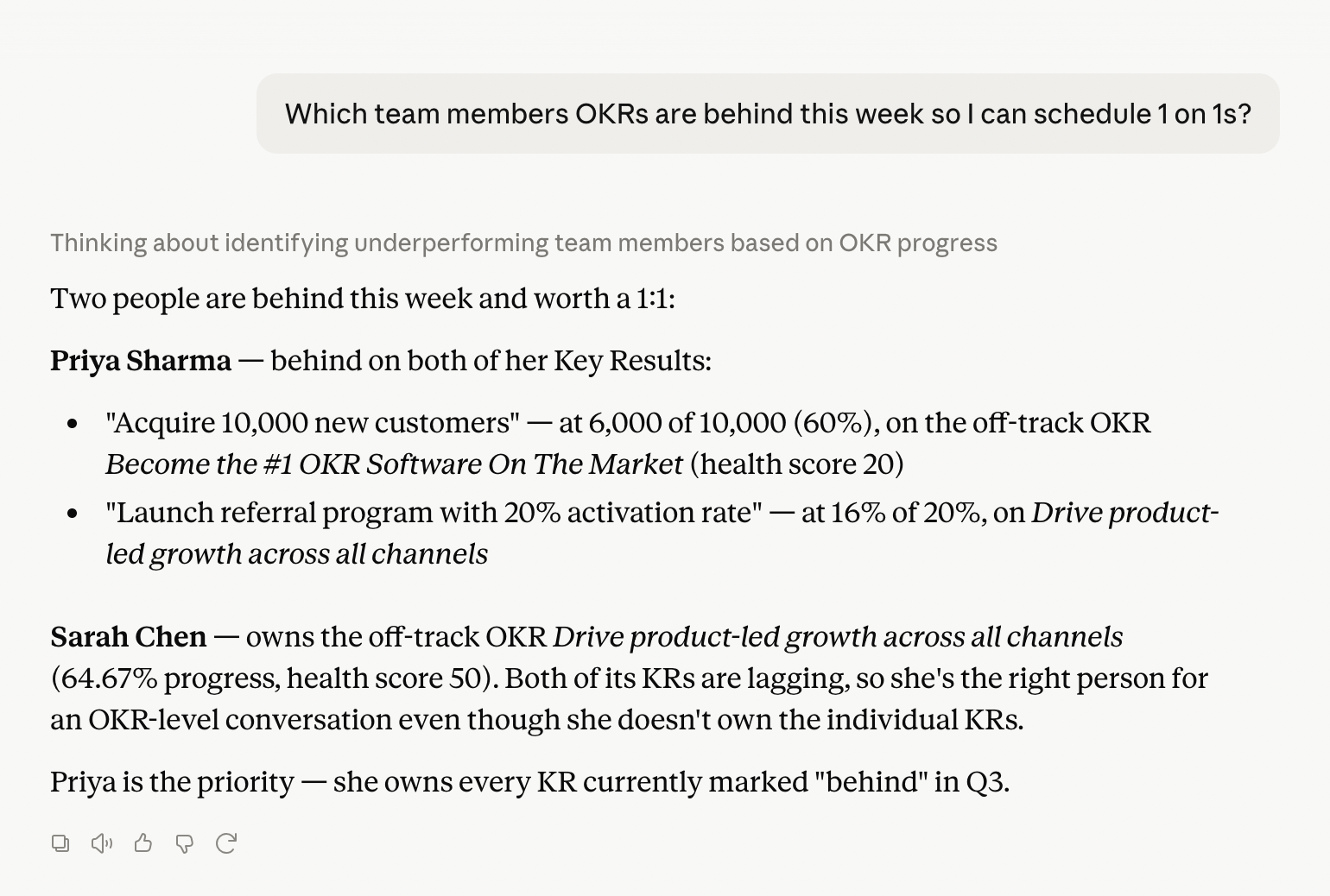
- "What does my team's performance look like this week?"
- "Summarize our Q3 progress for my board update"
Walk into every meeting already prepared.
Stop spending 30 minutes before a team meeting digging through dashboards. Ask your AI assistant what's slipping, who's at risk, and what to focus on.
- "Which teams are behind this week?"
- "What are the top 3 risks I should address tomorrow?"
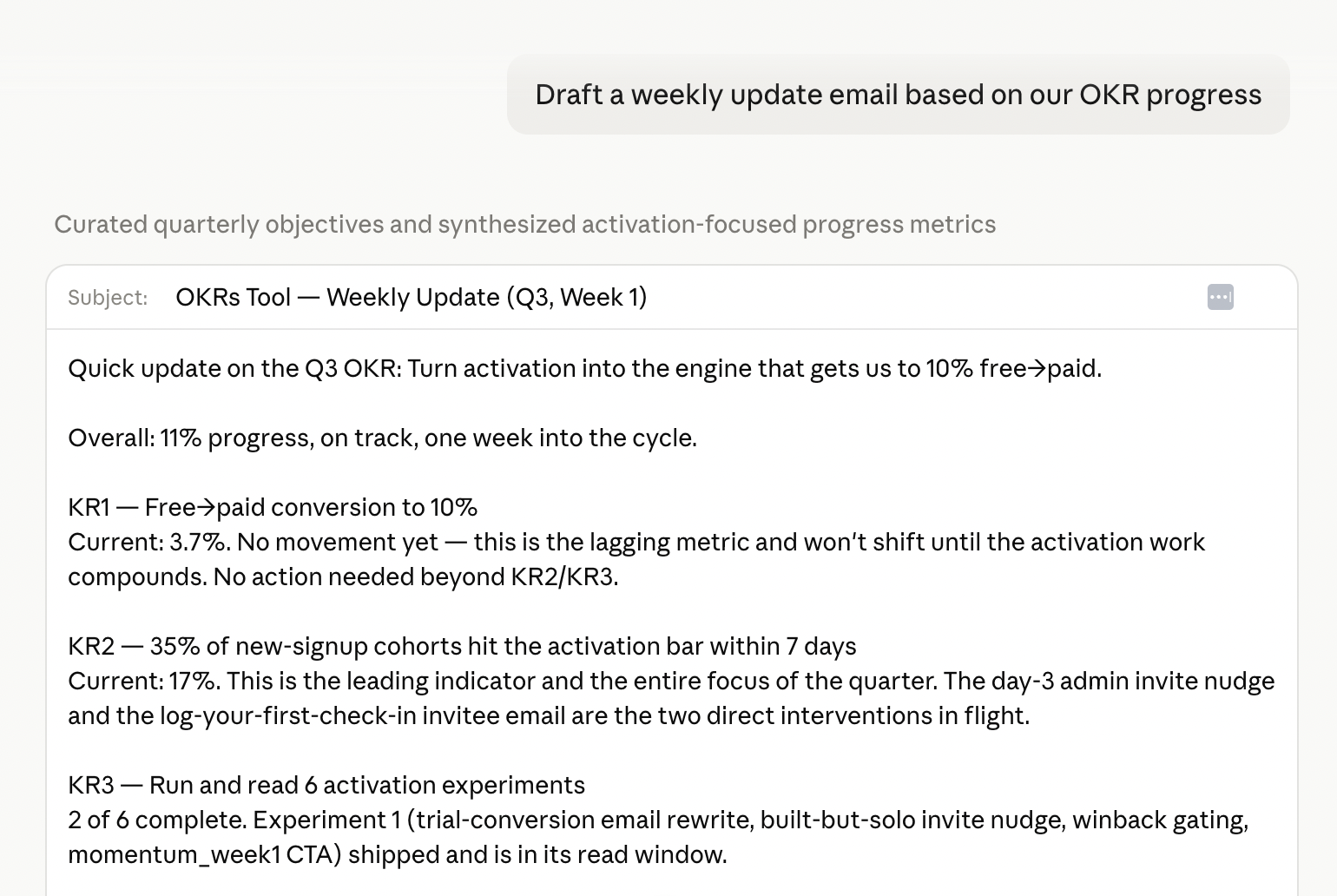
- "Draft a weekly update email based on our OKR progress"
Board prep in 5 minutes, not 5 hours.
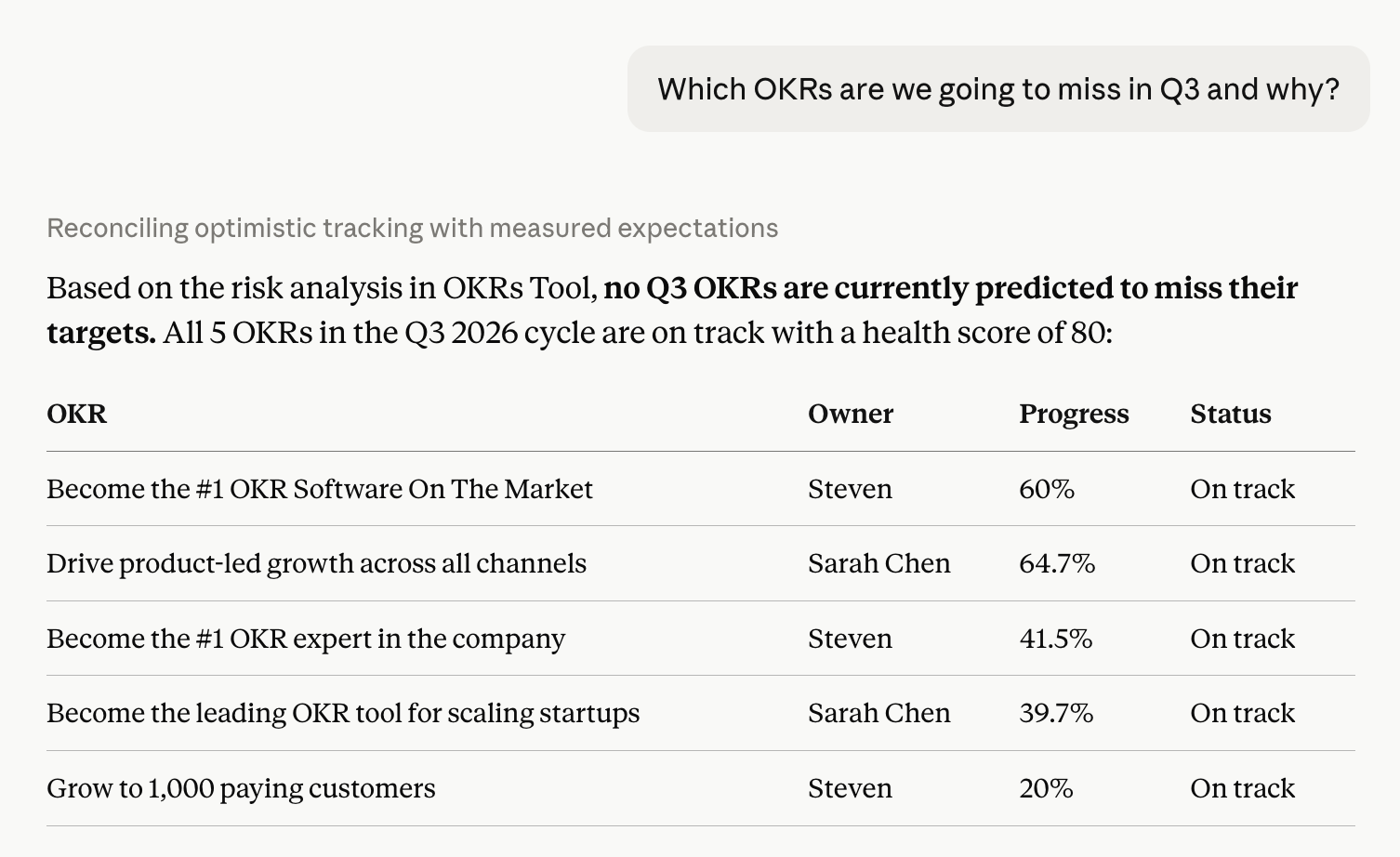
Ask your AI assistant for the executive summary you actually need. The narrative writes itself — your assistant can compare against last quarter, surface root causes, and call out misses honestly.
- "Give me a board-ready summary of Q3"
- "Which OKRs are we going to miss and why?"
- "Draft an email summary of our OKR progress for leadership"
Plug OKRs Tool into your AI workflows.
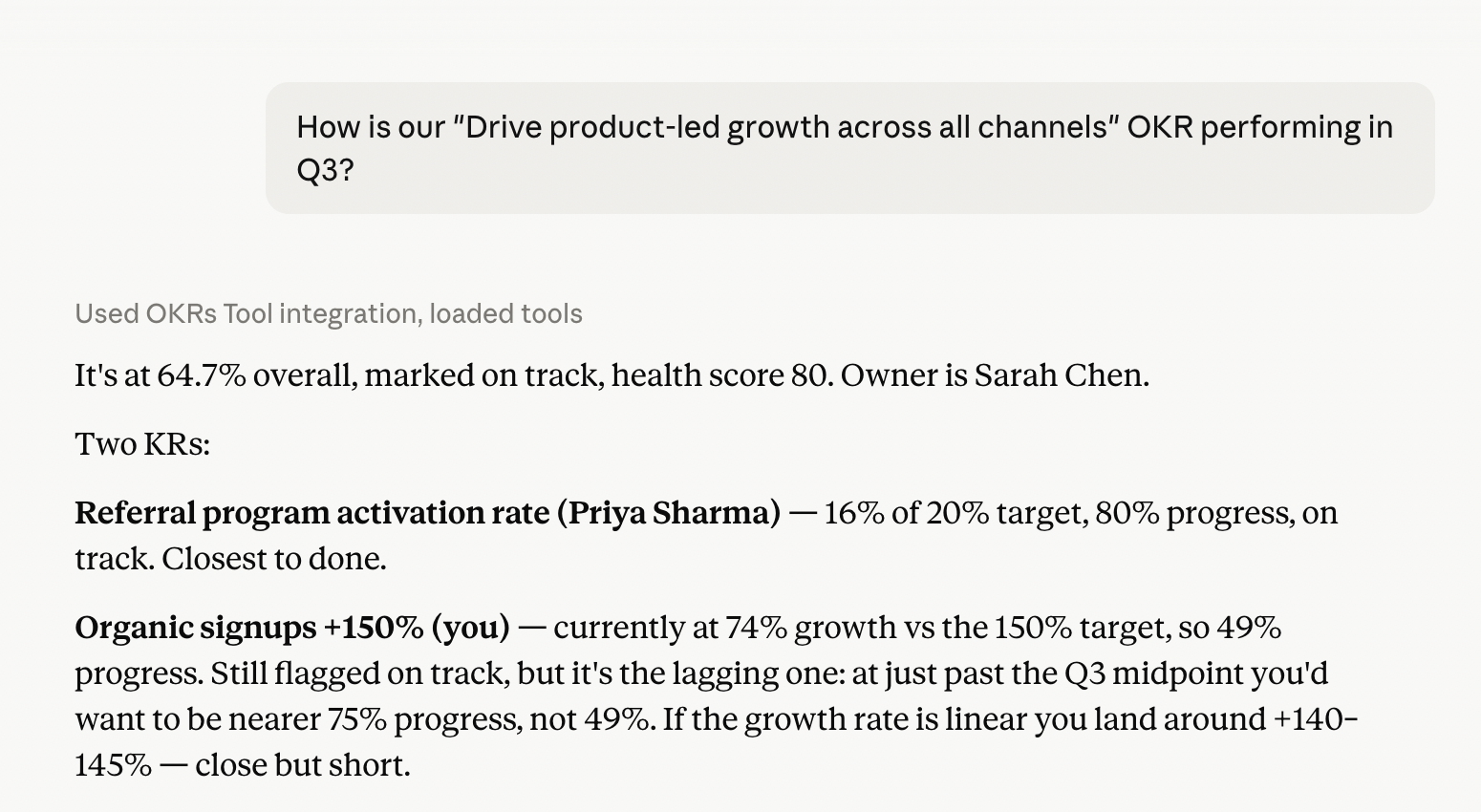
Everything Claude can do in chat — like summarizing OKR progress on demand — also works inside n8n, scheduled workflows, Cursor agents, and custom AI scripts. OKR data becomes a programmable input — not a manual export.
- Auto-generate status reports on a schedule
- Trigger Slack messages when KRs hit milestones
- Feed OKR data into other AI tools — chained reasoning, custom dashboards
MCP is not the same as AI Coach.
We get this question every day. Both use AI. Both work with OKRs. They solve completely different problems — here's the clean way to think about it.
AI inside OKRs Tool
Lives in our app. Helps you write better OKRs, score check-ins, and reflect on progress — without leaving the platform you already use to manage them.
- Drafts and refines OKRs from your strategy
- Forecasts at-risk KRs
- Generates check-in narratives
- You work in OKRs Tool
OKRs Tool inside any AI app
Lives wherever you already work with AI. Brings live OKR data into Claude — in the browser or the desktop app — Cursor, n8n, or any MCP-compatible client — so you can ask, log, and report without opening our app.
- Read OKRs, KRs, and check-ins from chat
- Log updates and check-ins from Claude
- Power your own AI workflows
- You work anywhere AI lives
Any MCP-compatible AI tool.
Plug into the AI tools your team already uses. If it speaks MCP, it speaks OKRs Tool.
* ChatGPT MCP support is currently limited to enterprise admin configuration and deep research workflows. Claude (web and desktop), Cursor, and n8n offer full MCP client support today.
Connect in under 2 minutes.
No code required. Two ways in, depending on where you use AI:
- In Claude, open Settings → Connectors → Add custom connector
- Paste the OKRs Tool connector URL:
https://go.okrstool.com/api/public/mcp-v2 - Approve the OAuth sign-in with your OKRs Tool account — scopes are granted per workspace
- Start asking — Claude in your browser can now read and update your OKRs
- Open OKRs Tool → Settings → Integrations → MCP server
- Click Generate token — a scoped OAuth token is created for your workspace
- Paste the server URL and token into Claude Desktop, Cursor, or any MCP-compatible client
- Start asking questions — your AI assistant can now read and update your OKRs
Included on the Enterprise plan.
The MCP server is part of OKRs Tool Enterprise ($349/mo flat), alongside the full REST API, webhooks, SSO, SCIM, and audit logs. Every other integration — Slack, Teams, Jira, Linear, Asana, ClickUp, Notion, Google — is included from Scale up.
See Enterprise planOAuth 2.1. Scoped per workspace. Your permissions apply.
OAuth 2.1 tokens
MCP tokens are scoped to your workspace, encrypted at rest, and revocable at any time from OKRs Tool integration settings. The browser connector uses the same OAuth flow — no long-lived keys in your clipboard.
Read tools plus check-in logging
The MCP server includes read tools for OKRs, KPIs, cycles, risks, and team performance, plus check-in logging. Your OKRs Tool role applies — Claude can only see and update what you can.
Every action in the audit log
Every change made through the MCP server — check-ins submitted, Key Result values updated — appears in the OKRs Tool audit log with a timestamp, the same as changes made in the app.
No new data store
The MCP server is part of OKRs Tool itself — same database, same infrastructure, same access controls. Connecting Claude adds no copy of your data anywhere new.
Questions about the MCP server?
Email Steven directly. We respond within one business day — and most setup questions are answered in under 15 minutes.
Contact supportClaude is a trademark of Anthropic. MCP (Model Context Protocol) is an open standard. OKRs Tool is an independent service.