Two-way Jira sync for the goals your engineers actually deliver.
Link Jira Cloud issues to your initiatives in OKRs Tool. Push status changes to Jira the moment they happen, and pull delivery progress back automatically — so your goals and your board never drift apart.
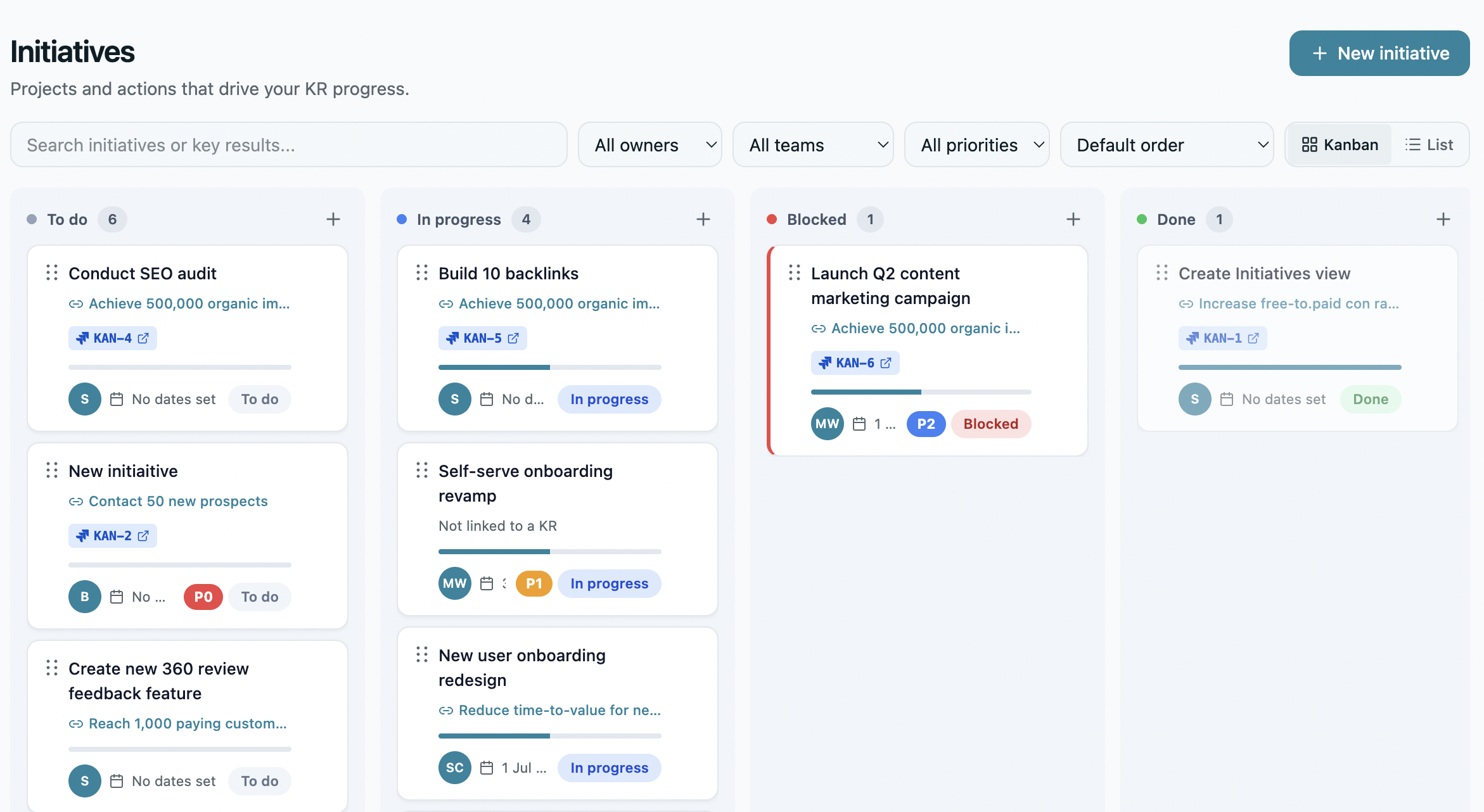
Goal layer above. Work layer below. Kept in step.
A focused integration for engineering teams who run on Jira Cloud and run on OKRs — without making them choose between visibility and delivery.
Most engineering teams have a gap: OKRs live in one system (or a doc, or a spreadsheet), and the actual work — the issues, sprints, and epics — lives in Jira. The two never meet. Goals drift. Delivery happens. Nobody can see how they connect.
OKRs Tool for Jira closes that gap in both directions. Search Jira Cloud issues from inside OKRs Tool and link them to the initiatives under your Key Results. When you update an initiative's status, that change is pushed to the linked Jira issue instantly. And every day — plus any time you hit "Sync now" — delivery progress is pulled back from Jira so subtask completion rolls up into your initiative progress automatically.
Built for engineering operators.
A focused, opinionated set of capabilities — not a kitchen-sink Jira clone.
Link initiatives to Jira issues
Search Jira Cloud by key, title, or assignee from inside OKRs Tool and attach an issue to any initiative — one issue per initiative, at both creation and edit time.
Push status to Jira, instantly
Update an initiative's status in OKRs Tool and the change is pushed to the linked Jira issue the moment it happens — status and progress, kept in step without anyone re-keying it.
Pull progress back, daily or on demand
A daily sync at 02:00 UTC — plus a "Sync now" button whenever you want it — pulls Jira progress back so subtask completion rolls up into initiative progress automatically.
Jira badge on every initiative card
Initiatives with a linked Jira issue show a clear badge with the issue key and current status. One glance: done, in progress, or blocked?
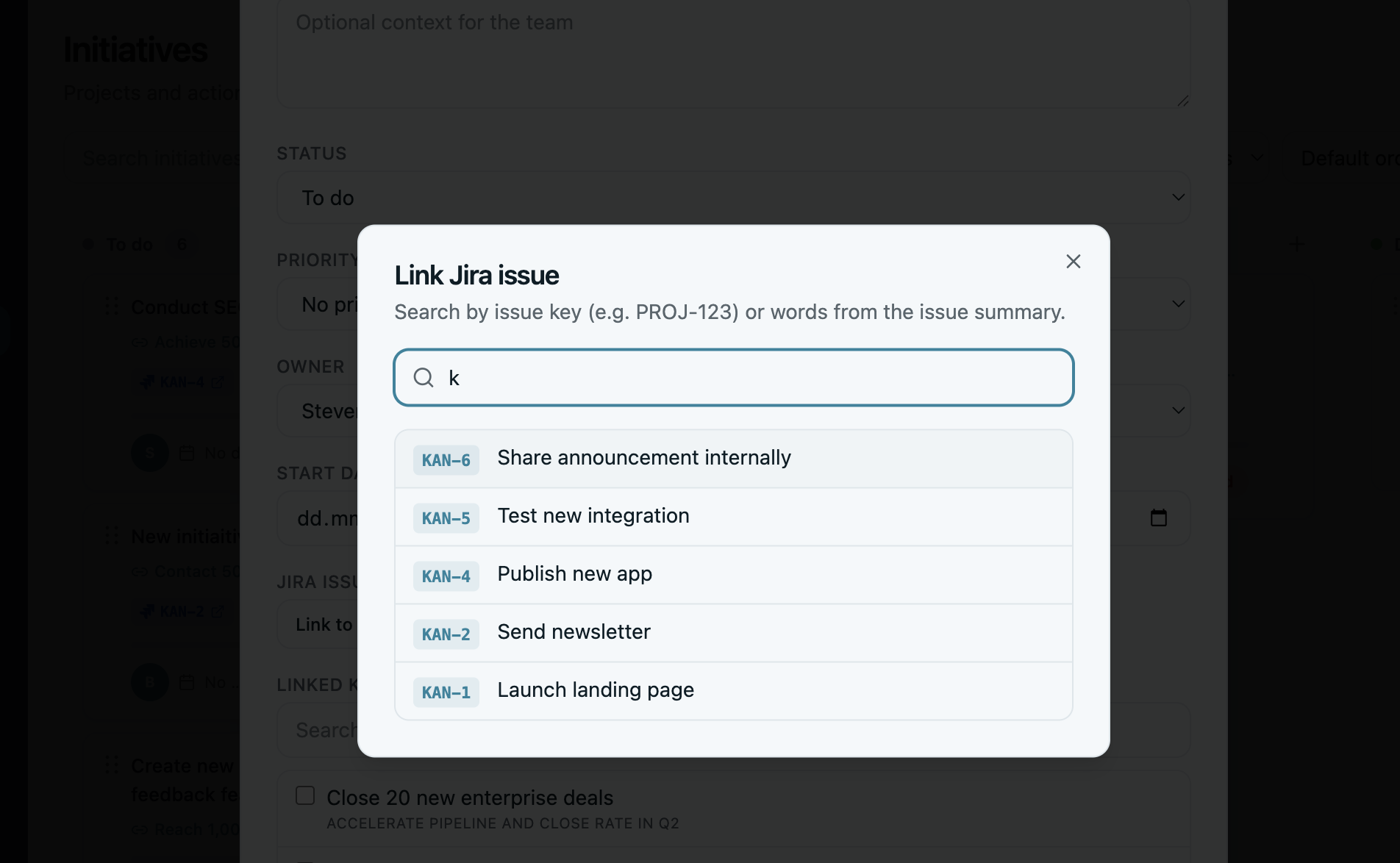
Set up in three minutes.
The Jira integration is configured directly from inside OKRs Tool. Included on every paid plan, starting with Scale.
How to connect Jira Cloud
If you already have an OKRs Tool account on any paid plan, sign in and follow the steps below. Not signed up yet? See plans or start your 14-day trial — Jira is included from Scale up.
- Log in to your OKRs Tool account at
go.okrstool.com - Navigate to Settings → Integrations → Jira
- Click Connect to Jira and authorize OKRs Tool in your Atlassian workspace
- Select the Jira Cloud sites and projects you want to connect
- Open any initiative in OKRs Tool and start linking Jira issues — the integration is now active
What this isn't.
Worth being clear up front. OKRs Tool is not a replacement for Jira — and we're not trying to be. We sit above Jira at the goals layer, not next to it at the work layer.
- We don't replace Jira's project management. Sprints, boards, backlogs, workflow customization — that's Jira's job. We don't try to do it.
- The sync is status and progress, not full issue content. We push and pull status and progress between a linked initiative and its Jira issue — we don't sync descriptions, comments, or other rich fields.
- Pull isn't real-time. Status you push to Jira lands instantly; progress pulled back from Jira updates once daily and whenever you hit "Sync now" — not live.
- Jira Cloud only. The integration works with Jira Cloud — not Server or Data Center — and stays within your own workspace.
- We're built for one buyer. VPs of Engineering and Heads of Product at 50–200 person companies who want OKRs that survive cycle two — not enterprise-scale program management.
For teams who run engineering on Jira.
The Jira integration is included on every paid plan, starting with Scale — $129/month flat for the whole team, with every integration built in. Built for organizations where OKRs need to plug into the actual delivery system, not live in a separate doc.
See Scale planBuilt with the minimum permissions needed.
We request only the scopes needed to read Jira issues, link them to your initiatives, and push status back — nothing more.
Atlassian permission scopes
The integration uses standard Jira Cloud OAuth 2.0 (3LO) scopes. Writes are limited to status and progress on issues you've linked — we never touch descriptions, comments, or unlinked issues.
read:jira-work— read Jira issue data (issue key, title, status, assignee, project)write:jira-work— push status and progress back to the specific issues you've linkedread:jira-user— read basic user info to display assignees on linked issuesoffline_access— refresh access tokens without requiring re-authentication
Data & privacy
Issue metadata is fetched via OAuth tokens and stored only as references (issue keys + IDs) on your linked initiatives. We do not store issue contents or descriptions in our database. You can disconnect the integration at any time from inside OKRs Tool or your Atlassian account.
Read our Privacy PolicyNeed help with the integration?
Email us directly. We respond within 2–4 hours during business hours — every email is personally answered by Steven, founder of OKRs Tool.
steven@okrstool.comJira and Atlassian are registered trademarks of Atlassian Pty Ltd. OKRs Tool is not affiliated with or endorsed by Atlassian.