
An OKR worksheet is a simple template for drafting one Objective and its Key Results, then tracking them week by week. The free two-page version below covers both jobs — and both matter, because 52% of Key Results are written as tasks in disguise, and a goal updated once all cycle hits its target just 48% of the time versus 72% for one tended weekly.
A worksheet won't fix a broken OKR process on its own, but it removes the two most common ways goals fail: getting written as vague tasks with no measurable target, and getting filed away after the planning meeting never to be looked at again. The writing page forces a baseline and a target on every Key Result; the tracking page keeps each one in view through the quarter. Used together, they cover the full life of an OKR across the quarterly cycle, from draft to done.
This piece walks through how to use each page — what goes in every field, the tests a good Key Result has to pass, and the weekly rhythm that turns the tracking sheet into an early-warning system. Grab the free PDF and follow along.
Page 1: The Writing Worksheet
The first page drafts a single OKR: one Objective at the top, two to three Key Results beneath it. The structure exists to force the discipline that separates a real goal from a wish.
Start with the Objective. It's qualitative and directional — what you're trying to achieve this quarter, stated in a way a team can rally behind. "Win the trust of enterprise buyers" is an Objective; it doesn't carry a number, and it isn't supposed to. The number lives in the Key Results beneath it — the split at the heart of how an OKR is structured, and the first thing writing OKRs well gets right.
Then the Key Results, and this is where most OKRs go wrong on the page. Each Key Result needs a named owner and a baseline-to-target number — the worksheet gives every one its own owner, baseline, and target field for exactly this reason. The reason the fields matter is stark in the data.
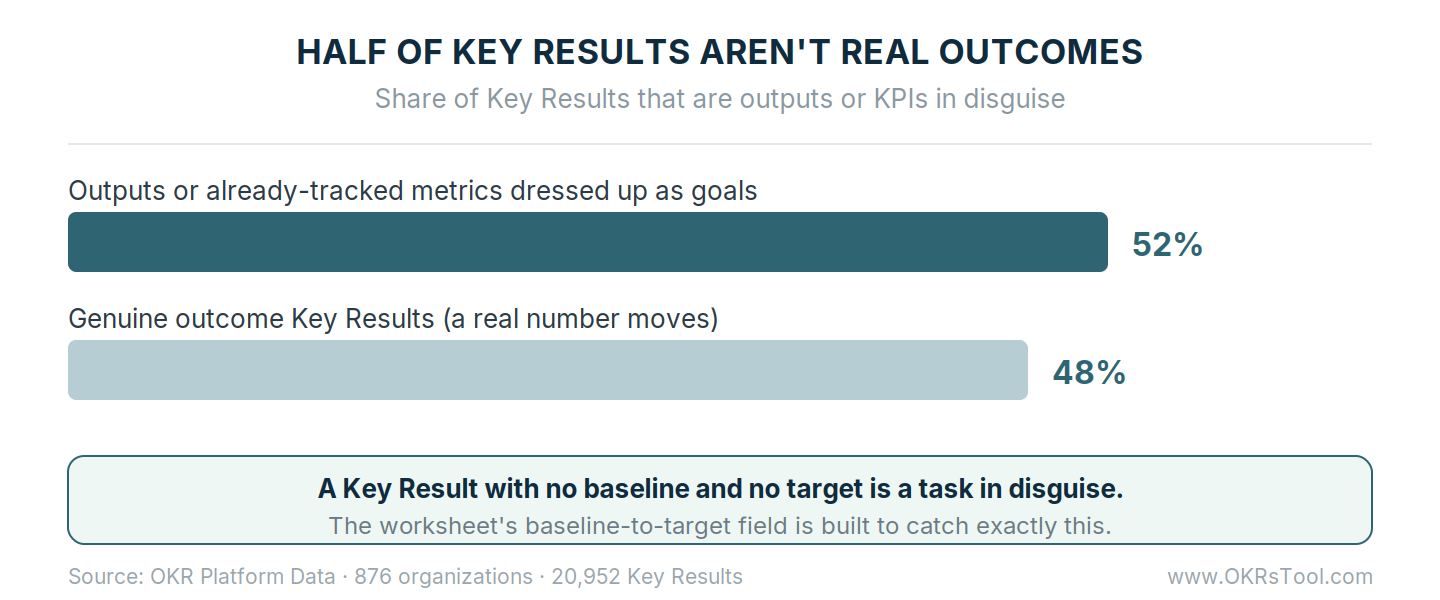
Across 20,952 Key Results, 52% were outputs or KPIs in disguise — tasks to complete or metrics already being tracked, rather than a deliberate change to drive. A Key Result written as "launch the new onboarding flow" can be marked done without a single number moving.
Written the way the worksheet demands — "raise Day 7 activation from 34% to 55%" — it can't be finished unless the outcome actually arrives. The baseline and target fields exist to force that: if you can't fill them in, you've written a task, not an outcome, and the worksheet just caught it before the quarter started.
The owner field does the second job. Half of all Key Results have no single named person accountable, and teams with one clear owner per Key Result complete 26% more than those with shared or vague accountability. One name per Key Result, every time — the worksheet leaves no room for "the team" to own it.
Before moving a Key Result off the page, run it through three quick tests: does it have a baseline and a target, does it name one owner, and does a real business number move when it's hit? Together they're a compact version of the key result formula — the shape a strong Key Result always takes. A Key Result that passes all three is worth carrying into the cycle.
One that fails any is a task in disguise that will sit untouched until the scoring conversation, when it's too late to fix — one of the most common ways a good OKR format gets undone in practice.
Page 2: The Weekly Tracking Sheet
Writing a strong OKR is half the work. The other half is keeping it in view, and that's what the second page is for — one row per Key Result, updated every week with last week's number, this week's number, a Red/Yellow/Green status, and the top blocker.
The tracking sheet exists because of the single clearest pattern in the data: the Key Results that get touched are the ones that get hit.
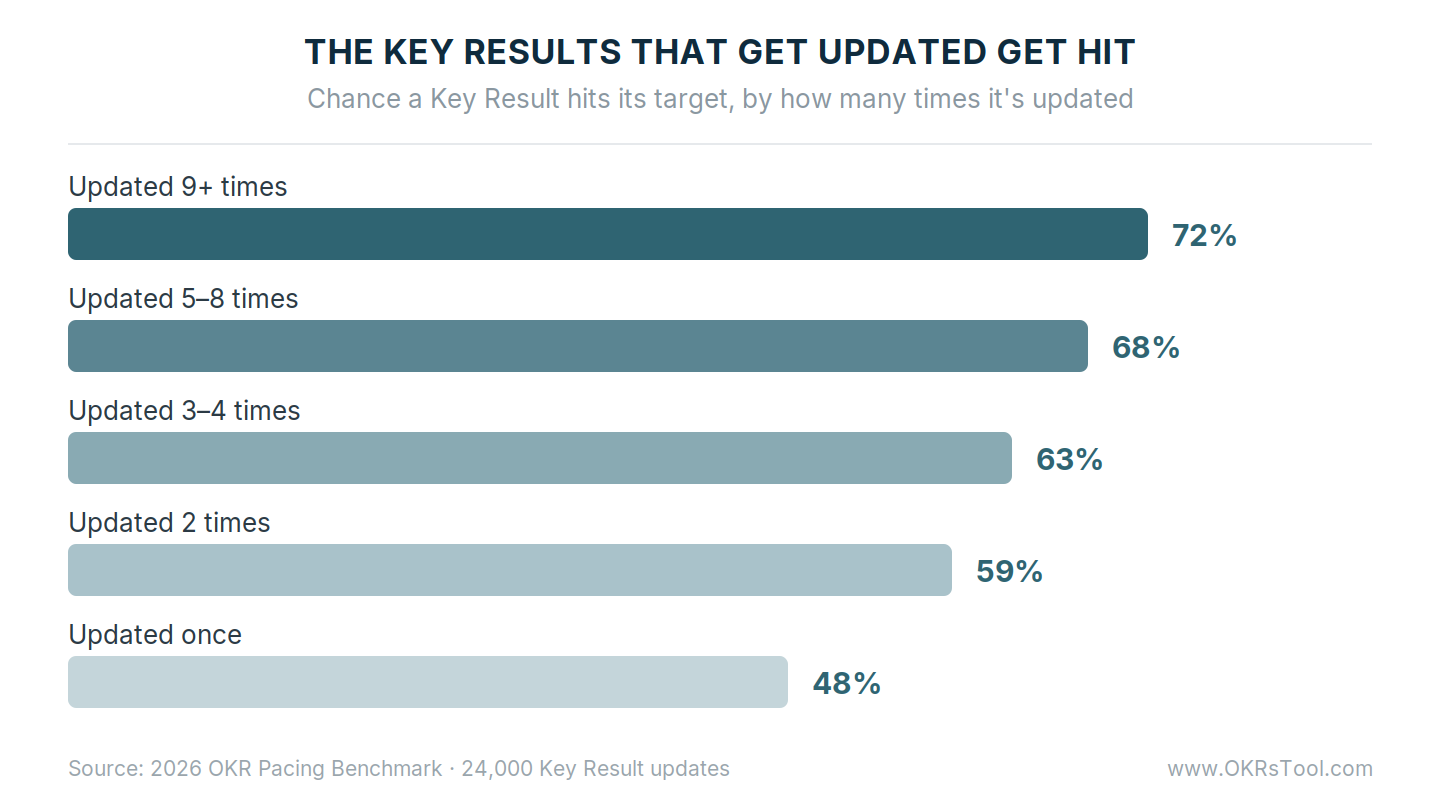
A Key Result updated once across the cycle hits its target 48% of the time; one updated nine or more times hits 72%. There's no magic number in the climb — just the compounding effect of a goal that stays in view. A single row filled in each week is enough to produce it, which is why the tracking sheet only works if it lives somewhere you'll actually see it.
The status column is where the sheet earns its keep. A Key Result sliding from Green to Yellow to Red over three weeks is telling you something the raw percentage hasn't caught up to yet, and a flat number two weeks running is the earliest honest sign a goal is stalling.
Reading those signals during a short weekly check-in — held on a consistent weekly cadence — is what turns the sheet from a record into an early-warning system, catching a drifting goal while there's still quarter left to update the plan rather than at the retrospective, when nothing can change. Kept up, it's what separates tracking that works from a sheet nobody opens.
From Worksheet to Working System
A paper worksheet is the right place to start, and for a single team running its first cycle it may be all you need. It teaches the discipline — measurable Key Results, one owner each, a weekly update — without asking anyone to learn a tool first.
The limits show up as you scale. A worksheet can't nudge an owner who forgot to update, can't roll a team's Key Results up to a company objective, and can't show at a glance which goals across the org are slipping.
Once more than one team is running OKRs, the manual version starts to cost more time than it saves, and the check-in becomes a chase for updates rather than a read of them. At that stage the same structure — the worksheet's fields, now automated in one platform — earns its place in software, and setup takes an afternoon rather than a rollout project.
Data: OKRs Tool platform data (876 organizations, 20,952 Key Results) and The 2026 OKR Pacing Benchmark (24,000 Key Result updates).