The usual advice on OKRs in Notion is to leave Notion behind, and that advice is only half right. Notion is a poor place to track OKRs — but a great place to read them, since it's where your strategy docs already live. The fix isn't migration. It's running OKRs in a dedicated tool and syncing them live into the Notion your team already opens.
Plenty of growing teams start their goal-setting in Notion, and it's easy to see why: it's flexible, it's where the quarterly planning docs and all-hands prep and board updates already live, and standing up a goals database takes minutes. For a small team, running OKRs in Notion genuinely works. The problem isn't that Notion is a bad tool. It's that a flexible document workspace and a goal-tracking system are two different jobs, and asking one tool to do both is where tracking OKRs in Notion quietly falls apart.
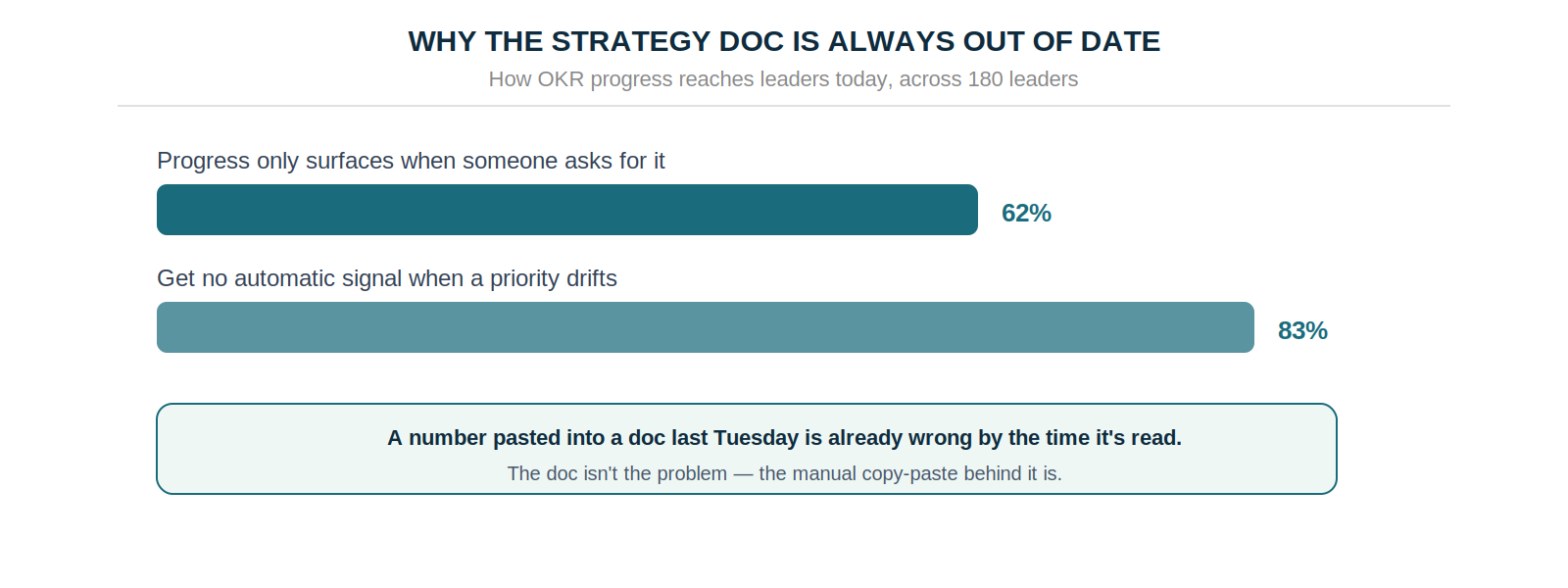
The failure has a specific shape. Notion holds the strategy, but the OKR progress in those docs is whatever someone pasted in last Tuesday — so by the time the doc is read, the numbers are wrong. Across 180 leaders in the Strategy Execution Benchmark 2026, 62% said progress only reaches them when they go and ask for it. This guide covers where OKRs in Notion breaks down, and the approach that keeps Notion doing what it's good at while fixing the data underneath.
Where OKRs in Notion Break Down
Notion is genuinely excellent at what it was built for — documents, wikis, flexible databases. The trouble starts when a free-form workspace is asked to enforce the disciplines that make OKRs actually work.
Three gaps show up reliably. The first is quality drift: a blank Notion page accepts anything you type, so nothing stops a key result from being a task in disguise. Across 20,952 key results in the platform data, 52% turned out to be tasks or KPIs rather than outcomes, and half had no named owner — exactly the drift a structured tool prevents and a flexible doc invites.
The second is no automatic cadence. Notion doesn't nudge anyone to update their progress, and the weekly check-in is the single highest-leverage OKR habit — worth 43% more completed goals. When updating is a manual chore nobody's prompted to do, it stops happening by week three.
The third is staleness, and it's the one that stings most in a strategy doc. Because progress has to be copied in by hand, the numbers in any Notion doc are only as fresh as the last person who remembered to update them — which is why 62% of leaders say they only learn where things stand when they ask.
The Two-Layer Fix
Here's the reframe. The instinct when Notion stops coping is to rip OKRs out and move them wholesale into dedicated software. But that throws away the thing Notion is genuinely best at: being the place your team already reads strategy. The better model keeps both tools, each doing the job it's good at.
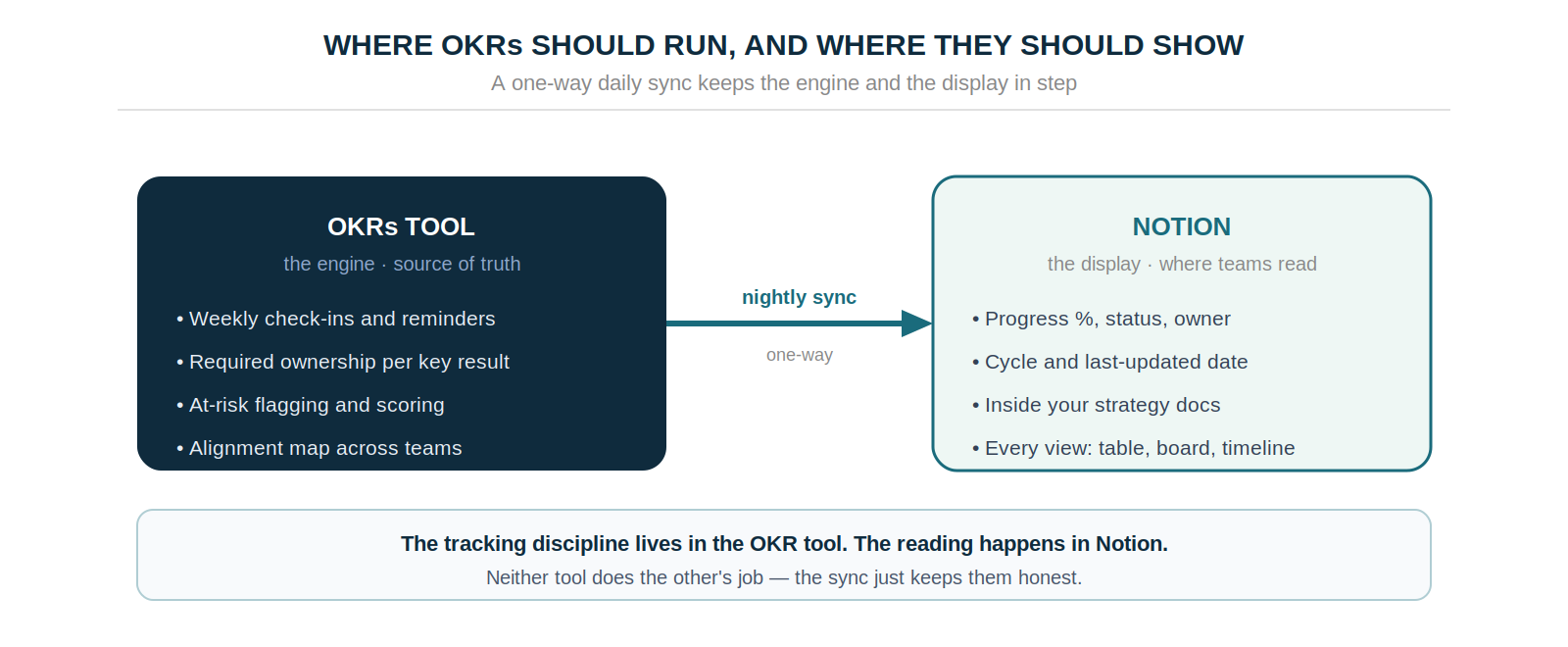
Run the OKRs in a dedicated tool — that's where the ownership enforcement, the automated check-ins, the at-risk flagging, and the alignment map live. Then display them in Notion, where your team already reads the strategy. The OKR tool is the engine and the source of truth; Notion is the display layer. Neither is asked to do the other's job, and the quality and cadence problems disappear because they're handled where they should be — in a system built for them.
How OKRs Tool for Notion Works
This is exactly what the OKRs Tool Notion integration does. You run your OKRs in OKRs Tool, and a one-way sync pushes the live data into a Notion database every night, so your strategy docs show reality instead of last week's copy-paste.
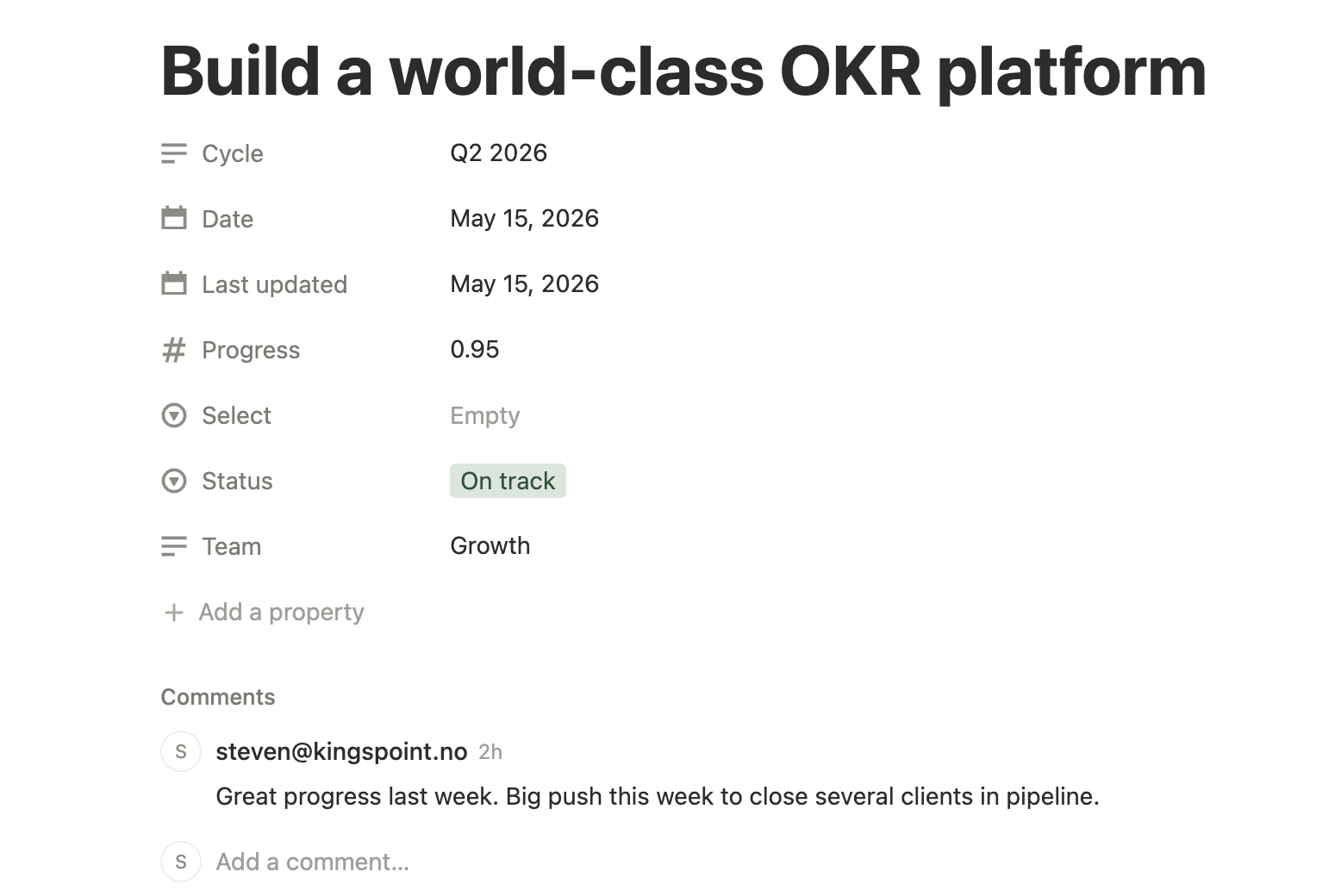
The mechanics are deliberately narrow. It's a daily automatic sync — every night OKRs Tool pushes progress percentage, status, owner, cycle, and last-updated date into your database, with no refresh button or manual export. It works with your existing database: point OKRs Tool at any Notion database you already own and it adds the required columns itself.
It's one-way by design — OKRs Tool stays the source of truth, and editing a synced value in Notion never touches your actual OKRs. And it works in every Notion view, so the data shows up filtered, sorted, and grouped however your team already looks at that database.
Two honest limits worth stating plainly: it's not real-time — the sync runs once overnight, so for the exact current number you check OKRs Tool directly — and it's not a two-way editor. Notion is the reading surface; the OKR tool is where the work happens. The integration is part of the Expand plan at $129/month flat for unlimited users.
Notion vs a Dedicated Tool, Side by Side
The useful comparison here is Notion alone versus Notion with the tracking handled properly underneath it.
Keep What Works, Fix What Doesn't
The old advice — leave Notion to run OKRs properly — asked teams to give up the tool their whole strategy already lives in. That was always a hard sell, and it was solving the wrong half of the problem. Notion was never bad at displaying goals; it was bad at tracking them, and those are separable.
So keep the strategy docs, the planning pages, and the board prep exactly where they are. Move only the tracking into a tool built for it — the ownership, the cadence, the at-risk flags — and sync the results back into Notion automatically. Your team keeps reading strategy where they always have, the numbers they read are finally current, and nobody has to migrate anything. That's the version of OKRs in Notion that actually holds up as a company grows.
Data: Strategy Execution Benchmark 2026 (180 strategy and operations leaders), OKRs Tool platform data (876 organizations, 20,952 key results), The 2026 OKR Benchmark Report (200 organizations).