
A strategy execution template gives your strategy a structure that survives the quarter — a single place where company priorities, team objectives, key results, owners, and the weekly cadence all connect. This one is free, includes a filled example, and maps to the way high-performing teams actually run execution.
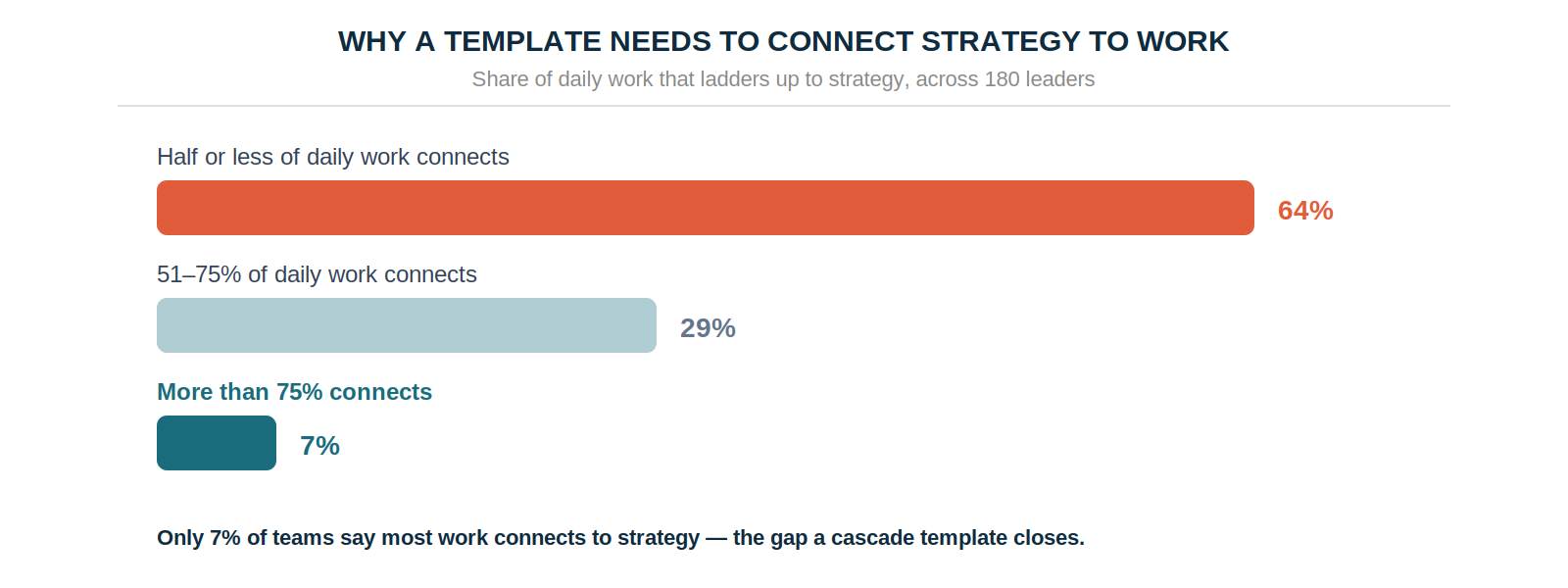
A strategy is only as good as the system that carries it into the work. The plan can be sharp and the offsite can go well, but without a structure that connects priorities to what teams do each week, execution drifts — and the data bears this out: across 180 strategy leaders in the Strategy Execution Benchmark 2026, only 7% say most daily work ladders up to strategy.
A template won't fix that on its own, but the right one removes the most common excuse for the gap — that there was nowhere to put the connection. This template gives every priority a home, forces the link between company strategy and team work to be explicit, and builds in the weekly cadence that keeps it alive. Below is what a strong template contains, a filled example, and how to run it through a full cycle. You can download the complete template — cover, framework, filled example, blank worksheets, a weekly tracker, and a retrospective — as a free PDF.
What a Strategy Execution Template Should Contain
The templates you'll find are usually either a blank goals grid or an elaborate strategy-planning canvas. Neither closes the execution gap, because both stop at documenting the strategy and skip the mechanism that connects it to weekly work. A template built for execution has six parts, and the connective logic between them is the point.
The first is company priorities — the three to five strategic choices for the year. Not metrics, but choices: "own the category conversation for mid-market buyers," not "grow revenue 30%." Fewer is deliberate; a template with room for ten priorities produces teams pulled in ten directions.
The second is the team cascade — how each team advances a priority for their function. This is where a company priority becomes a team objective, interpreted by the people who own the work.
The third is key results with owners — the measurable movements from a baseline to a target that prove the objective, each with a single named person accountable.
The fourth is initiatives: the actual work sitting one level below the key results, kept separate so you can change tactics without changing the goal.
The fifth and sixth are what most templates miss entirely: a weekly check-in tracker to keep the cascade visible between reviews, and a cycle retrospective to turn each quarter's results into next quarter's improvement. A template without these two is a planning document, not an execution one.
The Filled Example
The clearest way to understand the template is to see one completed.
Here's a full cascade for a single company priority, top to bottom.
To make your content as clear and readable as possible, follow these professional formatting standards:
- The company priority is "own the category conversation for mid-market buyers."
- Marketing translates that into a team objective: "make our research the reference buyers cite."
- That objective becomes measurable through three key results — grow organic sessions to research pages from 12K to 30K a month (owner: Dana), earn citations from industry publications from 3 to 15 (owner: Dana), and increase report downloads from 220 to 600 a month (owner: Sam).
- Underneath sit the initiatives — publish the benchmark report, pitch 20 publications, build six comparison pages, launch the gated scorecard.
The test of the cascade is the trace. "Launch the gated scorecard" moves report downloads, which proves the research is being cited, which advances owning the category conversation. Every piece of work connects back to a company priority — and any work that can't be traced that way is a signal it doesn't belong. The cascade framework covers this logic in more depth, but the template makes it concrete: you fill it in top-down and read it bottom-up.
How to Use the Template Through a Cycle
A template is only useful if it's run, not filled in once and filed. The rhythm that works maps to the pages in the download.
At the start of the cycle, set the company priorities, then have each team fill in their own cascade page — one priority per page, translated into an objective, made measurable with two or three key results, each with an owner. This is deliberately bottom-up: leadership sets the priorities, teams own the interpretation, which is what creates commitment rather than compliance.
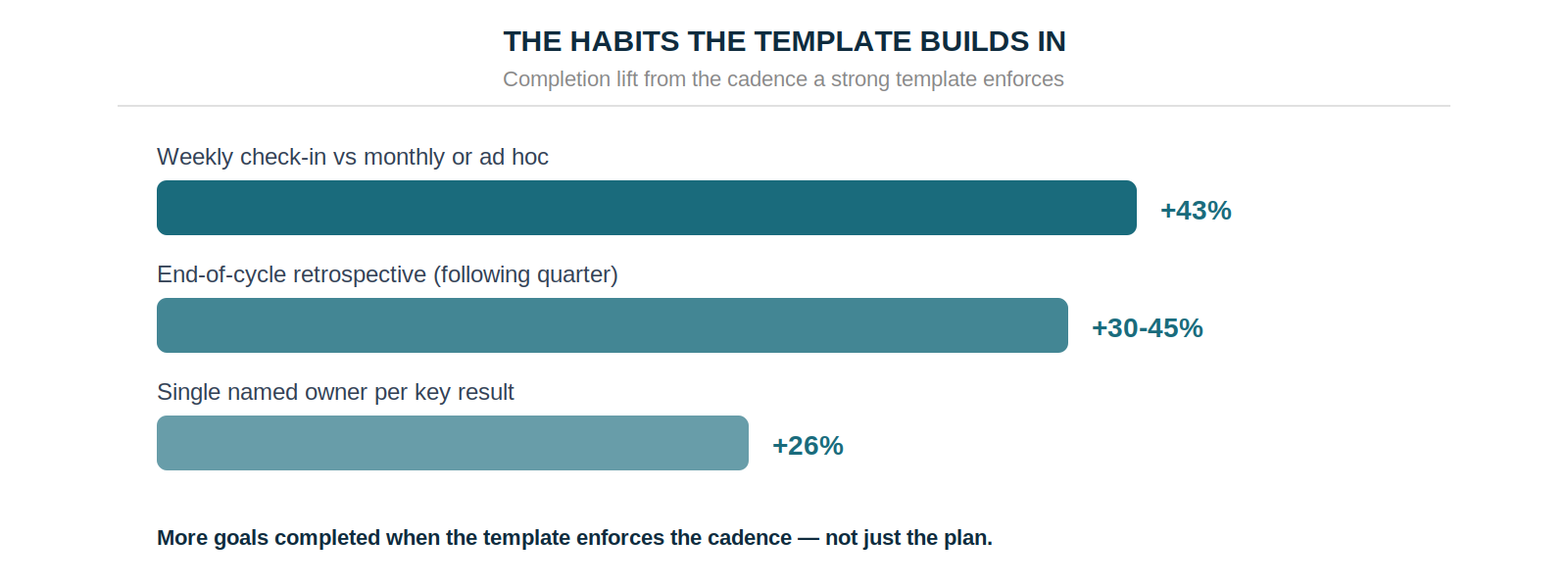
Each week, spend 20 minutes on the check-in tracker — logging what moved, what's at risk, and what needs a decision for each key result. This is the habit that separates execution from documentation. Teams that check in weekly complete 43% more goals than those reviewing monthly or ad hoc, and the tracker is where a stalling priority gets caught while there's still time to act.
At cycle close, run the retrospective page. Score each key result honestly against the 70–80% sweet spot — a perfect score means the targets were too safe — then diagnose what drove the results, what blocked progress, and what next cycle needs. This is where execution compounds: teams that run structured retrospectives complete 30–45% more goals the following quarter.
When a Template Isn't Enough
A template is the right starting point, and for a first cycle or a small team it may be all you need. But a PDF or spreadsheet has a structural ceiling: it can't send a reminder, surface a drifting priority, or show every team how their work connects in real time. That's why 83% of leaders get no automatic signal when a priority drifts — the artifact holding their strategy is static.
The moment a template starts to strain is usually when the cascade gets bigger than one page can hold, or when the weekly tracker becomes a chore someone has to chase. At that point the same structure — priorities, cascade, key results, weekly cadence, retrospective — is better run in strategy execution software that makes the links live and the check-ins automatic. That's the difference between a template that documents the cascade and a system that keeps it alive.
For the full picture of where execution breaks and how to close each gap, strategy execution covers the operating model, and the benchmark data breaks down what's behind it. When the template starts to strain, see how OKRs Tool runs the same structure as a living system — free for up to 5 users.
Data: Strategy Execution Benchmark 2026 (180 strategy and operations leaders at companies of 50–200 employees) and The 2026 OKR Benchmark Report (200 organizations).