Without in-person rhythm, OKRs need software to stay alive. The difference between the tools below isn't features — it's whether the weekly check-in habit happens automatically or depends on someone remembering to chase it.
Spreadsheets get buried in Slack threads. Updates fall through the cracks. Without in-person rhythm, OKRs fade faster than the enthusiasm that launched them. After helping 300+ teams get started with OKRs, the pattern is consistent: distributed teams need the right OKR software more than co-located teams do, because there's no ambient visibility to compensate when the tool isn't doing its job.
The 2026 OKR Benchmark Report found teams with automated weekly check-ins complete 43% more OKRs than those without. For remote teams, "automated" is the operative word — a check-in that depends on someone scheduling a Zoom call won't happen consistently. These 11 tools are evaluated on exactly that.
Why Remote Teams Need OKR Software
For co-located teams, OKRs can survive on whiteboards, all-hands, and hallway conversations. Remote teams don't have that infrastructure. If goals aren't surfaced in tools people already use, they get lost — and unlike an office, there's no ambient signal that goals are being ignored.
The best OKR software for remote teams solves three problems the office used to solve passively. Visibility across time zones — goals stay top-of-mind without requiring everyone in the same room at the same time. Async check-ins — lightweight updates that fit into Slack, email, or dashboards without demanding a synchronous meeting. And engagement without micromanagement — OKRs that feel like a living system rather than another tracker people resent updating.
11 Best OKR Software Tools for Remote Teams
1. OKRs Tool — Best for Distributed Teams at 50–200 People
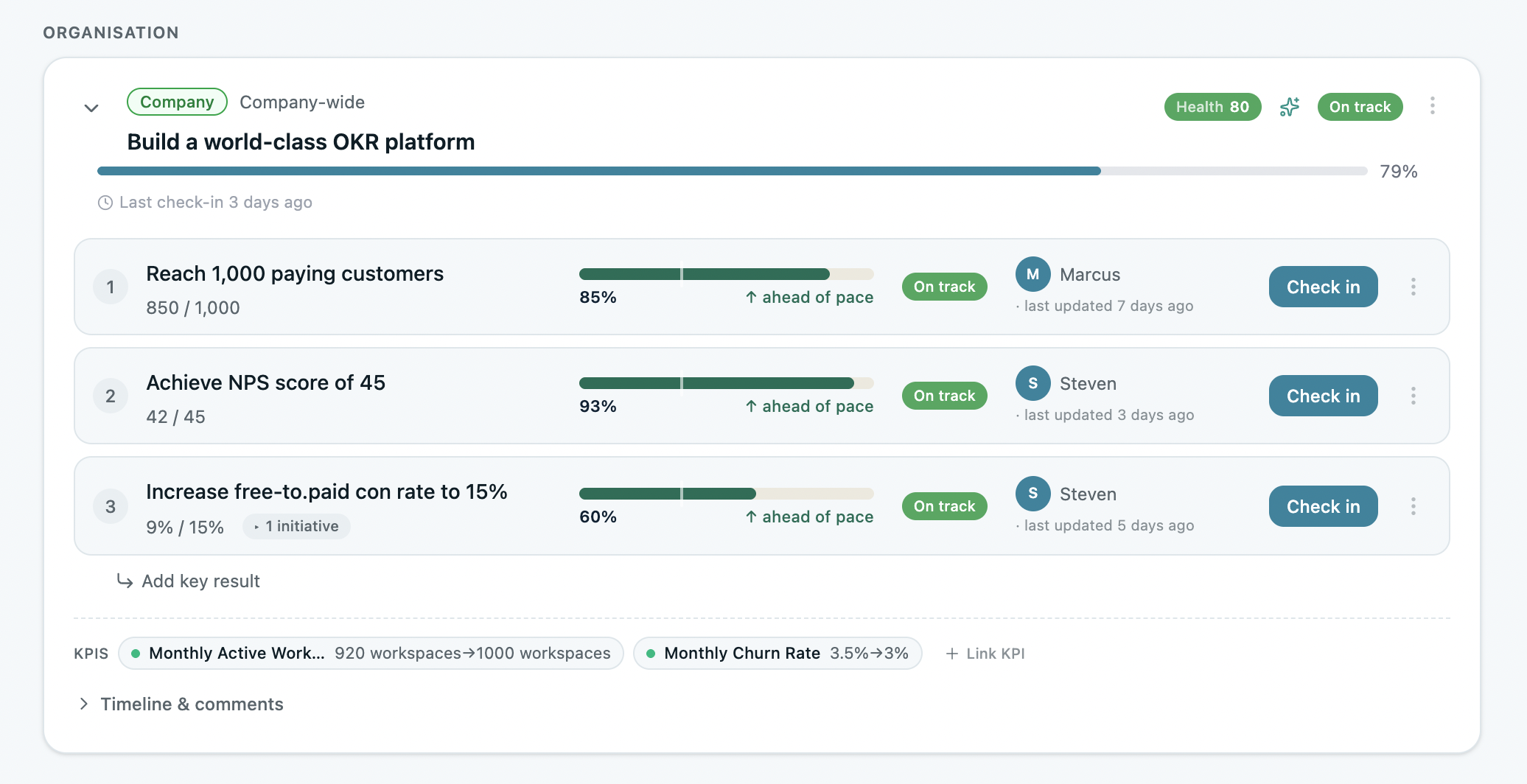
I built OKRs Tool after watching the same pattern: remote teams set OKRs with good intentions, and then the spreadsheet or the Notion doc gradually stops being updated because there's no automated system keeping the rhythm alive. We run a remote-first company ourselves. If OKRs Tool didn't work for distributed teams, it wouldn't exist.
The async weekly check-in is the core feature for remote teams — automated nudges via Slack or MS Teams, five minutes per team member, no scheduling required. Flat pricing at $49/month means the whole organization can participate without per-seat costs creating pressure to gate access. AI-assisted OKR writing removes the blank-page problem that delays the first cycle in distributed teams.
The limitation: integrations currently cover Jira, Asana, Linear, ClickUp, Slack, and MS Teams. Teams that need Salesforce or deep HRIS integrations will need to supplement.
Best for: Department heads and team leads at distributed companies (50–200 people) that need OKR alignment and weekly accountability without adding meetings. Pricing: Free for 1–5 users. $49/month flat for 6–50. $129/month for 51+.
2. Weekdone — Best for Remote Teams That Need Weekly Rhythm Built In

Weekdone's superpower for remote teams is structured weekly updates. Instead of waiting for quarterly reviews, teams log small, steady check-ins that surface blockers while there's still time to act.
The platform is built around visible progress — dashboards that make async status clear without requiring a synchronous meeting. For distributed teams where the risk is OKRs fading into the background, Weekdone's structured cadence provides the accountability mechanism that replaces the in-office visibility.
The limitation: some teams find the reporting structure rigid, and the platform can feel more like a reporting tool than a collaboration layer. For async-first cultures that resist structured cadences, the format may create friction rather than reduce it.
Best for: Distributed teams past 100 people that need accountability baked structurally into the process. Pricing: Free for up to 3 users. From $10/user/month.
3. Tability — Best for Simplicity-First Remote Teams

Tability calls itself the lightweight OKR tracker and earns the description. The interface is clean, check-ins are minimal, and the focus stays on outcomes rather than reporting overhead — which makes it a strong fit for smaller remote teams that want goals visible without configuration overhead.
For distributed teams in their first or second OKR cycle, the simplicity is the feature. Async updates take minutes, and the visual outcome tracking makes progress readable at a glance without a status call.
The limitation: Tability's feature set is intentionally narrow. Teams that grow past 50 people or need cascade enforcement, deep retrospective infrastructure, or HRIS integrations will find it too limited.
Best for: Small remote teams (under 50 people) that want lightweight OKRs without setup overhead. Pricing: From $6/user/month. Free plan available.
4. Profit.co — Best for Scaling Remote Orgs Connecting OKRs to Performance

Profit.co is a full-featured OKR and performance management suite. For remote leadership teams that want goals, KPIs, reviews, and tasks in one system, the breadth is the point — reducing the number of platforms distributed teams need to move between to get a full picture of execution.
Customizable dashboards give leadership a view across distributed functions without a reporting meeting. For remote organizations growing past 100 people where the bottleneck is cross-functional visibility, Profit.co provides the infrastructure.
The limitation: setup is heavy and onboarding requires significant internal investment. Small distributed teams that need to move fast will spend more time configuring Profit.co than running their first cycle.
Best for: Remote orgs growing past 100 employees that need OKRs connected to structured performance reporting. Pricing: Custom quote. 30-day free trial.
5. Workboard (formerly Quantive, acquired May 2025) — Best for Data-Driven Remote Orgs

Workboard (formerly Quantive before the May 2025 acquisition) is built for organizations that want OKRs connected directly to live data sources. For remote teams with multiple systems across regions, automated data pulls reduce the manual update burden that kills check-in consistency in distributed settings.
Deep integrations with CRMs, analytics tools, and databases mean progress updates without manual entry — which matters more for remote teams where the friction of a manual update is higher than in an office environment.
The limitation: implementation complexity and enterprise pricing make Workboard unsuitable for teams under 200 people. Without the data infrastructure to feed it properly, the integrations don't deliver their designed value.
Best for: Remote scale-ups (200+ people) with data ops maturity and a need for automated OKR updates. Pricing: Enterprise, custom quote. Demo required.
6. Perdoo — Best for Distributed Leadership Teams Aligning Strategy to Execution

Perdoo's standout for remote teams is its Strategy Map — a visual chain from vision through strategy to quarterly OKRs and KPIs. For distributed executive teams who can't hold whiteboard sessions, that shared visual clarity replaces the in-person strategy alignment they're missing.
The OKR and KPI combination works well for leadership teams that need to track both leading and lagging indicators across time zones. Board reporting features are also stronger than most platforms in this category.
The limitation: the mobile app is consistently cited as weak to the point of being unreliable — a meaningful gap for remote teams where mobile access is part of the workflow. The UI also feels dated compared to newer competitors.
Best for: Distributed leadership teams (50–200 people) that need strategy-to-execution clarity across time zones. Pricing: Free for up to 5 users. From €8/user/month (5-seat minimum, $3,000 floor).
7. Mooncamp — Best for Design-Conscious Remote Teams

Mooncamp wins on interface quality — clean, modern, and genuinely enjoyable to use. For remote teams, that matters: OKR adoption rates are higher when the software doesn't feel like an obligation.
Flexible workflows let teams adapt the OKR structure to their culture rather than conforming to a rigid system — useful for distributed teams where different time zones and working styles need accommodation. The Microsoft Teams integration is among the stronger ones in this category.
The limitation: no native mobile app (responsive web only) and no shipped AI as of mid-2026. The flexibility that makes it adaptable for some teams also means it requires more self-discipline to keep consistent. Enterprise tier requires 100 users minimum.
Best for: Remote-first teams under 150 people that prioritize design and work primarily in Microsoft Teams. Pricing: From €6/user/month. 14-day trial, no permanent free tier.
8. Synergita — Best for Remote Teams Connecting OKRs to Performance and Feedback

Synergita is broader than a pure OKR tool — it's a performance management and engagement system that embeds OKRs into recognition, continuous feedback, and development conversations. For remote companies where culture and engagement are harder to maintain without in-person interaction, that integration adds genuine value.
The platform works well for distributed HR-led organizations where the challenge isn't just tracking goals but keeping employees engaged with them as part of a wider people programme. OKRs live alongside review cycles and feedback loops rather than in a separate system.
The limitation: Synergita is heavier than most growing teams need for pure OKR execution. Organizations under 100 people that want lightweight weekly check-ins and fast setup will find the HR integration overhead disproportionate to the value.
Best for: Remote organizations past 100 people that want OKRs embedded into the employee lifecycle. Pricing: Custom quote. Demo available.
9. Betterworks — Best for Enterprise Remote Teams Running OKR-Native Performance Programmes
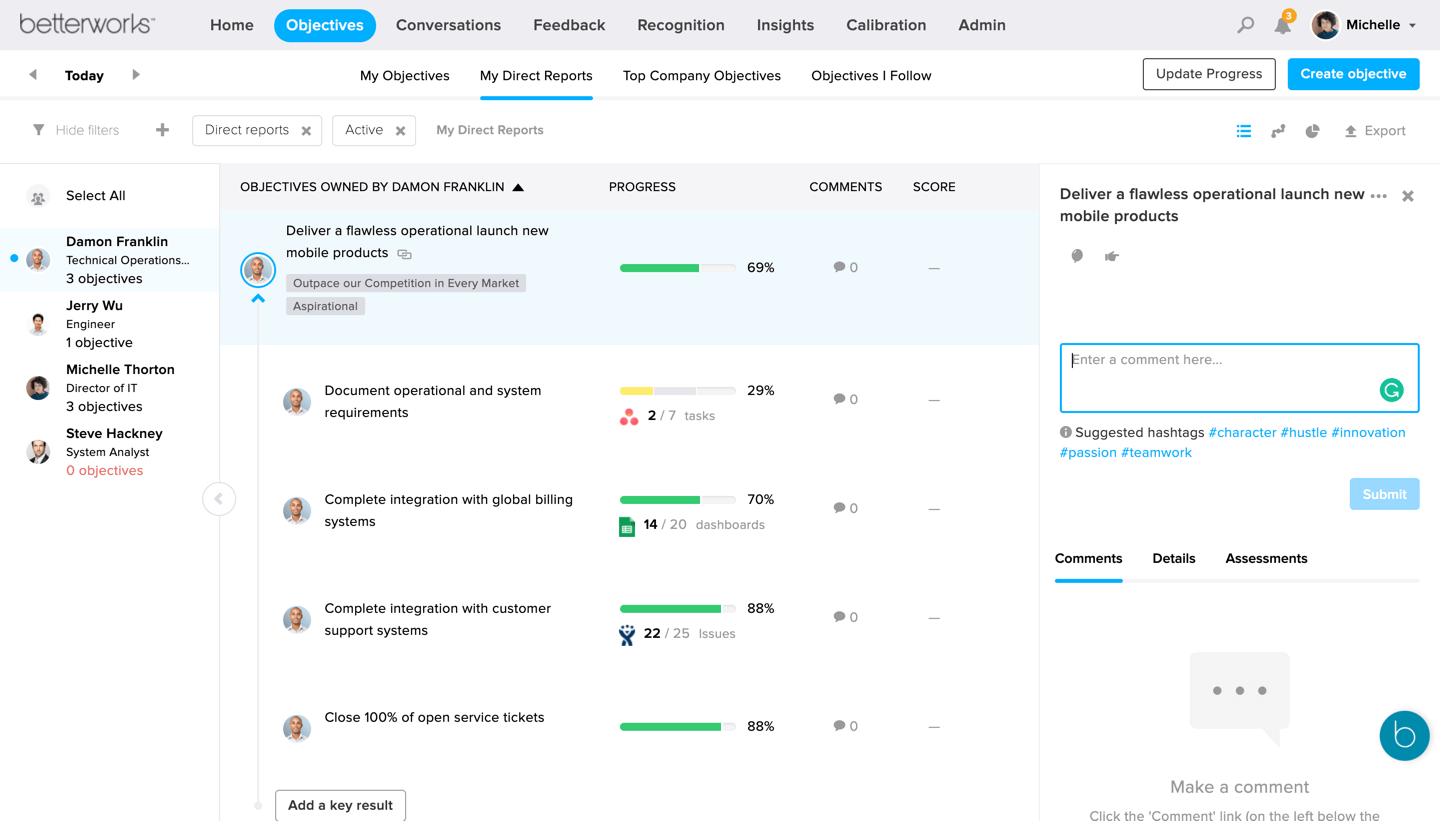
Betterworks is built for large distributed organizations where OKRs are the primary performance framework — not a planning exercise, but the foundation that connects goal-setting, continuous feedback, and performance calibration in one system. For remote enterprises where the challenge is maintaining performance rigour without in-person review cycles, that integration is the point.
The AI-powered execution risk detection flags at-risk Key Results before they become misses — useful for distributed teams where problems surface later than they would in an office. The Manager Command Centre gives leadership consolidated visibility across remote teams without requiring status meetings.
The limitation: no self-serve access, enterprise-only pricing, and implementation typically takes six or more weeks. Not appropriate for any organization under 200 people — the overhead exceeds the value at that stage.
Best for: Large remote enterprises (200+ people) with committed OKR-driven performance management. Pricing: Enterprise, custom quote. Demo required.
WorkBoard is less “startup tool” and more “remote enterprise OS.”
10. Lattice — Best for People-First Remote Organizations

Lattice blends OKRs with performance reviews, engagement surveys, and feedback loops. For remote teams where maintaining culture without in-person interaction is a genuine risk, connecting OKRs to the broader people programme rather than running them as a standalone planning tool adds real value.
For HR-driven organizations where People Ops owns the OKR programme, Lattice creates coherence between goal-setting and performance management that siloed tools can't provide. The adoption in remote-first tech companies reflects this strength.
The limitation: Lattice is expensive relative to purpose-built OKR tools, and the OKR module was added later rather than built as the core product. Teams that just need lightweight goal tracking with async check-ins will find Lattice significantly over-engineered for that use case.
Best for: Remote organizations past 100 people where People Ops drives OKR ownership alongside performance reviews. Pricing: From $11–16/user/month. No public free tier.
11. Oboard — Best for Remote Engineering-Heavy Teams

Remote product and engineering organizations living in Jira often adopt Oboard, which brings OKRs directly into Jira rather than requiring a context switch. For distributed dev teams where Jira is the daily operating system, that eliminates the friction that kills check-in consistency in remote settings.
The direct linkage between OKRs and Jira issues means progress updates happen automatically from ticket completion — reducing the manual update burden that is proportionally higher for remote teams.
The limitation: non-technical teams are excluded if Jira isn't their daily tool. Organizations that want OKR visibility across Sales, Marketing, and Customer Success alongside Engineering will find Oboard creates a silo rather than solving one.
Best for: Remote engineering-led organizations where Jira is the primary workflow tool. Pricing: From $6/user/month.
At a Glance: Best OKR Software for Remote Teams
How to Choose for Remote Teams
The decision comes down to three variables specific to distributed settings.
Where does your team already live? The OKR tool needs to live where work happens — in Slack, MS Teams, Jira, or Asana. A platform that requires opening a separate app to update goals will see check-in rates drop within six weeks. Tools with native Slack or Teams integration win this test for remote teams.
What's the team size? Under 50 people: OKRs Tool or Tability — both launch in an afternoon and don't require a dedicated programme owner. Between 50–200 people: OKRs Tool's flat pricing and async check-in automation are the strongest combination for distributed execution. Past 200 with data maturity: Workboard or Profit.co.
What's actually breaking? If the problem is check-in consistency, choose the tool with the most frictionless async update mechanism. If it's cross-functional visibility, choose one with strong cascade and dashboard features. If it's connecting goals to performance reviews, Lattice or Betterworks. See how OKRs Tool implements the full async execution cycle — and why it's the default choice for distributed teams between 50 and 200 people.
Data: The 2026 OKR Benchmark Report (200+ organizations).