Most AI in goal-setting software stops at writing suggestions. We built AI into OKRs Tool as execution infrastructure — assisting with goal creation, recommending initiatives, flagging at-risk OKRs early, and surfacing leadership insights — so teams don't just write better OKRs, they hit them.
______________________________________________________________________________________________________
83% of organizations are now actively using AI in their OKR process — and the split between writing (51% impact) and analysis (49% impact) is closing fast. Source: OKR Intelligence Report 2026, 222 organizations.
The most valuable AI usage isn't drafting better goal sentences. It's identifying misalignment, flagging at-risk Key Results mid-cycle, and synthesizing what happened across a full quarter into specific improvements for the next one.
Teams using AI for both writing and analysis are the most proactive when goals go off track — accepting a low score on missed OKRs only 14% of the time, compared to 35% for teams using AI for writing only.
OKRs Tool builds AI into both layers — not as a drafting assistant, but as execution infrastructure that works across the full OKR cycle.
AI That Actually Moves the Needle
Unlike other platforms, we didn't just bolt on AI to check a box — we built it into the parts of the OKR workflow where teams actually lose momentum: goal creation, initiative planning, mid-cycle drift, and leadership visibility.
From the first OKR draft to end-of-cycle review, every feature is designed to reduce friction and boost focus — without adding complexity.
What the Data Says About AI in OKRs
The OKR Intelligence Report 2026 — 222 organizations across the technology sector — is the first study to measure how AI is actually used in OKR programmes, not just whether it's adopted.
Three findings directly relevant to how OKRs Tool has built its AI layer:
83% of organizations are using AI in their OKR process — but only 13% use AI suggestions as-is. 47% treat AI as a strong starting point that always needs human refinement. The implication: AI that generates high-quality, outcome-based drafts reduces refinement overhead without removing human judgment from the process.
The biggest concern about AI in OKRs is data privacy — cited by 25% of respondents, outranking output quality (19%) and leadership trust (16%). OKRs Tool processes AI requests without training on customer data. Strategic goal data stays within your organization's context.
Teams using AI for both writing and analysis are the most proactive responders when goals go off track — accepting a low score and moving on only 14% of the time, compared to 35% for teams using AI for writing only. The analysis layer — misalignment detection, at-risk flagging, cycle synthesis — is where AI creates the most durable execution improvement.
How Each Feature Works
1. AI-Generated Personalized OKRs
Setting OKRs from scratch is one of the most common reasons teams delay starting. Different roles, different responsibilities, different interpretations of "ambitious but achievable."
Our AI-Generated OKRs solve that by creating custom-fit objectives and key results tailored to individual roles and company priorities. The system analyzes team members' job functions and your organization's strategic context to instantly propose OKRs that are realistic, relevant, and role-specific.
Instead of staring at a blank document, each team member gets a first draft in seconds. The AI acts as a built-in strategy coach — ensuring no one's guessing or relying on vague templates from the internet.
In practice: faster first-cycle setup, better KR quality from day one, and teams who spent 30+ minutes debating goal wording now spend that time reviewing rather than writing.
2. AI-Driven Initiatives
Setting goals is only half the equation. Executing on them is where most teams struggle — and it's almost always because the bridge between a Key Result and the specific work that moves it was never built.
Once your key results are set, AI-Driven Initiatives recommends the most effective actions to achieve those outcomes. It draws from your team's current activity, real-time performance trends, and what high-performing teams in similar situations have done.
The AI doesn't generate random ideas. It identifies high-leverage actions based on what's working, what's stalled, and where effort will have the most impact. The benchmark data supports why this matters: high-performing teams attach 2–3 initiatives per KR within the first week of the cycle. Teams that delay this step almost never recover the lost momentum.
In practice: teams stop debating what to do and start doing it. The decision fatigue that kills early-cycle momentum disappears.
3. AI Insights — Spot At-Risk OKRs Before They Fail
This is the feature that changes mid-quarter behavior most dramatically.
AI Insights continuously monitors your OKRs and flags which ones are drifting, off-pace, or under-updated — before they become a miss. It identifies OKRs likely to fall short based on update frequency, progress velocity, and trajectory against target.
The result isn't just a red flag on a dashboard. It's a specific, actionable read on which goals need attention — surfaced at the moment when there's still time to course-correct. The benchmark data is clear on why this matters: only 49% of leaders consistently review OKRs weekly. AI Insights fills that gap automatically.
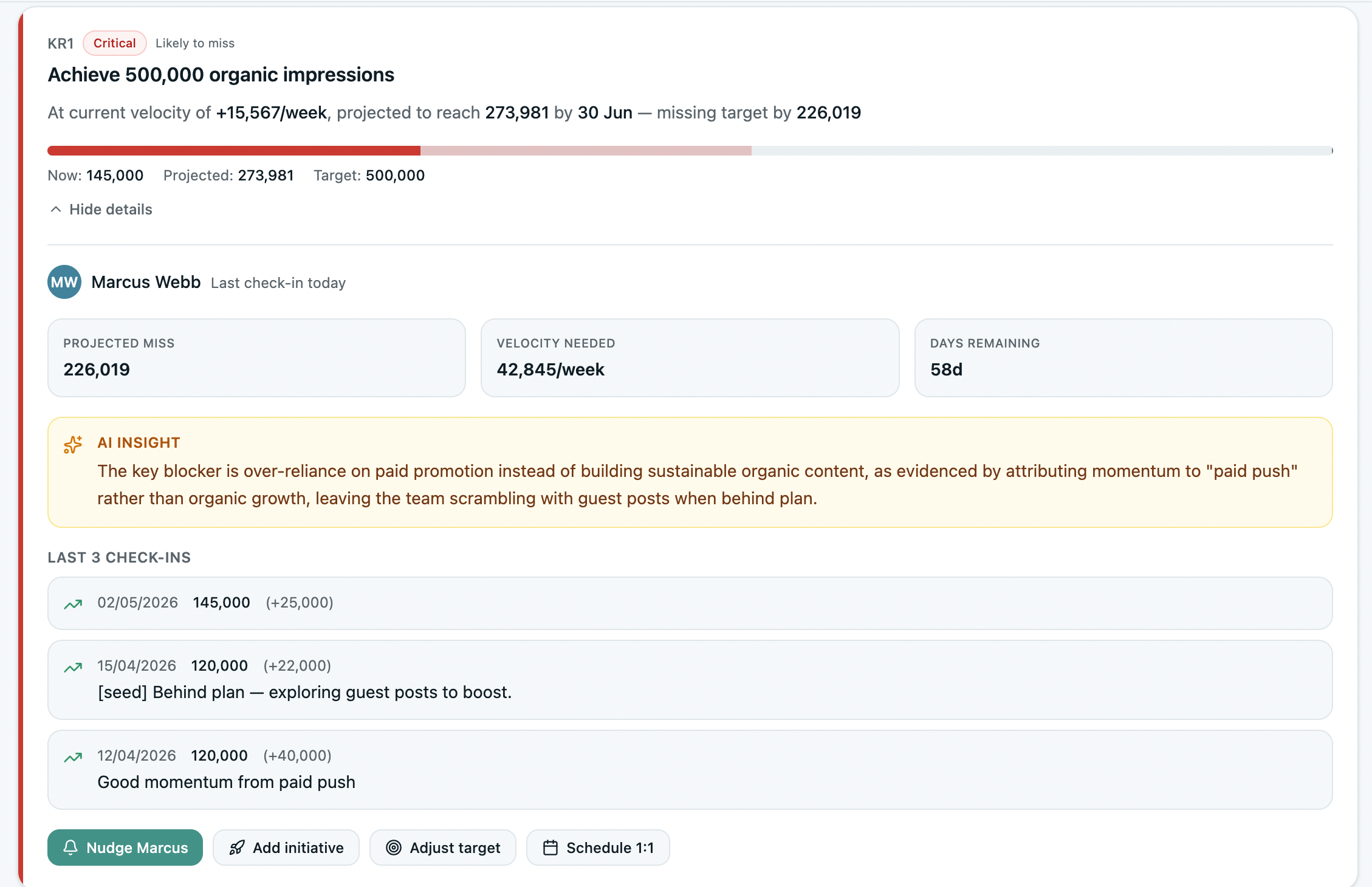
In practice: leaders stop finding out about at-risk goals at the end-of-quarter review. They find out in week four, when there's still seven weeks to act.
4. AI Coach — Specific Recovery Actions Per OKR
AI Insights flags the problem. AI Coach tells you what to do about it.
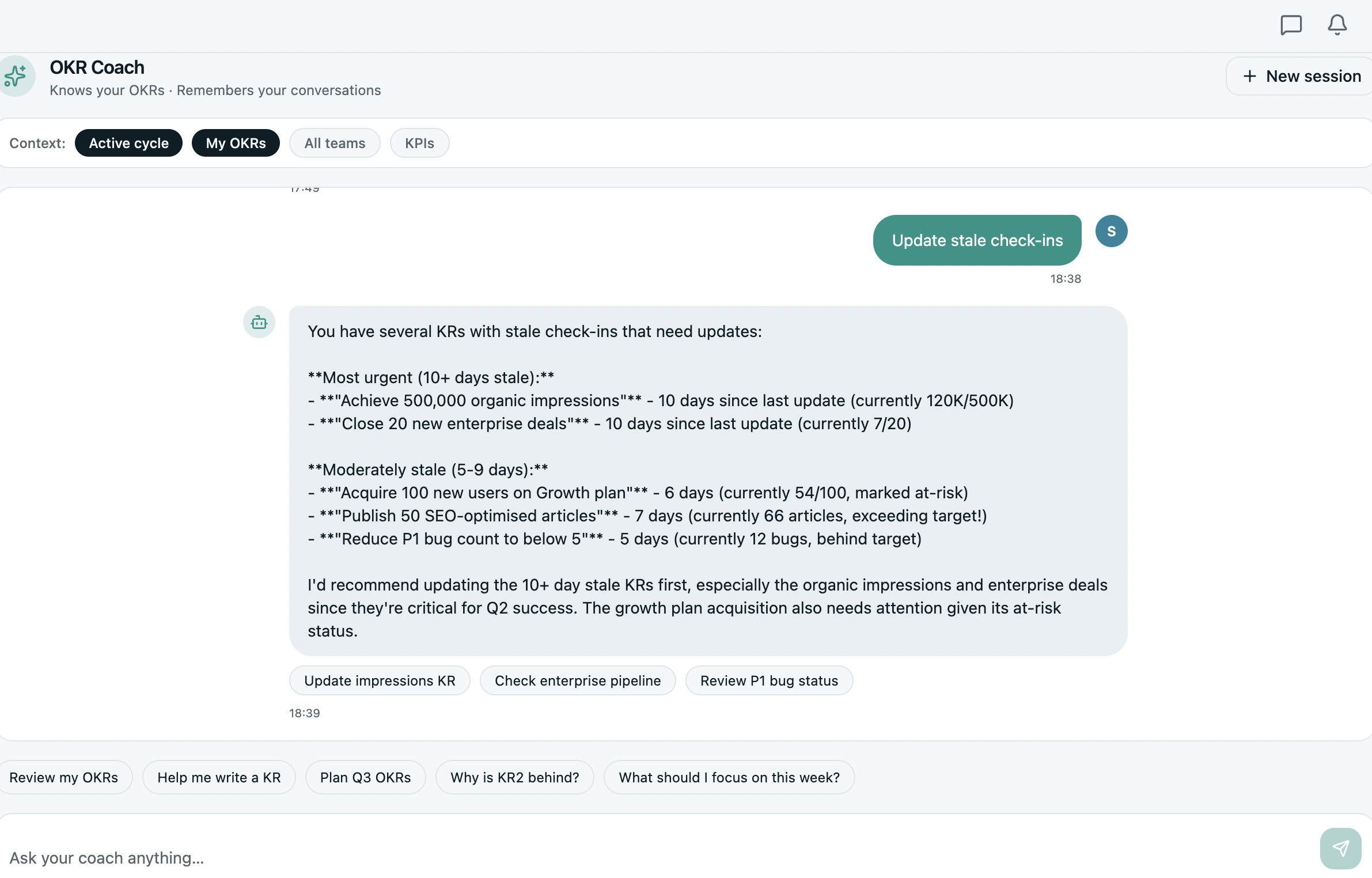
For each at-risk OKR, the AI Coach suggests specific recovery actions — not vague prompts like "review your strategy." Actual next steps based on where the OKR is, what's happened so far, and what's most likely to move the metric before the quarter ends.
This is the difference between a system that shows you a dashboard and a system that acts like a strategic advisor. AI Coach makes the weekly check-in more productive because leaders arrive knowing which OKRs need intervention and what the recommended intervention is — rather than spending the first 10 minutes figuring that out.
In practice: the weekly 20-minute check-in stays at 20 minutes. The signal-to-noise ratio improves every week.
5. Leadership Summaries
One of the most common invisible costs in growing organizations: the time leaders spend chasing OKR status updates.
Leadership Summaries solve this by synthesizing team OKR status — progress, risks, blockers, recent updates — into a single paragraph for leadership. No pulling reports. No asking for updates. One paragraph that tells you what's moving, what's at risk, and what needs a decision.
This is particularly valuable for department heads and VPs managing multiple teams, where the alternative is either a long status meeting or an aggregated spreadsheet that's out of date the moment it's compiled.
In practice: leaders get the signal they need without the overhead of generating it. OKR visibility for leadership stops being a manual exercise.

6. Smart OKR Assistant
Goal-setting doesn't end when a first draft is written. The Smart OKR Assistant provides contextual guidance throughout the process — whether you're editing an objective, refining a lagging KR, or preparing for the next cycle.
When a goal is hit early, the Assistant doesn't just mark it complete. It recommends a more ambitious follow-up OKR calibrated to current momentum. It factors in progress speed, scope, and cycle history to keep momentum flowing rather than stalling out mid-quarter.
It also helps teams avoid the most common OKR writing mistakes — vague objectives, output-based KRs, goals that are too safe or too broad — in real time, as they're written.
In practice: OKR quality compounds over cycles. Teams who use the Assistant consistently write significantly better goals by cycle three than they did in cycle one.
7. Team Alignment Insights and the Alignment Map
Keeping teams aligned isn't just about setting OKRs — it's about staying in sync as work unfolds across departments and cycles.
Team Alignment Insights gives leaders a real-time view of how every team is progressing, from check-in consistency to goal velocity. AI monitors trends, flags outliers, and identifies which groups may be falling behind or accelerating. Smart nudges suggest when to celebrate a team's momentum or schedule a conversation before a slip compounds.
The Alignment Map sits underneath all of this — showing every OKR from company level down to individual team, fully connected, with status visible at a glance. Click any OKR to see the Key Results, owners, and recent updates. It's the visual layer that turns AI insights into something leadership can act on immediately.
In practice: fewer surprises at quarter-end. Leaders see misalignment forming in week five, not week twelve.
Which Plan Includes What
AI features are available across plans, with the full capability unlocked on Scale and Expand.
How OKRs Tool AI Compares
While many OKR platforms are beginning to adopt AI, not all implementations are equal. Some use AI as a writing aid — helpful, but limited to goal creation.
The distinction that matters most: OKRs Tool AI isn't just about writing better goals. It's about keeping goals alive mid-quarter — flagging drift early, recommending specific interventions, and surfacing leadership visibility without adding meetings or manual overhead.
Final Thoughts
Most growing teams don't need more tools. They need tools that reduce the work of staying aligned.
That's why we've built AI into OKRs Tool at the execution layer — not just goal creation. From AI-Generated OKRs and initiative recommendations to at-risk flagging and leadership summaries, every feature is designed to reduce friction, not add to it.
If you're tired of juggling spreadsheets, chasing updates, or finding out about off-track goals at the end-of-quarter review, the AI inside OKRs Tool is built to fix exactly that.
We built it because we needed it ourselves. Now it's here to help your team stay aligned, move faster, and execute with clarity — no consultants required.