OKRs Tool is purpose-built for the VP, Head of Department, or team lead who needs their team running OKRs this quarter — not after a six-week implementation. Required KR ownership, automated weekly check-ins, and a visual alignment map keep goals alive all quarter, not just the first two weeks.
The 2026 OKR Benchmark Report across 330 organizations makes the cost concrete: only 5% of teams have more than 75% of their weekly work tied to a goal. 50% of all Key Results have no named owner. And teams without a weekly check-in habit are 3x more likely to abandon OKRs entirely.
OKRs Tool is built to close that gap — not by adding more process, but by making the right habits structurally unavoidable.
What Is OKRs Tool?
OKRs Tool is OKR software built for senior operators inside growing companies — typically 50 to 200 people — who need OKRs to work this quarter, not after a consultant-led rollout.
It's the right fit if you've set OKRs in a spreadsheet or Confluence and watched the team stop updating them by week two. It's built for the team lead who doesn't have time to chase updates, run status meetings, or rebuild the OKR system from scratch every quarter.
How OKRs Tool Works
OKRs Tool is built around a simple quarterly cycle — the OKR flywheel — that keeps goals alive beyond the planning session.
Here's the flywheel in 60 seconds — the full quarterly cycle, from setting OKRs to the weekly check-in that keeps them moving. It's the difference between goals that survive to week twelve and goals that get abandoned by week two. Watch it before you dig into the six steps below.
1. Set Clear OKRs
Use AI to generate high-quality objectives and Key Results in seconds — role- and context-aware, not generic templates. Go from blank page to aligned priorities in minutes, not meetings.
Every Key Result requires a single named owner before it goes live. This isn't optional. It's the structural fix for the most common OKR failure mode — the 50% of Key Results across growing organizations with no named accountability. Teams with required single ownership see 26% higher completion rates.
2. Connect OKRs to Strategy
The Strategy section closes the gap between annual planning and quarterly execution. The Strategy Canvas puts vision, mission, and strategic themes in a single structured view every team OKR links back to — replacing the slide deck nobody opens after the offsite. The Strategy Coverage diagnostic flags strategic themes with zero Key Result coverage before the cycle starts, not at the end when nothing can be done. The Cascade Map shows top-down how every team Key Result connects to a company Objective — and surfaces the orphan goals that don't connect to anything.
3. Track Initiatives That Move the Needle
Attach initiatives — campaigns, sprints, experiments — to each Key Result so everyone sees how progress is made. No more guessing what work is moving which metric. The initiative is the sprint. The Key Result is what the sprint is trying to change. Keeping them in separate layers is what separates outcome-based OKRs from task lists dressed up as goals.
4. Run Weekly Check-Ins Without Meetings
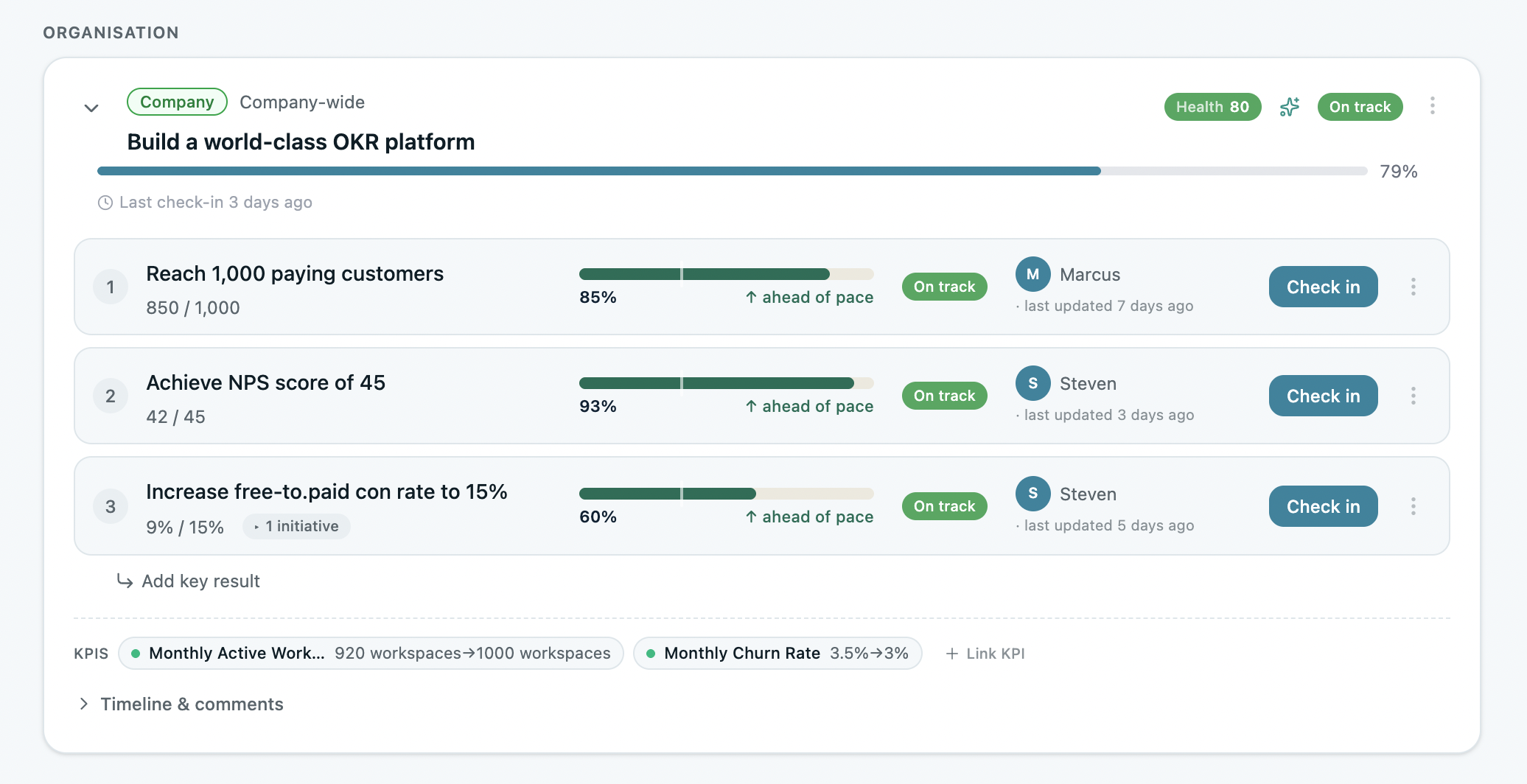
Check in via Slack with a single click — status, blockers, and progress, all in one place. Automated weekly nudges go out without anyone scheduling them.
Teams with a weekly check-in habit complete 43% more OKRs than those reviewing monthly or ad hoc. Teams that skip it entirely are 3x more likely to abandon OKRs. The nudge isn't a reminder — it's the accountability infrastructure.
5. See the Full Alignment Map
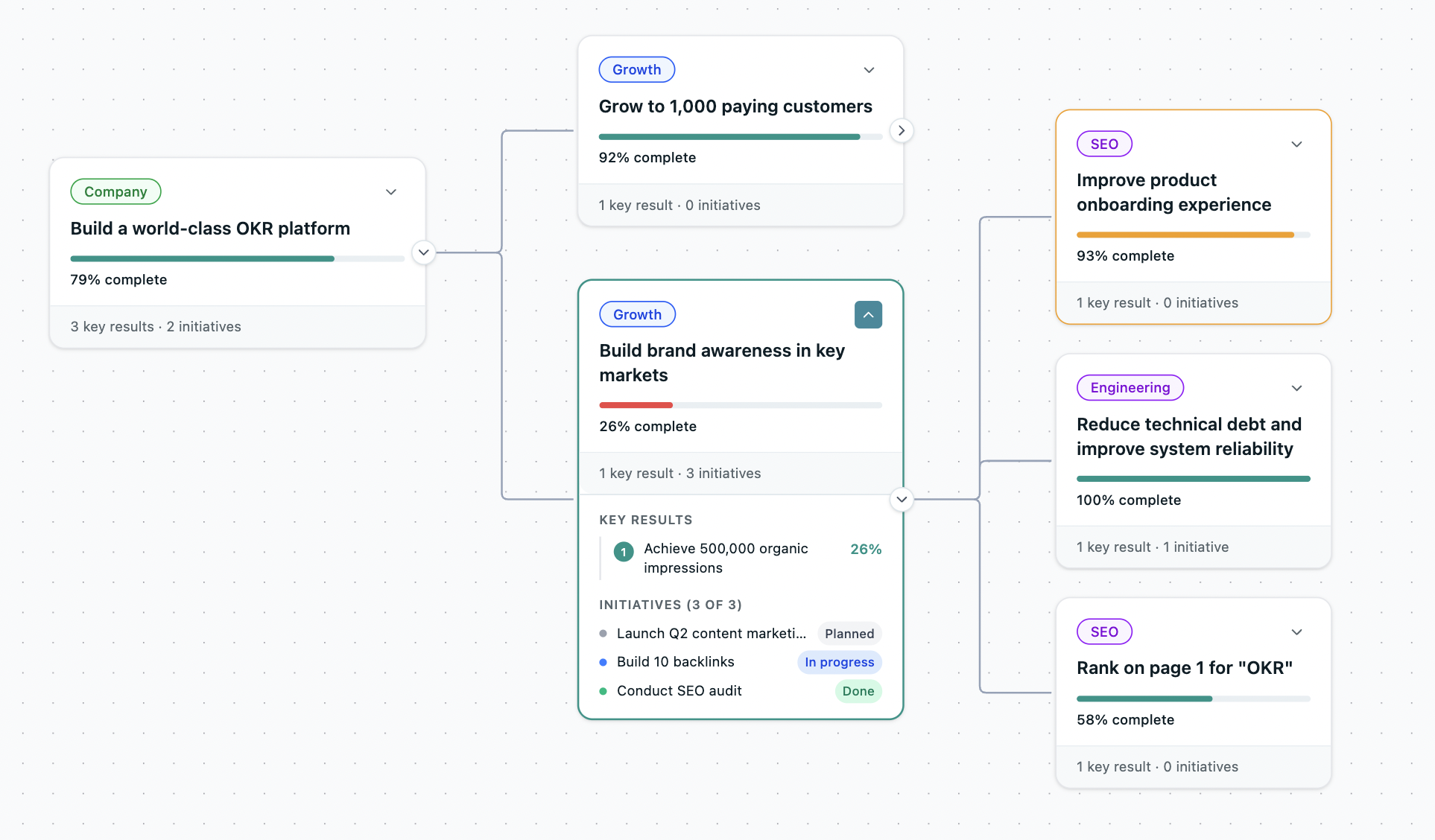
The alignment map connects every team's OKRs to company priorities in a single live view — with status indicators showing what's on track and what's drifting, before anyone has to ask.
This is the view that replaces the "how's everything going?" meeting. Leadership sees the full picture in 60 seconds. Teams see how their work connects to company strategy. Misalignment becomes visible before it becomes a missed quarter.
6. Reflect and Improve Every Cycle
Team reflections capture learnings, wins, and roadblocks each cycle — with AI-generated improvement suggestions for the next one. Teams that run consistent end-of-cycle retrospectives complete 30–45% more OKRs the following quarter.
The OKR maturity curve shows why this compounds: cycle 1–2 teams average 51% completion. Cycle 5+ teams average 79%. The improvement doesn't come from better planning — it comes from the learning loop.
AI That Powers Execution, Not Just Writing
AI in OKRs Tool isn't a prompt box. It's built into the execution layer — surfacing what needs attention before problems compound. See OKRs Tool AI.
Everything in OKRs Tool
The ROI of OKRs Tool
The ROI of OKRs: 2026 Benchmark Report models the return on investment across three infrastructure approaches against the same $1.5M revenue uplift baseline.
Enterprise software doesn't just fail to beat the framework-only return — it actively destroys value. At $95K all-in, it generates a 1:16 return against the same $1.5M revenue uplift. OKRs Tool at $17K all-in delivers 1:88 — more than five times the return of enterprise software and three times the return of spreadsheets. The pricing difference is not a discount. It's a categorically different investment.
How OKRs Tool Compares
See how OKRs Tool compares to several platforms here.
Who OKRs Tool Is For
OKRs Tool was built for the person responsible for getting their team running OKRs properly — without it becoming another initiative that quietly dies by week three. The right fit: a VP, CTO, CFO, or Head of Department at a 50–200 person company; a team lead who's tried OKRs in spreadsheets and watched them fail; a senior operator implementing OKRs after reading Measure What Matters or following Google's model; or a leader whose team has grown past 50 people and lost the informal alignment that used to work.
Not the right fit: an enterprise organization with 500+ people needing HRIS integration and annual calibration cycles (look at Betterworks or Lattice); a team under 10 people where informal alignment still works (the free plan covers you, but a spreadsheet works too); or an organization that needs OKRs to feed directly into compensation and performance calibration at scale — that's a different product category.
What OKRs Tool Is Not
Not enterprise software in disguise. No multi-layer dashboards, heavy configuration, or consultant-level complexity. If it takes more than an afternoon to set up, it's the wrong tool.
Not per-seat punitive pricing. Flat pricing that stays predictable as the team grows. No surprise invoices when headcount increases.
Not a compliance tool. OKRs Tool is not built for annual review cycles, mandatory HR workflows, or performance rating systems. It's built for the weekly execution rhythm that makes quarterly goals survive.
Not a replacement for strategy. OKRs Tool is the execution layer — it translates strategic priorities into quarterly OKRs, cascades them to teams, and keeps them alive through the weekly check-in. The strategy is yours. The execution system is ours.
Get Started
OKRs Tool is free for up to 5 users. No credit card. Set up in an afternoon.
Teams typically have their first OKR live within 30 minutes of signing up — with AI drafting the objective and Key Results, ownership assigned, and the weekly check-in nudge scheduled before anyone leaves the session.
If you're migrating from a spreadsheet, Notion, or Confluence, reach out and the team will move your existing OKRs over in a single session.
Data: The ROI of OKRs: 2026 Benchmark Report (330 respondents), The 2026 OKR Benchmark Report (330 organizations).