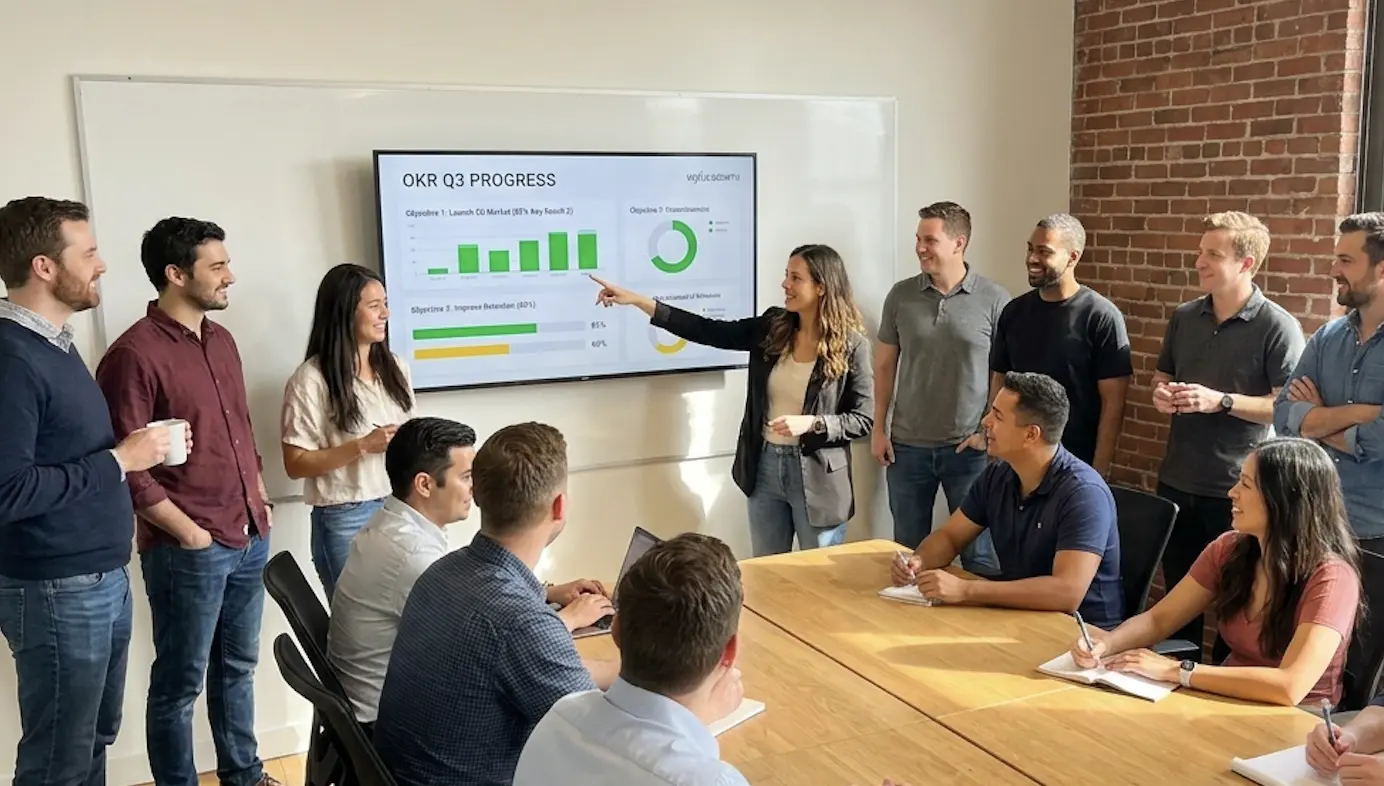
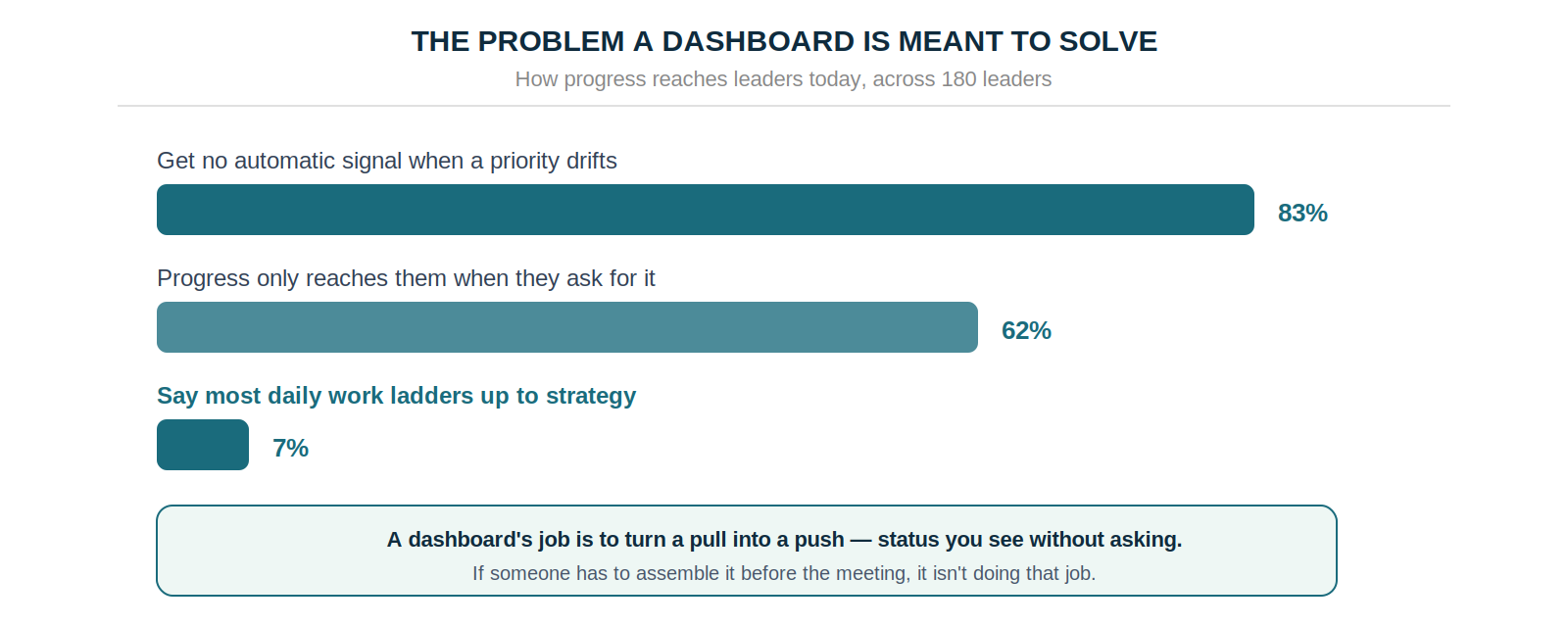
An OKR dashboard template earns its place by answering three questions in ten seconds: what's on track, what's at risk, and what needs a decision now. Dashboards that show far more than that get opened once a quarter. The benchmark case for getting it right is blunt — 83% of leaders currently get no automatic signal when a priority starts to drift.
The common failure with an OKR dashboard is that it's built to display goals rather than to drive decisions. It lists objectives, shows progress bars, marks who owns what — and then leadership opens it once a quarter, if at all. The information is all there. None of it changes what anyone does on Monday, which is the difference between tracking and executing.
The Strategy Execution Benchmark 2026 puts numbers on the gap this creates: across 180 leaders, 83% get no automatic signal when a strategic priority drifts, and 62% say progress only reaches them when they go and ask for it. That's the exact job a dashboard exists to do — and the reason most fail is structural, not cosmetic. This guide covers what a working OKR dashboard template contains, the four signals it should surface in under a minute, and the weekly rhythm that turns it from a report into a decision tool.
Why Most OKR Dashboards Get Ignored
A dashboard nobody opens is a document. Three structural problems explain almost every one of them.
Built for reporting, not deciding. A reporting dashboard answers what happened and shows completion percentages. A decision dashboard surfaces what's at risk while there's still time to act on it. Those are different artefacts, and the first one gets skimmed.
Requires manual preparation. When someone has to assemble the data before the meeting, the dashboard becomes a presentation rather than a live signal, and by the time it's ready the insight is stale. This is where the 62% figure bites: if progress only surfaces when a leader asks, the dashboard isn't pushing anything.
Shows far too much. Fifteen objectives across six teams, each with four key results, produces ninety-plus data points. Nobody reads ninety data points in a twenty-minute check-in. A working dashboard answers three questions and stops: what's on track, what's at risk, what needs a decision now.
What a Working OKR Dashboard Shows
Five components, in priority order.
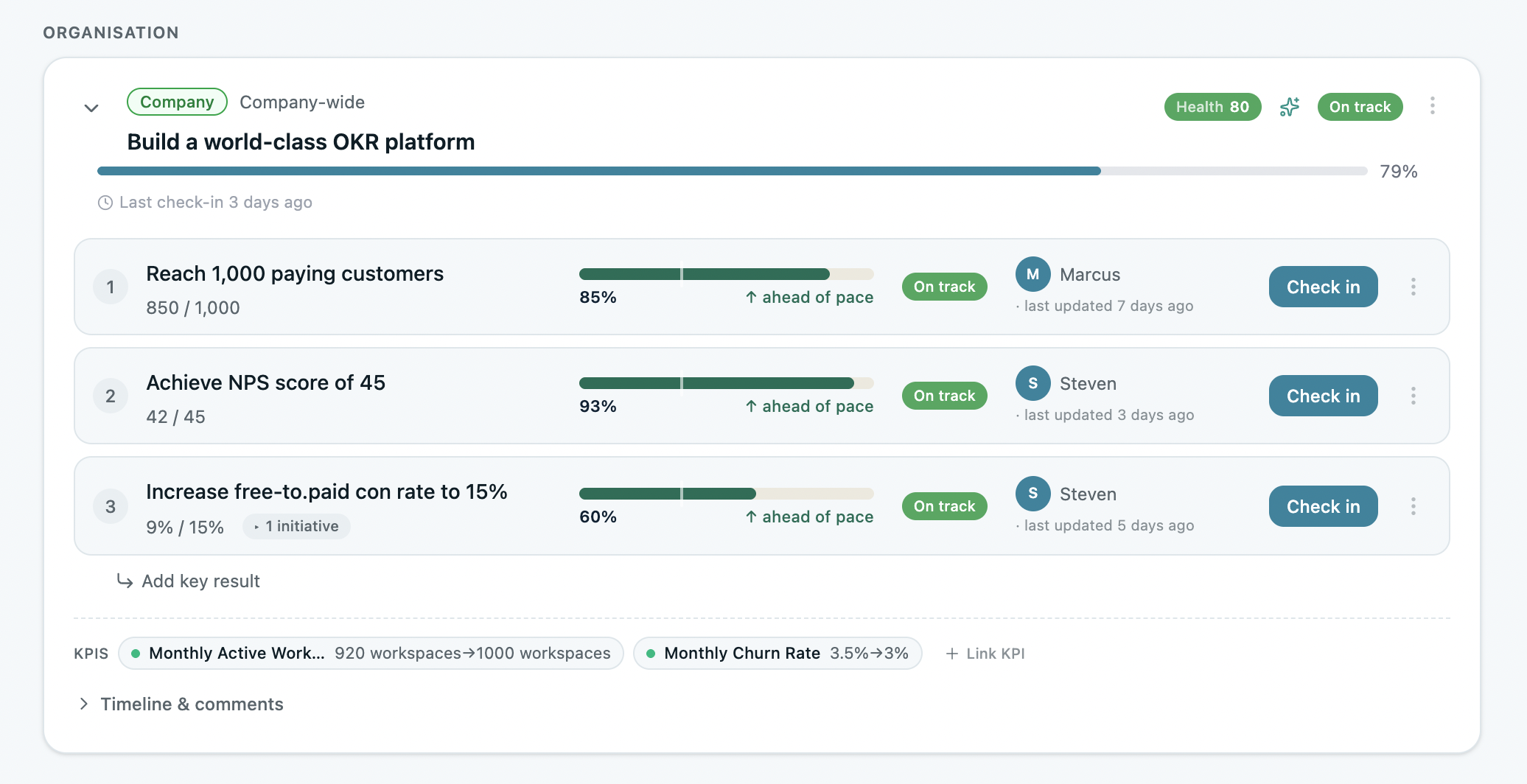
Company OKR status at a glance. The two or three company objectives for the quarter, each with a status indicator, a progress figure, an owner, and a last-updated date. If an objective is on track, one glance confirms it; if it's at risk, the dashboard flags it without anyone digging.
Key result progress with ownership. Each objective breaks into two or three key results carrying a named owner, a baseline-to-target figure, current progress, and status. The owner field is the non-negotiable one: half of all key results across growing organizations have nobody's name on them, and teams enforcing single ownership complete 26% more of their goals.
At-risk flags, not just status. The valuable signal is what needs intervention before it's too late, rather than the completion percentage. A key result flagged at risk with four weeks remaining is recoverable; the same one discovered at the quarter-end review isn't. Good dashboards raise that flag automatically from progress velocity, update frequency, and distance to target.
A check-in cadence indicator. One of the clearest signs of a programme in trouble is a key result nobody has touched in a fortnight. Showing the last-updated date on every row makes a slipping weekly habit visible immediately — and that habit is worth 43% more completed goals than reviewing monthly or ad hoc.
A team-level roll-up. For anyone managing several teams, one line per team — overall status, how many key results are on track versus at risk, any blockers raised. This is the view that replaces the "how's it all going?" meeting, and it's what an alignment map does at a glance.
The Four Signals That Predict Performance
If a dashboard can surface these four in under sixty seconds, it's doing its job. If it takes longer, simplify it.
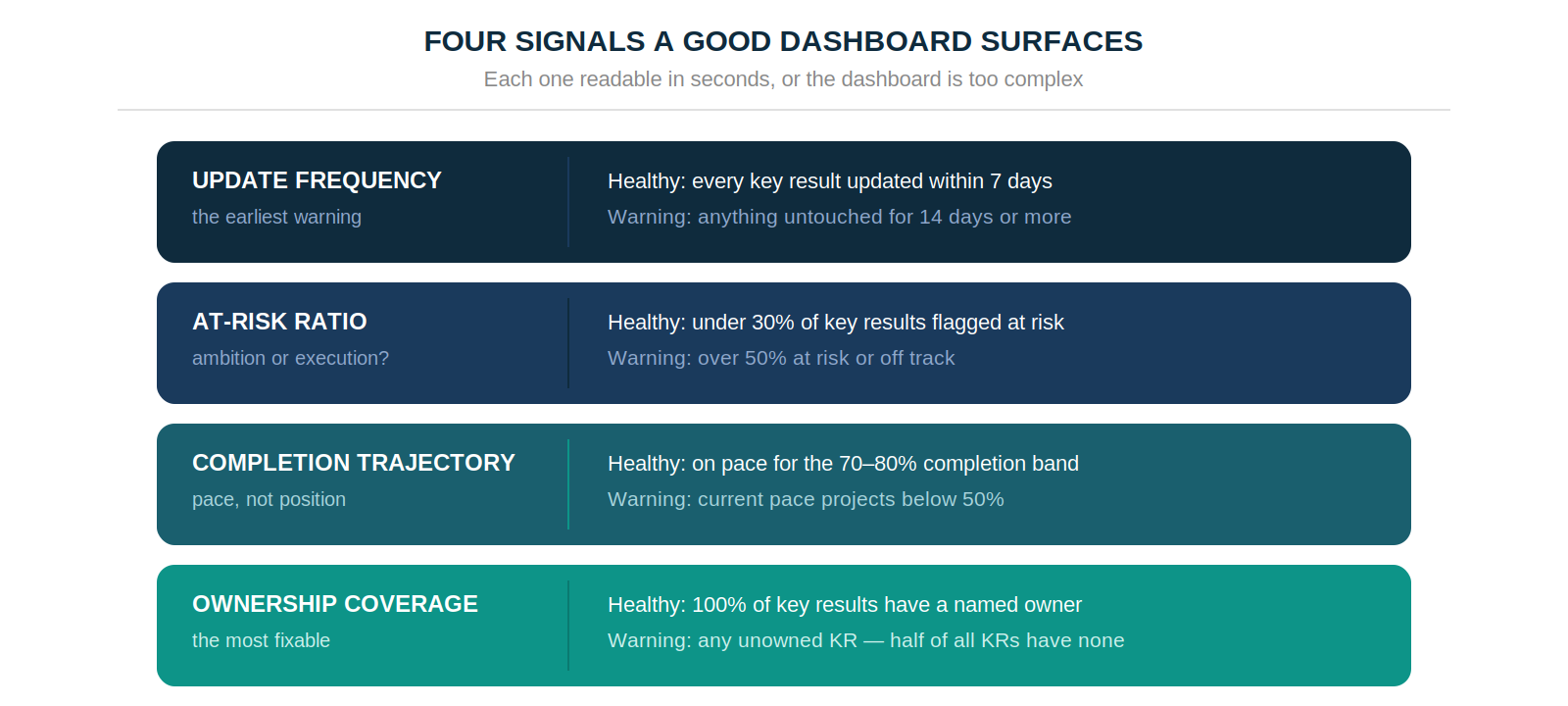
Update frequency is the earliest warning: every key result touched within seven days is healthy, and anything untouched for fourteen means the weekly habit is breaking down. The at-risk ratio tells you whether goals were over-ambitious or execution has stalled — under 30% flagged is normal, over 50% needs diagnosis rather than encouragement.
Completion trajectory should track toward the 70–80% band that indicates real stretch without sandbagging; a pace projecting under 50% needs intervention now, not at cycle end. And ownership coverage should sit at 100%, which is the most fixable problem on the list given that half of all key results start without an owner.
What's Inside the Template
Four tabs, each with a clear owner and update rhythm.
The Weekly Rhythm That Makes It Work
A template is only as useful as the routine around it. Four steps, none of them long.
Monday — owners update. Each key result owner spends two or three minutes updating their progress figure, adjusting status if needed, and adding one line of context. Under five minutes per person.
Monday or Tuesday — leadership scans. Before the check-in, leadership reads the company view with one goal: spot every amber and red before the meeting starts, so meeting time goes to decisions rather than data collection.
The check-in — twenty minutes. The agenda follows the dashboard exactly. Green gets noted and skipped. Amber gets a question: what changed, what's the response. Red gets a decision. Same time every week, which is what makes the check-in a habit rather than an event.
Cycle close — complete the summary. Score each key result, note what moved and what didn't, and carry the insight into next cycle's planning. Teams running a consistent retrospective complete 30–45% more the following quarter.
When to Graduate From Template to Software
The template works well for a team under twenty people running its first couple of cycles. Past that, the friction shows up in predictable places: no automated reminder when a key result goes stale, no at-risk flagging without someone reviewing manually, no alignment view across teams, and version-control problems as more people touch the file.
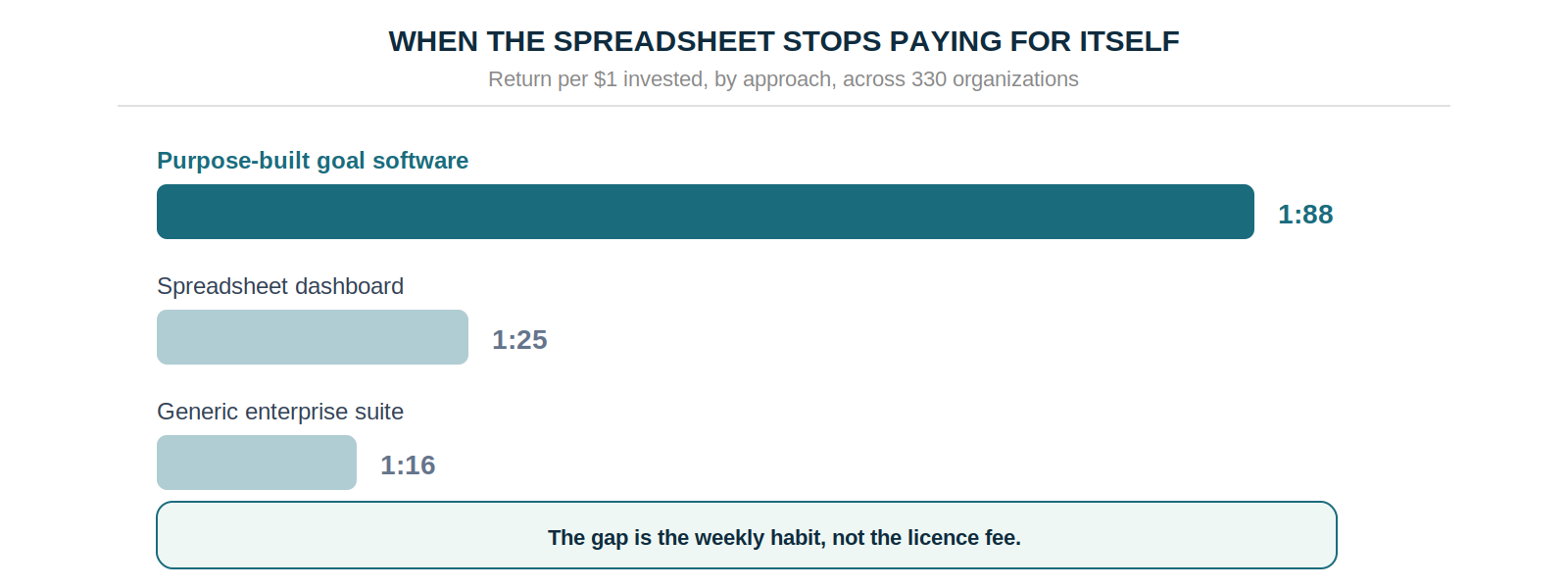
The return data marks the difference: organizations on purpose-built goal software report 1:88 against 1:25 on spreadsheets. The gap comes from the weekly habit becoming structural instead of depending on somebody remembering, not from the licence fee. Teams typically feel the switch point somewhere between fifteen and twenty-five people, and the signal is simple: when maintaining the template costs more effort than it saves, it has stopped being a dashboard.
Build the Simplest One You'll Open Every Week
An OKR dashboard is a decision-making tool, and its only real test is whether it changes behaviour. Five seconds to see what's green. Ten to spot what's at risk. Twenty minutes to make the calls that keep the quarter on track.
That's the whole standard, and it argues for less rather than more. Start with the template, keep it to the three questions, and upgrade when the maintenance outgrows the value. A dashboard that shows ninety data points and gets opened quarterly is worth less than one showing six that gets opened every Monday.
Data: Strategy Execution Benchmark 2026 (180 strategy and operations leaders), OKRs Tool platform data (876 organizations, 20,952 key results), The 2026 OKR Benchmark Report (200 organizations), The ROI of OKRs 2026 Benchmark Report (330 organizations).